AI Dialer vs Power Dialer: 5 Proven Reasons Reps Win More
Quick answer: a power dialer automatically dials the next number when a rep is ready, so humans spend less time punching numbers. A predictive dialer calls several numbers at once and connects a rep when someone answers. An AI dialer goes further: an AI voice agent makes the call itself, has the first conversation, qualifies and books, and hands the warm ones to a person. Use a power dialer when every call needs a skilled human. Use an AI dialer when most first calls are routine and speed matters more than charm.
Key takeaways
- Reps spend most of a dialing session waiting: rings, voicemails, wrong numbers.
- 86% of people don't answer unknown numbers, so dialing faster has diminishing returns.
- An AI dialer handles the routine first touch completely and hands your reps live, qualified conversations.
- iThinqAI's Growth plan includes a dialer for your team plus AI calling campaigns, with approval gates and Do Not Call controls. Hear it at 561-715-7686.
What is an AI dialer?
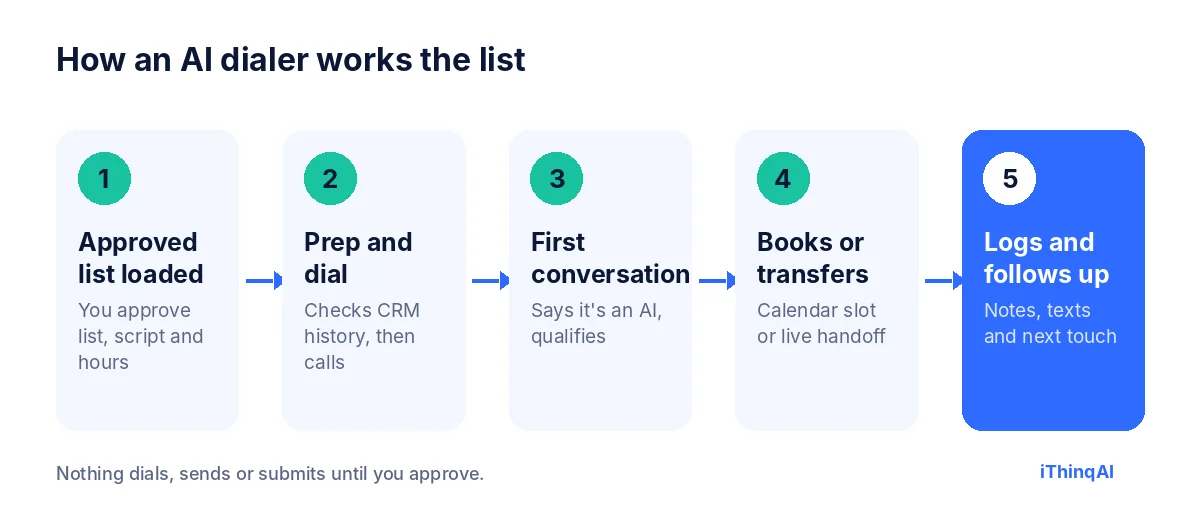
An AI dialer is a calling system in which an AI voice agent places calls and handles the first conversation itself. Instead of connecting a rep to every ring, it greets the person, identifies itself as an AI, asks qualifying questions, books an appointment or transfers interested people to your team, and logs the outcome. It replaces the repetitive part of outbound calling, not the human judgment that closes deals.
Your best rep spends most of the day not talking
Watch a rep work a call list. Dial. Ring. Ring. Voicemail. Hang up. Log it. Next. Dial. Ring. "Not interested." Log it. Next.
The conversations, the part that makes money, are a sliver of the day. The rest is waiting.
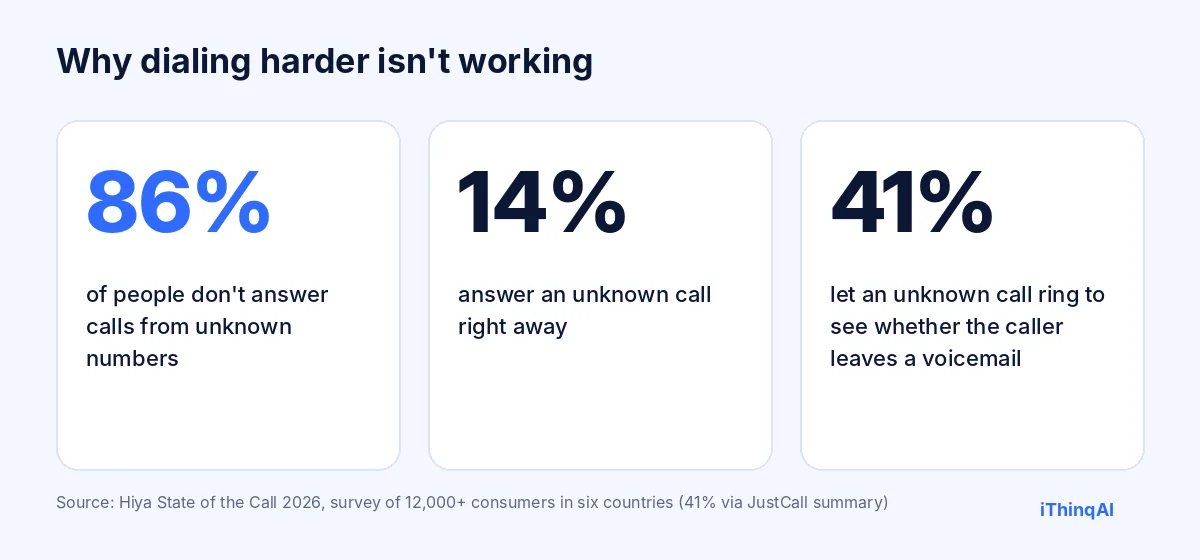
And the waiting is getting worse. Hiya's State of the Call 2026 found 86% of people don't answer calls from unknown numbers (Hiya). More dials, fewer answers.
Power dialer vs. predictive dialer vs. AI dialer
| Manual | Power | Predictive | AI | |
|---|---|---|---|---|
| Who places the call | Rep | Software, one line at a time | Software, several lines at once | Software |
| Who talks first | Rep | Rep | Rep, once someone answers | AI agent |
| Rep time spent waiting | High | Medium | Low | None on routine calls |
| Risk of dead air or dropped calls | None | Low | Higher | Low |
| Works at 8 PM without staff | No | No | No | Yes, inside your approved calling window |
| Best for | A few high-value calls | Skilled reps working lists | Large call centers | First contact, follow-up, reminders, booking |
The reason why AI dialing changes the math
Albert Lasker's rule was to give the reason why, so here it is. Faster dialing saves the seconds between calls. AI calling saves the calls themselves: the voicemails, the wrong numbers, the "just looking" and the "call me next month."
The AI handles those conversations completely and logs the result. Your rep only picks up the phone when there's a qualified person on the other end who wants to talk, or a booked appointment on the calendar.
That's not a faster rep. That's a different job for the rep.
The AI dialer that does its own prep
Here's what a power dialer can't do: get ready for the call. iThinqAI's agent has its own computer, with a browser, files and your connected tools, so before calling it can research the prospect, check the CRM history and tailor the opening line. After the call, it logs the notes, sends the follow-up and books the next step. Your reps inherit warm, documented conversations.
What the iThinqAI dialer does
The Growth plan includes both: a dialer your team can use, and AI calling campaigns that run on their own.
- AI calling campaigns work approved lists: new web leads, missed calls, reminders, renewals, old quotes.
- The dialer lets your people make their own calls from the same system, with contacts and history on screen.
- Prospect discovery and research (200 research credits on Growth) help build lists, with your approval before anything is called.
- Every call is logged in the built-in CRM and pipeline.
- Compliance is built in: approval gates, daily limits, calling windows, verified caller ID, TCPA and Do Not Call controls, and AI disclosure.
Growth is $799 a month with 5 seats and 5,000 AI minutes, as of November 2026 (ithinq.ai/pricing).
A day of rep-paced dialing vs. a day of AI calling
With rep-paced dialing: your rep logs in at 9 AM with 200 numbers. By noon they've dialed 140, reached 18 people and booked 4 meetings. They spent the rest of the morning listening to rings, leaving voicemails and logging "no answer." At 5 PM they stop, and the list stops with them.
With AI calling: the AI starts the approved list at 9 AM and works it inside your calling window. It reaches the people who pick up, qualifies them, books meetings and texts the rest. Your rep spends the morning on live transfers and booked calls only. At 5 PM the rep goes home; the AI stops when the calling window you set ends, and picks up again tomorrow.
The illustration isn't a promise, but the shape is real: the rep's day fills with conversations instead of dial tones.
Predictive dialer risks most teams underestimate
A predictive dialer can raise rep talk time, but it carries trade-offs. When it dials more numbers than there are reps, some people answer to silence or a dropped call. That frustrates prospects and can create compliance problems under telemarketing rules on abandoned calls. Predictive dialing also works best at large scale; for a team of three or five, the math rarely justifies the risk. An AI dialer avoids the dead-air problem entirely, because the AI is always there to talk when someone answers.
How to choose between a power dialer and an AI dialer
Ask four questions:
- How complex is the first conversation? If it's routine qualification and booking, the AI handles it. If it's a nuanced discovery call with an executive, use a skilled rep with fast dialing.
- Who are you calling? People who asked to hear from you are ideal for AI. Cold lists are risky with any dialer.
- When do your prospects answer? If evenings matter, an AI dialer can call inside your approved evening window without overtime.
- What does your team hate? If the answer is "voicemails and no-answers," that's exactly what the AI absorbs.
Many teams end up with both: AI calling for first touches and follow-ups, and rep-paced dialing for reps working their own pipeline.
AI dialer use cases by industry
| Industry | What the AI dialer calls | What gets booked |
|---|---|---|
| Insurance | Renewals, quote requests | Policy reviews |
| Home services | Web leads, open quotes, tune-up lists | Estimates, service visits |
| Real estate | Portal leads, past clients | Showings, listing consultations |
| B2B services | Inbound inquiries, event attendees | Discovery calls |
| Healthcare and medspa | Recall lists, cancellations | Appointments |
What to measure
Compare results from both approaches on the same kind of list for two weeks: conversations per hour of rep time, meetings booked per 100 leads, show rate, and opt-outs. The goal isn't more dials. It's more qualified conversations for every hour your people spend on the phone.
Common objections
"Prospects will hang up on an AI." Some will. Many hang up on unknown numbers anyway. People who asked to hear from you are far more likely to talk, and the AI tells them who's calling up front.
"Our reps will feel replaced." Reps hate the dialing, not the selling. The AI takes the dialing.
"We already pay for a power dialer." Keep it for reps who need it. Add AI calling for the first touch and see whether rep talk time goes up.
What reps actually want from outbound tools
Ask a sales rep what they want and you'll rarely hear "more dials." You'll hear "better conversations." Reps want to talk to people who are expecting the call, who have a real need and who have time. They want notes before the call and a clean record after. And they want the hours of rings, voicemails and wrong numbers to disappear. Any calling setup you choose should be judged by that standard: does it put more good conversations in front of your best people, and fewer dead ends?
Build a calling list that's worth dialing
No tool fixes a bad list. Before any campaign, clean and prioritize:
- Start with people who asked: recent inquiries, quote requests, missed calls.
- Add existing customers with a real reason to call: renewals, service due, follow-ups.
- Remove opt-outs and Do Not Call numbers for marketing calls.
- De-duplicate so nobody gets called twice in a day.
- Add context: what each person asked about, so the first sentence is specific.
A short, warm, well-documented list beats a long, cold one every time, for answer rates, conversions and legal risk.
Scripts for the first touch
Keep the first call short and clear:
- Who's calling, that it's an AI, and why: "following up on the quote you requested Tuesday."
- One or two qualifying questions.
- Two specific times to meet.
- A confirmation and a text.
- An easy opt-out.
Write one version per list. A renewal call and a web-lead callback should never start with the same sentence.
How caller ID affects answer rates
People decide whether to answer in about two seconds, mostly from the number on the screen. Calls from a number they recognize, such as the business they just contacted, get answered far more often than calls from random numbers. iThinqAI places approved calls from your verified business number, so the person sees who's calling. Keep daily volumes steady, too: sudden bursts of calls from one number can get it labeled as spam.
Mistakes to avoid when you add AI calling
- Turning on every list at once. Start with one warm list and learn.
- Long scripts. First calls should be under three minutes.
- Hiding the AI. Say it up front; trust matters more than ever.
- Ignoring the summaries. The first week of calls tells you how to fix the script.
- Skipping approvals. Every campaign should have a named approver.
How AI calling fits with email and text
Calls work best as part of a short sequence, not on their own. A practical rhythm: a text right after the inquiry ("Got your request, calling you in a few minutes"), the call, a text summary of anything agreed, and a reminder before the appointment. If the person doesn't answer, a second call later that day and a short email with a booking link. Because iThinqAI keeps calls, texts and email in one inbox with one history, every touch knows about the others, and nobody sends a "just checking in" message to someone who booked an hour ago.
What managers should watch
Sales managers get the most from AI calling when they watch a few simple numbers each week: conversations per rep hour, meetings booked per hundred leads, show rate, and opt-outs per campaign. Listen to a handful of call recordings or read summaries every Friday. Look for the sentence where people hesitate or hang up, and fix it. Celebrate reps for meetings held and deals won, not for dials made. The point of the change is to stop rewarding activity and start rewarding results.
Your first 30 days
Week 1: Pick one warm list, write the first-touch script, set the calling window and a modest daily limit, and run test calls to your own team.
Week 2: Go live on that list. Read every summary. Adjust the script daily.
Week 3: Add a second list, usually missed calls or quotes from the last 90 days. Start live transfers to reps during business hours.
Week 4: Compare conversations per rep hour and meetings booked with the month before. Decide which lists to add next and which tools you no longer need.
By the end of the month, you'll know from your own numbers whether your reps should spend their mornings dialing or talking.
What callers hear on the first ten seconds
The opening matters more than the rest of the script. People decide in a few seconds whether to stay on the line, so the first sentence should say who is calling, why, and that the caller asked for it: "Hi Maria, this is the scheduling assistant for Desert Air. You asked for a cooling quote yesterday. Is now a good time for two quick questions?" No long greeting, no "how are you today," no pitch before permission. If the answer is "not now," the next line offers a text with a booking link and a time to call back. That respect is what keeps opt-out rates low and reputations clean.
How handoffs to a human work
When a prospect is ready to talk money, wants to negotiate, or simply asks for a person, the call moves to a rep with a short summary on screen: name, need, timing, budget if mentioned, and the exact question that triggered the handoff. Outside business hours, the system books a call on the rep's calendar instead and sends a confirmation text. Either way, the prospect never repeats themselves, and the rep starts the conversation where the last one ended.
Records you'll be glad you kept
Keep the source of every lead, the date and wording of consent, every call time, the outcome, and every opt-out. Store recordings or summaries for as long as your counsel recommends. If a complaint ever comes in, those records answer it in minutes instead of weeks.
When to keep the power dialer
We'll say it straight: if your reps sell complex, high-ticket deals to executives who expect a human from the first second, a power dialer in skilled hands is still the right tool.
The best setups use both. The AI takes the first touch, the follow-ups and the reminders. The humans take the calls worth a human.
A word on the law
AI-voice calls count as "artificial voice" calls under the TCPA after a February 2024 FCC ruling, which generally means you need prior consent (Mayer Brown). Use AI dialing for people who asked to hear from you. Read our guide on whether AI cold calling is legal, and ask your attorney about your lists.
Hear the AI side of the call
Call 561-715-7686. That's the voice your leads would hear on the first touch. Or enter your number on ithinq.ai and let it call you.
Then book a demo and we'll show the dialer and an AI campaign side by side. For booking strategy, see AI appointment setter.
P.S. Ask your best rep how many real conversations they had yesterday. Then call 561-715-7686 and imagine them only taking the calls that matter.
Sources
Frequently Asked Questions
What is an AI dialer?
A system where an AI voice agent places calls and handles the first conversation, then books or transfers qualified people to your team.
What's the difference between a power dialer and a predictive dialer?
A power dialer calls one number at a time when a rep is ready. A predictive dialer calls several at once and connects the rep when someone answers.
Is an AI dialer better than a power dialer?
For routine first contact and follow-up, often yes. For complex sales, humans with a power dialer still win. Many teams use both.
Does iThinqAI include a dialer?
Yes. The Growth plan includes a dialer and AI calling campaigns.
Can an AI dialer leave voicemails and texts?
iThinqAI can follow up by text through the same inbox and logs every attempt; set your follow-up rules when you approve the campaign.