AI Employee for Small Business: 9 Proven Jobs It Does Best
Quick answer: an AI employee for small business is an AI agent that does front-office work the way a staff member would: it answers calls and messages, books appointments, follows up with leads, keeps your CRM current and, with computer use, works in web apps and portals on its own computer. Unlike a basic AI virtual assistant, it doesn't just suggest. It does the work, under rules you set, asks before submitting anything important, and lets you watch every step. It isn't for every task, and honest vendors say so.
Key takeaways
- One full-time employee covers about 40 of the week's 168 hours. Calls, messages and follow-ups don't stop at 5 PM.
- An AI employee for small business handles the repetitive front-office work: phones, booking, follow-up, inbox, data entry.
- Computer use lets it work in apps that have no integration, like portals and older vendor software, with your approval.
- iThinqAI answers on your number, books on the call and, on the Scale plan, has its own computer. Hear it at 561-715-7686.
What is an AI employee for small business?
An AI employee for small business is an AI agent assigned to a defined job in your business, such as receptionist, appointment setter or front-office assistant. It uses the same tools a person would: your phone number, calendar, CRM, inbox and web apps. It works around the clock, follows rules and approvals you set, and reports what it did. The term is a metaphor: it's software, not a person, and it works best on clear, repeatable tasks.
The owner who does everything
You know the routine. You open at 7. You answer the phone between customers. You return voicemails at lunch. You update the CRM at night, if you remember. You chase quotes on Saturday morning. You meant to call last month's leads back, but it's been a busy month. It's always a busy month.
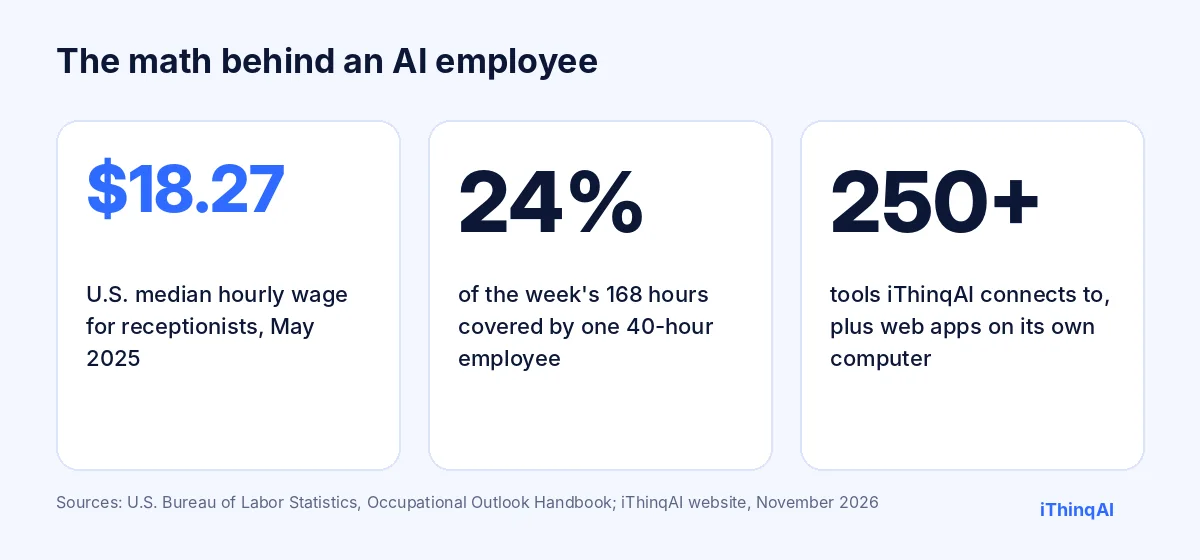
You've thought about hiring. But a full-time receptionist means wages, payroll taxes, training and turnover. The U.S. median wage for receptionists was $18.27 an hour in May 2025 (BLS), about $38,000 a year before benefits. And even a great hire covers about 40 of the week's 168 hours.
The calls that matter most, at 7:15 PM, on Saturday, during lunch, are the ones nobody is there to answer.
AI virtual assistant vs. AI employee
The words get used loosely, so here's a practical difference:
| Typical AI virtual assistant | AI employee | |
|---|---|---|
| What it does | Answers questions, drafts text, takes messages | Answers, books, follows up and completes tasks |
| Where it works | Inside one app | Across your phone, inbox, calendar, CRM and web apps |
| Who acts on its output | You | It does, within rules you set |
| Works in apps without an integration | No | Yes, with computer use |
| Reports what it did | Sometimes | Every call, message and task logged |
An AI virtual assistant helps you work. An AI employee does a defined part of the work for you. For more background, see our page on virtual assistant artificial intelligence.
Nine jobs an AI employee does best
1. Receptionist
Answers every call on your existing number, day and night, in English, Spanish and other major languages. Books on the call and texts a confirmation.
2. Appointment setter
Calls and texts new leads within seconds, qualifies them politely and books them on the right calendar.
3. Follow-up specialist
Chases quotes that didn't close, no-shows and "call me next month" leads, on a schedule you approve.
4. Reactivation caller
Works your old lead list, from approved lists only, with Do Not Call controls and daily limits.
5. Inbox manager
Keeps calls, texts, email, social messages and faxes in one unified inbox, replies where it's allowed and flags the rest.
6. CRM keeper
Updates contacts, notes, tasks and pipeline stages after every conversation, so your records are current without anyone typing.
7. Portal clerk
With computer use on the Scale plan, it works in web portals and older vendor apps the way a trained assistant would: looking up records, entering data and downloading documents. iThinqAI's feature page mentions carrier portals, listing sites and older vendor apps.
8. Researcher
Finds prospects that fit your criteria on the Growth plan and prepares lists for your review before any outreach.
9. Marketing helper
On its own computer, it can build simple marketing material or a basic web page in a browser for you to review and approve.
What computer use actually means
Computer use means the AI operates a computer the way a person does: it opens a browser, reads the screen, clicks, types and moves files. That matters because most small businesses run on tools that don't connect to anything: a carrier portal, a supplier's ordering site, a scheduling system from 2009.
iThinqAI's agent has its own computer on the Scale plan. iThinqAI says it works like a trained assistant and needs no API. Here's how it stays safe:
- It asks before important actions, like clicking Submit.
- You can watch every step and stop it at any time.
- It works with the access you give it, and nothing more.
- Everything it does is logged next to the conversation that triggered it.
What it shouldn't do
Being honest about limits is part of the job. The FTC has cracked down on companies that exaggerate what AI can do (FTC). So here's the plain version. An AI employee for small business shouldn't:
- Give legal, medical, financial or insurance advice.
- Make decisions that need a license or professional judgment.
- Move money or sign contracts on its own.
- Reset passwords or grant access by phone.
- Be trusted with tasks you haven't defined, tested and approved.
It's excellent at clear, repeatable work. Judgment calls stay with you.
The reason why this works
Albert Lasker's rule: give the reason why. Here's ours. Small businesses don't lose customers because the owner isn't good at the work. They lose them in the gaps: the unanswered call, the quote nobody chased, the referral nobody filed. Those gaps are exactly the repetitive, time-sensitive tasks an AI employee does well. Fill the gaps, and the business you already built finally gets to keep the customers it earns.
A day in the life
- 6:58 AM: a homeowner calls about a leak. The AI books a 9:00 visit and texts the confirmation.
- 9:30 AM: a referral fax arrives. The AI files it and calls the client to book.
- 11:00 AM: it runs the approved follow-up list for last week's quotes. Three people book.
- 12:15 PM: lunch-hour calls are answered and booked.
- 2:00 PM: on its own computer, it logs into a supplier portal and downloads this month's invoices, then asks before submitting a reorder.
- 5:45 PM: it updates the CRM with every conversation from the day.
- 9:40 PM: an after-hours caller is booked for tomorrow at 8.
How to manage an AI employee
Treat it like a new hire:
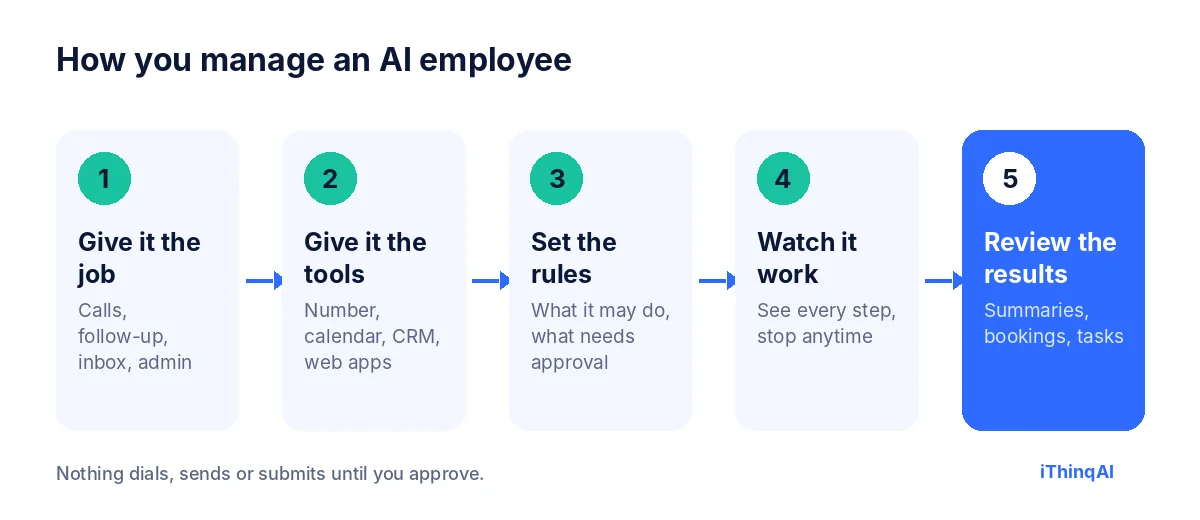
- Give it a clear job. Start with one role, like receptionist.
- Give it the tools. Number, calendar, CRM, and the web apps it needs.
- Set the rules. What it may do alone, and what needs your approval.
- Watch it work. Read summaries daily for the first two weeks.
- Expand gradually. Add follow-up, then campaigns, then computer use tasks.
What to measure
- Calls answered that used to go to voicemail.
- Appointments booked by the AI.
- Follow-ups completed on time.
- Hours of admin work removed from your team's week.
- Revenue from booked work compared with the monthly cost.
Computer use, step by step
Here's what computer use looks like on a real task. Say an insurance agency wants yesterday's new policy documents downloaded from a carrier portal and attached to each client's record.
- The AI opens a browser on its own computer and goes to the portal.
- It signs in with the credentials you provided for that purpose.
- It finds yesterday's documents, downloads them and checks the client names.
- It attaches each document to the right record in your CRM.
- If anything doesn't match, it stops and asks you instead of guessing.
- It posts a summary: twelve documents filed, one needs your review.
A person would spend an hour on that. The AI does it while your team is serving clients, and you can watch every step. That's the practical promise of computer use: not magic, just reliable hands on the keyboard for the work nobody wants.
Choosing an AI employee for small business
Ask every vendor:
- Does it answer on our existing number, without porting?
- Can it book directly on our calendars and update our CRM?
- Does it run follow-up from approved lists only, with opt-out controls?
- Does it offer computer use for apps without an integration, and how are actions approved?
- Can we watch what it does and stop it?
- Does it log every call, message and task?
- Are prices published, with seats and minutes spelled out?
An AI employee for small business should answer every one of those clearly. If a vendor promises it can do "anything," keep looking.
Starting small: your first 30 days
Week 1: receptionist only. Connect your number and calendar, write the greeting and answer the ten most common questions.
Week 2: add follow-up. Approve a list of quotes from the last 60 days and a simple script.
Week 3: add the inbox. Bring texts, social messages and faxes into one place, with rules for what the AI may reply to.
Week 4: try one computer use task on the Scale plan, such as downloading documents from a portal you use every week. Watch it the first few times, then let it run with approval on submits.
By day 30, you'll know exactly which jobs your AI employee does well and which still need a person.
AI virtual assistant tasks you can hand off today
If you're still deciding where to start, these tasks are almost always safe first steps for an AI virtual assistant or AI employee:
- Answering after-hours and lunch-hour calls.
- Booking and rescheduling appointments.
- Sending confirmations and reminders.
- Following up on quotes and missed calls.
- Logging every conversation in the CRM.
- Filing incoming documents and faxes.
Each one is repeatable, time-sensitive and easy to check. Each one frees hours your team can spend on customers.
How it changes your team's day
An AI employee for small business doesn't replace your best people. It removes the interruptions that keep them from doing their best work. The front desk stops juggling three phone lines. The office manager stops retyping data from one system to another. The owner stops spending Saturday mornings returning calls. When the repetitive work is handled, people do more of what customers actually value: listening, solving problems and building relationships.
It remembers, so customers don't repeat themselves
A good employee remembers the customer who called last week. So does this one. Every call, text, email and fax is kept in one history per customer, so when someone calls back, the AI already knows what they asked, what was quoted and what was promised. The second conversation starts where the first ended. For customers, that feels like dealing with a business that pays attention. For your team, it means fewer "let me look that up" moments and fewer mistakes.
Talk to it like you'd talk to staff
Owners don't want another dashboard to check. You can give instructions in plain language, the same way you'd message an employee: "Call everyone who got a quote last week and didn't book," or "Send me a summary of overnight calls at 7 AM." Scheduled jobs and automations run on the Growth plan, so routine work happens on its own, and you get the results instead of the reminders.
Guardrails you control
You decide what the AI may do on its own and what needs a yes from you. Common settings: it can book appointments freely, but discounts need approval. It can call approved lists, but not new ones. It can fill in a portal form, but it asks before submitting. It can answer questions from your approved information, but anything outside that gets routed to a person. Start strict, loosen as you gain confidence, and review the log whenever you like.
The math on one recovered hour a day
Say your team spends one hour a day on tasks the AI can take: returning voicemails, retyping data, chasing confirmations and filing documents. That's about 22 hours a month. At the median receptionist wage of $18.27 an hour, those hours alone are worth roughly $400 a month, before counting a single extra booking from calls that used to be missed. Most owners find the bookings matter far more than the hours. Run your own numbers with your average job value, and compare.
When to add a person instead
Sometimes the right answer is a human hire. If your calls are mostly complex, emotional or high-stakes, if customers expect the same person every time, or if the work is physical, hire a person and let the AI handle overflow and after hours. The two work well together: the AI covers the gaps, and the person covers the judgment.
Objections we hear
"AI can't run my business." Right. It runs defined tasks inside your business, with your rules.
"I don't trust it to click things." It asks before important actions, and you can watch and stop it.
"My team will feel replaced." Most teams feel relieved. The AI takes the repetitive calls and data entry; people keep the work that needs a human.
What it costs
iThinqAI's published plans, as of November 2026:
| Plan | Price | Best for |
|---|---|---|
| Starter | $299/mo | Receptionist: answering, booking, unified inbox, CRM (2 seats, 1,000 AI minutes) |
| Growth | $799/mo | Adds follow-up and calling campaigns, dialer, prospect discovery, automations (5 seats, 5,000 AI minutes) |
| Scale | $1,999/mo | Adds computer use, multiple locations and numbers (15 seats, 15,000 AI minutes) |
Compare that with a month of wages for one part-time employee. Prices at ithinq.ai/pricing.
Who it's not for
If your work is almost entirely custom judgment, with few calls and little repetitive admin, an AI employee won't move the needle much. It pays off where phones ring, leads need chasing and staff spend hours on data entry.
Hear it now
Call 561-715-7686. Ask it to book you. Then ask what else it can do.
Then book a demo and bring the three tasks you most wish someone else would handle. We'll show you which ones it can take today. More reading: AI vs human receptionist, AI appointment setter and online fax for small business.
P.S. The best employee you'll hire this year might not need a desk, a parking spot or a lunch break. Call 561-715-7686 today and give it a try.
Sources
Frequently Asked Questions
What is an AI employee?
An AI agent assigned to a defined job, like receptionist or follow-up, that uses your tools and follows your rules.
How is it different from an AI virtual assistant?
An AI virtual assistant usually helps you do the work. An AI employee completes defined tasks itself, under rules you set.
What is computer use?
The AI operating a computer like a person: browser, clicks, typing and files. On iThinqAI's Scale plan, the agent has its own computer.
Can it do any task?
No. It's best at clear, repeatable front-office work. Advice, licensed decisions and money movement stay with people.
Is it safe to let AI click Submit?
iThinqAI asks before important actions like submitting, and you can watch every step and stop it.