AI Social Media Manager: 7 Proven Fixes for Lost DMs
Quick answer: an AI social media manager plans and publishes your social media posts on all the major networks, answers direct messages quickly in one inbox, and turns interested followers into booked appointments. You approve the posts; it does the work every week. Sprout Social's research found 73% of consumers will choose a competitor if a brand doesn't respond on social, so fast replies matter as much as good posts. iThinqAI's AI social media manager also answers your phone and follows up by text, so a post that works doesn't create a backlog.
Key takeaways
- Most small businesses post in bursts, then go quiet. Consistency is what builds trust and reach.
- Customers expect answers on social within a day, and many will move on if they don't get one.
- An AI social media manager handles the weekly posting and the replies, and books the customers who are ready.
- iThinqAI posts to every major network, answers messages in one inbox and books on your calendar. Hear it at 561-715-7686.
What is an AI social media manager?
An AI social media manager is software that does the work of a junior social media manager: it plans a content calendar, writes and designs posts from your material, publishes them across networks on schedule, answers incoming messages, and reports what worked. Unlike a scheduling tool, it creates the content and handles the responses, within rules and approvals the business owner sets.
The account that went quiet in March
Look at most local businesses' social accounts and you'll see the same pattern. A burst of posts in January. A few in February. Then nothing until a holiday promotion in May.
It's not laziness. Posting takes time: finding a photo, writing a caption, choosing hashtags, logging into three apps. And the messages that come in? They sit unread until someone remembers to check.
Meanwhile, a potential customer who found you on Instagram sends a DM asking about price and availability. No answer by the next day. They book with the business that replied in ten minutes.
What customers expect on social media
Sprout Social's research spells it out. About three-quarters of consumers (74%) expect a brand to respond within 24 hours, and 73% say they'll choose a competitor if a brand doesn't respond (Net Influencer, citing the 2025 Sprout Social Index). Sprout's Consumer Pulse survey also found 80% of consumers use social media more than they did a year earlier to engage with brands about customer service (Sprout Social).
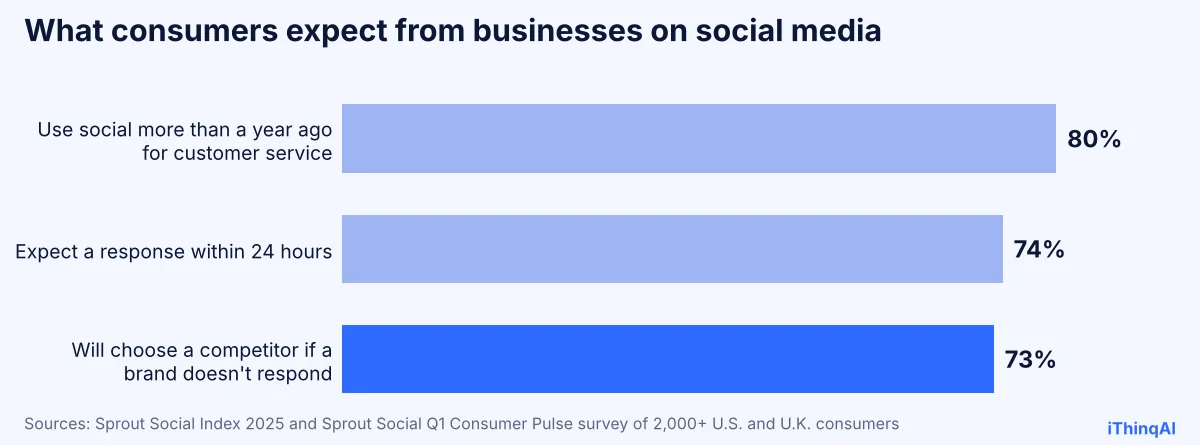
Social isn't just a billboard anymore. It's a front door. And front doors need someone to answer them.
Seven proven fixes for lost DMs and dead accounts
1. Plan the week in advance
A short weekly plan beats daily scrambling. The AI drafts the week's social media posts every Monday from your recent jobs, photos, reviews and offers.
2. Approve in one pass
You review the drafts once, edit what you want, and approve. Nothing goes live without your OK.
3. Publish on every network you use
The AI publishes to all the major social networks on schedule, adapting the format and length for each.
4. Answer DMs in minutes, not days
Messages from social channels land in the same unified inbox as your calls and texts. The AI answers common questions from your approved information right away.
5. Move ready buyers to a booking
When someone asks "how much" or "do you have anything Saturday," the AI gives your approved answer and offers times. The DM becomes an appointment.
6. Turn real work into content
Every finished job, happy review or new team member is a post waiting to happen. The AI asks for photos after jobs and turns them into posts, with permission.
7. Report what's working
A short weekly recap: posts published, messages answered, bookings from social and which posts drew the most engagement.
How the AI social media manager works
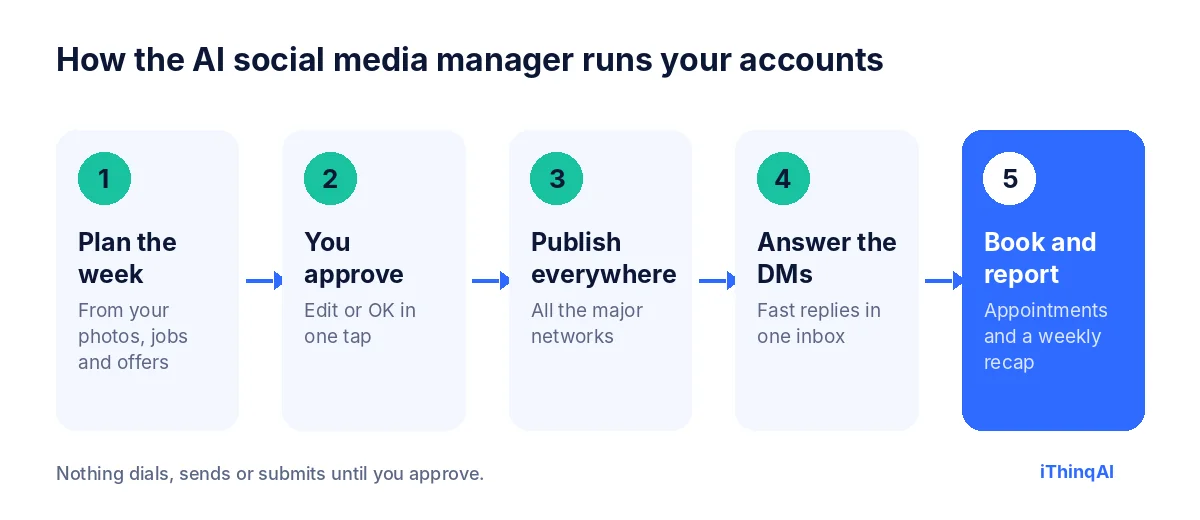
- It plans the week from your photos, recent jobs, reviews and current offers.
- You approve the drafts in one pass.
- It publishes to every network you use, on the schedule you set.
- It answers messages from social channels in one inbox, alongside calls and texts.
- It books and reports: interested people get booked, and you get a weekly recap.
It has its own computer
Most social tools stop at scheduling. iThinqAI's agent works on its own computer, with a browser, files and your connected tools. On the Scale plan, it can:
- Pull photos from a shared folder and prepare them for each network.
- Build a simple landing page for a promotion and link it in your posts, published on your domain.
- Update your profiles' hours or links when something changes.
- Log every social lead in your CRM with the full conversation.
You can watch every step and stop it at any time. It asks before publishing anything.
The reason why this works
Albert Lasker's rule was to give people the reason why. Here's the reason an AI social media manager works for small businesses: social media marketing rewards two things, consistency and responsiveness, and those are exactly the two things busy owners can't sustain. A person gets busy, sick or bored. An AI that works from your approved plan doesn't. Show up every week, answer every message, and the platform and the customers both reward you.
What makes social media posts work for local businesses
| Post type | Example | Why it works |
|---|---|---|
| Before and after | A repaired roof, a smile makeover, a clean install | Shows real results |
| Team spotlight | "Meet Luis, our lead tech" | Builds trust |
| Customer question | "Do I need a new water heater?" | Answers real searches |
| Offer with a deadline | "Tune-ups $89 through April 30" | Gives a reason to act now |
| Review highlight | A real review, with permission | Social proof |
| Behind the scenes | Morning prep, new equipment | Makes you human |
Plain words and real photos beat stock images and buzzwords.
Social media marketing without the guesswork
Good social media marketing for a local business isn't about going viral. It's about being visible and helpful week after week, so when someone needs you, you're the name they remember and the account that answers. The AI keeps a steady calendar, mixes post types, and learns from what gets responses in your market.
A DM that becomes a booking
Follower (9:40 PM): "Hi, how much is teeth whitening and do you have anything next week?"
AI (9:41 PM): "Hi! I'm the AI assistant for Bright Smile Dental. In-office whitening is $399. Dr. Patel has openings next Tuesday at 10 and Thursday at 3. Would either work?"
Follower: "Thursday!"
AI: "You're booked for Thursday at 3. Can I get your name and phone number for the confirmation?"
One message, one minute, one new patient.
Guardrails that protect your brand
- Approval first: every post waits for your OK until you decide otherwise.
- Approved answers only: prices, policies and claims come from information you provide.
- No invented reviews or results: only real stories, with permission.
- Sensitive topics go to you: complaints, refunds and anything that needs judgment are flagged to a person.
- Clear identification: in messages, the assistant says it's an AI working for your business.
What to measure
- Posts published per week, per network.
- Average reply time to DMs.
- Messages that turned into bookings.
- Engagement on each post type.
- Revenue traced to social leads.
AI social media manager vs. scheduler vs. agency
| Scheduling tool | Social media agency | AI social media manager | |
|---|---|---|---|
| Writes social media posts | No (you do) | Yes | Yes |
| Publishes on schedule | Yes | Yes | Yes |
| Answers DMs fast | No | Business hours, if included | Yes, any hour |
| Books customers from messages | No | Rarely | Yes |
| Answers your phone too | No | No | Yes |
| Monthly cost | Low | Often high | Plan price |
A scheduler saves clicks but not time. An agency saves time but often costs more than a small business can justify. An AI social media manager sits in between: it does the work like an agency, at the price of software, and it handles the replies most agencies don't.
A month of social media marketing, planned once
Here's a simple monthly calendar the AI can run for a local service business:
| Week | Monday post | Wednesday post | Friday post |
|---|---|---|---|
| 1 | Before and after from a recent job | Tip: answer a common customer question | Team spotlight |
| 2 | Review highlight (with permission) | Seasonal reminder | Behind the scenes |
| 3 | Offer with a deadline | Customer question answered in a short video | Community event or local shout-out |
| 4 | Before and after | "Did you know?" fact about your service | Month recap and thank-you |
That's 12 social media posts a month, approved in four short sessions. Social media marketing doesn't need to be complicated. It needs to be steady.
How to write social media posts that bring in customers
Every one of your social media posts should do one job: inform, prove or invite. The AI follows a few simple rules:
- Lead with the picture. Real photos of your work stop the scroll better than stock images.
- Say one thing. One idea per post, in plain words.
- Be specific. "Replaced a 15-year-old water heater in Henderson in three hours" beats "Quality service you can trust."
- Give a next step. "Message us for a quote" or "Book through the link in our profile."
- Answer fast. A post that works brings messages. Reply within minutes.
Why an AI social media manager matters for small teams
Large brands have social teams. Small businesses have the owner and maybe one office manager, both already busy. That's why most local accounts go quiet: there's no one whose job it is. An AI social media manager makes it someone's job again, every week, without adding payroll. And because the same AI answers the phone, texts back and books appointments, the attention your posts create turns into revenue instead of unread messages.
Social media marketing by industry
| Industry | Best-performing content | What the AI books |
|---|---|---|
| Medspa and salon | Before and afters, offers, team | Appointments from DMs |
| Dental | Smile results, patient tips, team | New patient visits |
| Home services | Job photos, seasonal tips | Estimates and service calls |
| Real estate | New listings, market updates, sold stories | Showings and valuations |
| Restaurants and retail | Daily specials, new arrivals | Reservations and orders |
| Professional services | Short explainers and FAQs | Consultations |
A week on social, before and after
Before: Monday, you mean to post but a customer emergency eats the day. Wednesday, you post a blurry photo at 10 PM. Thursday, five messages arrive while you're on jobs; you see them Saturday. Two people already booked elsewhere. Your account looks like a business that's too busy to care.
After: Monday morning, the week's posts are waiting for your OK. You approve them over coffee. They publish Monday, Wednesday and Friday on every network. Thursday's five messages get answers within minutes, and three turn into appointments. Saturday, you read a short recap instead of digging through apps.
How it learns what works in your market
Every week, the AI social media manager looks at which posts drew comments, shares, messages and bookings, and adjusts the mix. If before-and-after photos bring in messages and tips get ignored, you'll see more before-and-afters. If Tuesday evening posts outperform Friday mornings, the schedule shifts. You stay in control of the content; the data helps decide the timing and format.
Your photos are the secret weapon
The single biggest upgrade most local accounts can make is better photos of real work. Ask your team to snap a quick picture at the end of each job or appointment, with the customer's permission where people appear. The AI turns them into social media posts with short captions, so your feed becomes a running record of real work in your community. Nothing builds trust faster.
Handling complaints on social
Not every message is a happy one. When someone sends a complaint by message, the AI doesn't argue or make promises. It acknowledges the message politely, asks for contact details, and flags it to you immediately with the full conversation. Public comments that need a response are flagged to you too. You decide how to respond. Fast acknowledgment plus a real fix turns many unhappy customers into loyal ones.
Events, holidays and local moments
Local businesses win by showing up in their community. Sponsoring a youth team, joining a charity run, celebrating a local holiday or sharing a neighborhood event all make strong posts. Add them to a shared calendar, and the AI plans posts before and after each one. Over a year, your feed tells a story of a business that's part of the neighborhood, not just selling to it. That kind of goodwill is hard for a competitor to copy, and it makes every promotional post land better.
Video without the hassle
Short videos often reach more people than photos. You don't need a studio: a 20-second clip of a finished job, a quick tip from a technician or a walk-through of your office works. Send the clip by text, and the AI adds a caption, picks the right format for each network and schedules it with the rest of the week's posts.
Common objections
"AI posts look fake." Posts built from your real photos and real jobs don't. Generic stock content does.
"I want to keep my personal voice." Give it examples of your best posts and approve every draft. It learns your style.
"Replies need a human touch." Simple questions get fast answers. Anything sensitive goes to you, with the conversation attached.
What it costs
iThinqAI's published plans, as of November 2026:
| Plan | Price | Best for |
|---|---|---|
| Starter | $299/mo | Answering calls and messages in one inbox, booking and CRM (2 seats, 1,000 AI minutes) |
| Growth | $799/mo | Adds campaigns, dialer, prospect discovery and automations (5 seats, 5,000 AI minutes) |
| Scale | $1,999/mo | Adds computer use for full content and publishing work, plus multiple locations and numbers (15 seats, 15,000 AI minutes) |
Prices at ithinq.ai/pricing.
Who it's not for
If social media is your main product, say you're an influencer or a media brand, you'll want a human creative lead. The AI social media manager fits local and service businesses that need steady, professional posting and fast replies.
Your first two weeks
Days 1 to 3: connect your social accounts, share photos, offers and three posts you like.
Days 4 to 7: approve the first week's posts and turn on DM answering.
Week 2: review the recap, adjust the mix of post types and set your approval preferences.
Hear it now
Call 561-715-7686. Ask the kind of question you'd send in a DM and hear how it answers and books.
Then book a demo and bring your social accounts. Related: AI marketing assistant, AI receptionist for medspa and talking to AI on the phone.
P.S. Somebody messaged a business like yours last night and is still waiting for an answer. Call 561-715-7686 now, so the next one that messages you gets booked.
Sources
Frequently Asked Questions
What does an AI social media manager do?
It plans, creates and publishes posts, answers messages, books interested customers and reports results.
Which networks can it post to?
iThinqAI posts to all the major social networks.
Does it answer DMs?
Messages from social channels land in one inbox with your calls and texts, and the AI answers from your approved information.
Will it post without my approval?
No. Posts wait for your approval until you decide otherwise.
How often should a small business post?
Steady beats frequent. A few good posts every week, every week, is a strong start.