WhatsApp AI Assistant: 7 Easy Ways to Run Your Office
Quick answer: a WhatsApp AI assistant lets you run your business from a chat. You message tasks to your AI employee on WhatsApp (or Telegram, or plain SMS) the way you'd text a staff member, and it does the work: calls back leads, books and moves meetings, sends and answers email, updates your CRM and reports back in the same chat. It also answers customers who message your business. iThinqAI's AI employee works this way, and it asks before anything important goes out.
Key takeaways
- Most owners already run their day from their phone. A chat is the easiest place to hand off work.
- There are two jobs: an assistant you message with tasks, and an assistant that answers your customers' messages. iThinqAI does both.
- WhatsApp has more than 100 million monthly users in the U.S., so many of your customers are already there.
- iThinqAI takes tasks by WhatsApp, Telegram or SMS and does the work with your approval. Hear it at 561-715-7686.
What is a WhatsApp AI assistant?
A WhatsApp AI assistant is an AI that you or your customers talk to through WhatsApp. For a business, it can mean two things: an assistant the owner messages to get work done, and an assistant that answers customers who message the business. The useful kind connects to your phone line, calendar, email and CRM, so a chat message turns into real actions, not just a reply.
The owner who lives in chat
You run your business from your phone. Your team texts you. Your suppliers message you on WhatsApp. Customers send photos of broken water heaters at 10 PM. Your laptop stays in the truck.
So why does getting work done still require opening five apps?
A WhatsApp AI assistant flips that. The chat you already use becomes the place you give instructions, and the assistant goes off and does the work.
Why chat is where work happens now
WhatsApp passed 100 million monthly active users in the U.S. in 2024 (Fortune) and more than 3 billion worldwide in 2025 (Nairametrics). Meanwhile, 76% of small businesses say they already use AI in some form, according to Goldman Sachs' 2026 survey (Goldman Sachs).
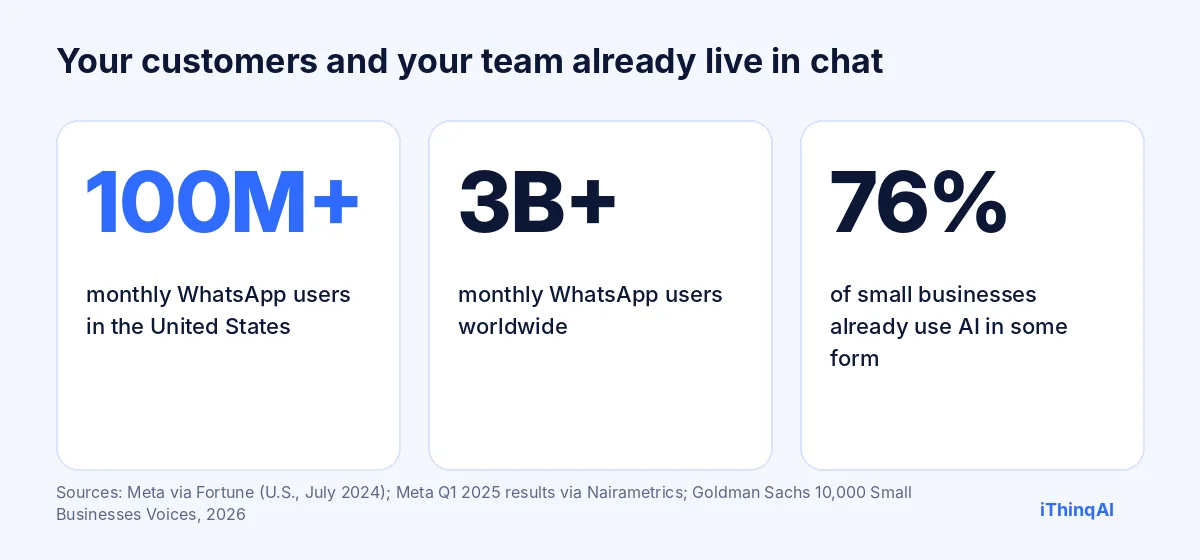
Put those together and the opportunity is obvious: meet owners and customers in the chat they already use, and make the AI do something useful there.
Seven easy ways to run your office from WhatsApp
1. Hand off follow-ups
"Call everyone who asked about a quote this week and book them." The assistant calls or texts each person, books the ready ones and reports back.
2. Manage your calendar
"Move my 3 PM to tomorrow and let the client know." It reschedules, sends the client a confirmation and confirms to you.
3. Send email without opening email
"Email the Garcias that their parts arrived and we can install Friday." It sends from its own email address, which you set up on any plan, and logs it.
4. Get a morning brief
Set a daily summary of today's appointments, overnight calls and open tasks, delivered to your chat at 6:45 AM. Scheduled automations run on the Growth plan.
5. Ask about your business
"How many new leads came in this week? Who hasn't been called back?" It checks your inbox and CRM and answers in the chat.
6. Send it photos and files
Forward a photo of a job, a supplier invoice or a handwritten note. It files it with the right customer or task.
7. Approve with one word
When something needs your OK, like a quote or a big email, it sends a preview. Reply "yes" or tell it what to change.
How it works
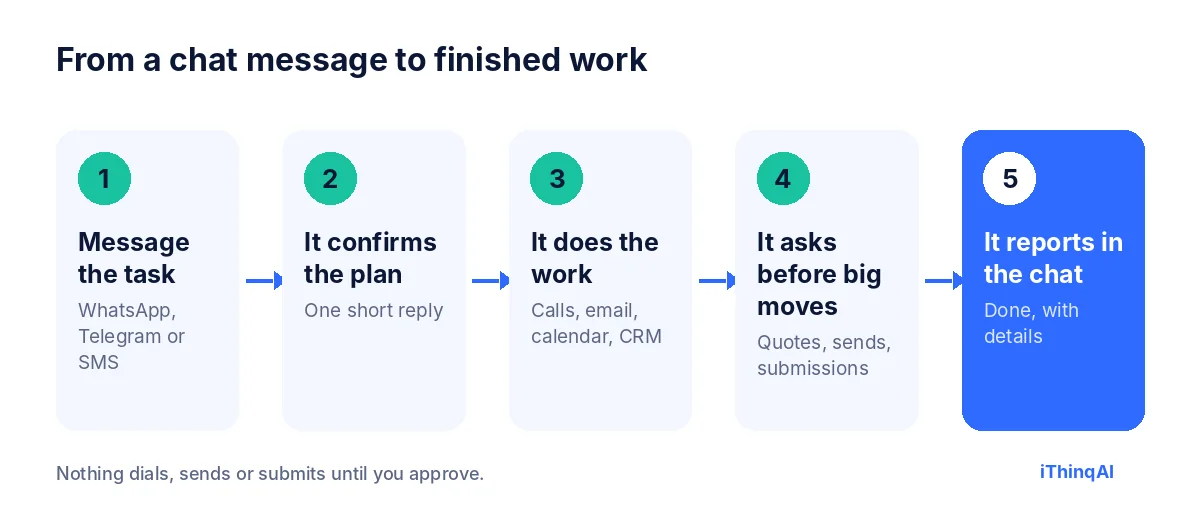
- Message the task on WhatsApp, Telegram or SMS.
- It confirms the plan in one short reply, or asks one question if something's unclear.
- It does the work across your phone line, email, calendar and CRM.
- It asks before big moves: quotes, mass emails and form submissions wait for your OK.
- It reports in the chat with what got done and what's still open.
Answering customers on WhatsApp, too
The other side of a WhatsApp AI assistant is the customer side. Many customers, especially younger and Spanish-speaking ones, prefer to message a business rather than call. iThinqAI lists WhatsApp among the channels customers can use to reach you, and every conversation lands in the same inbox as your calls and texts. The AI answers from your approved information, books appointments and hands off to a person when needed. For bilingual customers, see our guide to the Spanish AI receptionist.
WhatsApp, Telegram or SMS?
| Channel | Best for | Notes |
|---|---|---|
| Owners and teams who already use it; customers who prefer chat | Popular with international and Spanish-speaking customers | |
| Telegram | Owners who like bots, groups and file sharing | Good for team updates and quick commands |
| SMS | Everyone | Works on every phone, no app needed |
Use whichever you already live in. The assistant works the same way across all three.
It has its own computer
A chat message is only as useful as what happens next. iThinqAI's agent works on its own computer, with a browser, files and your connected tools. On the Scale plan, a message like "download this month's supplier invoices and add them to the job files" means it logs into the supplier's portal, downloads the files and files them, asking before it submits anything. You can watch each step and stop it at any time.
The reason why this works
Albert Lasker built campaigns on giving people the reason why. Here's the reason a WhatsApp AI assistant works for owners: the best system is the one you'll actually use from a job site with one thumb. You don't need a dashboard, a training course or a new habit. You already text. Now your texts get things done.
Example chat
You (8:12 AM): "Morning. Who called last night?"
AI: "Three calls. Ana Ruiz booked a water heater install for Thursday at 10. Mark Lee asked for a quote on a new AC; I booked an estimate Friday at 2. One spam call blocked."
You: "Great. Email Mark a reminder Thursday afternoon. Also, text all of today's customers that we're running 20 minutes late."
AI: "Done. Four customers texted. Mark's reminder is scheduled for Thursday at 3 PM."
You: "Perfect."
Guardrails you control
- Who can instruct it: only approved numbers or accounts can give it tasks.
- What it can do alone: booking, reminders and simple replies, for example.
- What needs approval: quotes, discounts, emails to many people, form submissions.
- What it never shares: anything you haven't approved.
- A full log: every action, tied to the message that requested it.
Using WhatsApp Business with your AI
If your business already uses a WhatsApp Business account to talk to customers, keep it. The assistant answers those conversations in your unified inbox, alongside calls, texts, email and faxes, so your team sees the whole history in one place. Customers keep messaging the number they know, and nobody has to juggle apps.
What to measure
- Tasks sent by chat each week.
- Tasks completed without you opening a laptop.
- Response time to customer messages.
- Bookings from chat conversations.
- Hours back in your week.
What a WhatsApp AI assistant is not
It's worth clearing up a common mix-up. Many "WhatsApp bots" are scripted menus: press 1 for hours, press 2 for prices. They answer a fixed list of questions and stop there. A WhatsApp AI assistant built on an AI employee is different in three ways:
- It understands plain language. No menus, no keywords to memorize.
- It takes action. It books, emails, calls and updates records, not just replies.
- It remembers context. It knows the customer's history and what you asked for yesterday.
If a tool can only reply, it's a chatbot. If it can do the work, it's an assistant.
Telegram for teams
Telegram is popular with owners who like groups, bots and quick file sharing. Some businesses set up a Telegram group with the owner, a manager and the AI. Anyone in the group can ask for an update or hand off a task, and the AI reports back to the whole group. It's a simple way to keep a small team aligned without another project management tool. Telegram and WhatsApp work the same way for instructions, so pick whichever your team already opens most.
Ten tasks owners send most often
- "Who called today?"
- "Call back everyone who asked about a quote this week."
- "Move my 2 PM to tomorrow and tell the client."
- "Text tomorrow's customers a reminder."
- "Email the Smiths that their order arrived."
- "Add this photo to the Johnson job."
- "What's still unpaid this month?"
- "Send me today's schedule."
- "Follow up with the leads from Saturday's event."
- "Remind me Friday at 4 to call the supplier."
None of them takes more than a few seconds to send. Together, they're hours of office work.
Setting up a WhatsApp AI assistant in an afternoon
Setup is simpler than most owners expect:
- Connect the basics: your business number, calendar, CRM and the email address you'll give the AI.
- Link your chat: add the WhatsApp, Telegram or SMS number you'll use to send tasks, and mark it as approved.
- Write your rules: what it can do alone and what needs your OK.
- Load your business info: hours, services, prices and policies it can share with customers.
- Send a test task: "What's on my calendar tomorrow?" and see the reply.
By the end of the afternoon, your WhatsApp AI assistant is ready for real work.
WhatsApp Business conversations in one inbox
When customers message your WhatsApp Business number, the conversation shows up next to their calls, texts and emails. If someone calls Monday, messages on WhatsApp Tuesday and emails Wednesday, your team sees one thread, not three. The AI answers what it can, books what it can, and flags anything that needs a person with the full history attached.
A day run from your phone
- 6:45 AM: your morning brief arrives: four appointments, two overnight calls already booked, one invoice overdue.
- 8:30 AM: from the truck, you send: "Text the 9 AM customer we'll be 15 minutes late." Done.
- 11:15 AM: a customer sends a photo of a leak. The assistant books an afternoon visit and sends you the photo.
- 1:40 PM: you forward a supplier quote and ask it to file it with the Martinez job.
- 3:00 PM: it reminds you about the overdue invoice and offers to send a friendly note. You reply "yes."
- 6:20 PM: you ask, "Anything I need to know?" It lists two callbacks for tomorrow and one review that came in.
You never opened a laptop. The office still ran.
Your team can use it too
The owner doesn't have to be the only one sending tasks. Add your office manager or a lead technician as approved senders, with permissions that fit their role. A tech can ask for the next job's details from the driveway; a manager can ask for the day's bookings. Everyone works from the same history, and you can see who asked for what.
Keeping your personal chats private
The assistant only reads messages sent to it, from the accounts you approve. It doesn't read your family group or your personal conversations. Think of it as a new contact in your phone: it sees what you send it and nothing else. If someone else on your team needs to send it tasks, you add them, and you can remove them just as easily.
When a person needs to step in
Some messages shouldn't be handled by AI alone: an angry customer, a billing dispute, a request for advice that needs a license. The assistant recognizes those, responds politely, and sends them to you or the right team member with the full conversation, so nobody has to ask the customer to repeat themselves.
Before you hand it the keys
Start small. For the first week, let it handle reminders, rescheduling and simple follow-ups, and ask it to show you every email before it sends. Read its reports each evening. Once you trust the results, widen what it can do on its own. Most owners are handing off ten or more tasks a week by the end of the first month.
Works across locations
If you run more than one location, the same chat can cover all of them. Ask "How did the Henderson office do this week?" or "Move tomorrow's Summerlin appointments to the afternoon," and the assistant works with the right calendar and team. Multiple locations and numbers are included on the Scale plan.
Weekends and vacations
Chat also makes time off realistic. Before a long weekend, tell it: "Handle routine calls and bookings. Only message me for emergencies." It runs the office by those rules and sends you one summary when you're back, so you return to a calendar, not a pile of messages.
Common objections
"I don't want another app." You won't have one. You use the chat you already have.
"What if it misunderstands?" It confirms the plan before acting and asks one question when something's unclear.
"Is it secure?" Only approved accounts can instruct it, important actions need your OK, and everything is logged.
What it costs
iThinqAI's published plans, as of November 2026:
| Plan | Price | Chat-driven capabilities |
|---|---|---|
| Starter | $299/mo | Answers calls and messages, its own email address, calendar, tasks, inbox and CRM (2 seats, 1,000 AI minutes) |
| Growth | $799/mo | Adds campaigns, dialer, prospect discovery and scheduled automations like a daily brief (5 seats, 5,000 AI minutes) |
| Scale | $1,999/mo | Adds computer use for work in web apps and portals, plus multiple locations and numbers (15 seats, 15,000 AI minutes) |
Prices at ithinq.ai/pricing.
Who it's not for
If you never text and prefer to work at a desk, the same assistant works from email and the web inbox. The chat approach fits owners who are on the move all day.
Your first week
Day 1: connect your number, calendar, CRM and the email address for the AI, then link your WhatsApp, Telegram or SMS.
Day 2: send three small tasks and watch how it reports back.
Days 3 to 7: set up a morning brief, approve your guardrails and add two recurring tasks.
Hear it now
Call 561-715-7686. Hear the voice that answers your customers. Then imagine texting it: "Call back everyone from this week."
Then book a demo, and we'll show the chat side live. Related: AI personal assistant for business owners, AI employee for small business and AI employee vs virtual assistant.
P.S. Your next free hour could start with one message from the parking lot. Call 561-715-7686 today and meet the assistant who'll read it.
Sources
Frequently Asked Questions
Can I give my AI assistant tasks on WhatsApp?
Yes. You can message tasks on WhatsApp, Telegram or SMS, the way you'd text an employee.
Can it answer my customers on WhatsApp?
Yes. iThinqAI lists WhatsApp among the channels customers can use, with every conversation in one inbox.
Does it work with Telegram?
Yes. Telegram works the same way for giving tasks.
Will it act without my permission?
Only within the guardrails you set. Important actions wait for your approval.
Do I need a WhatsApp Business account?
For customers who message your business on WhatsApp, a WhatsApp Business account is the usual setup. To give the AI tasks yourself, any of the three channels works.