Fax and Phone on the Same Number: 5 Easy Wins for Offices
Quick answer: yes, you can have fax and phone on the same number. With iThinqAI, every business number takes voice calls and receives faxes. Voice calls are answered by the AI receptionist, which books appointments and answers questions, and faxes are filed as documents in the same inbox as your calls, texts and email. You don't need a separate fax line, a fax machine or a second inbox, and you can print one number on everything.
Key takeaways
- Many offices still pay for a separate fax number, a fax machine or a separate online fax service, and check it separately.
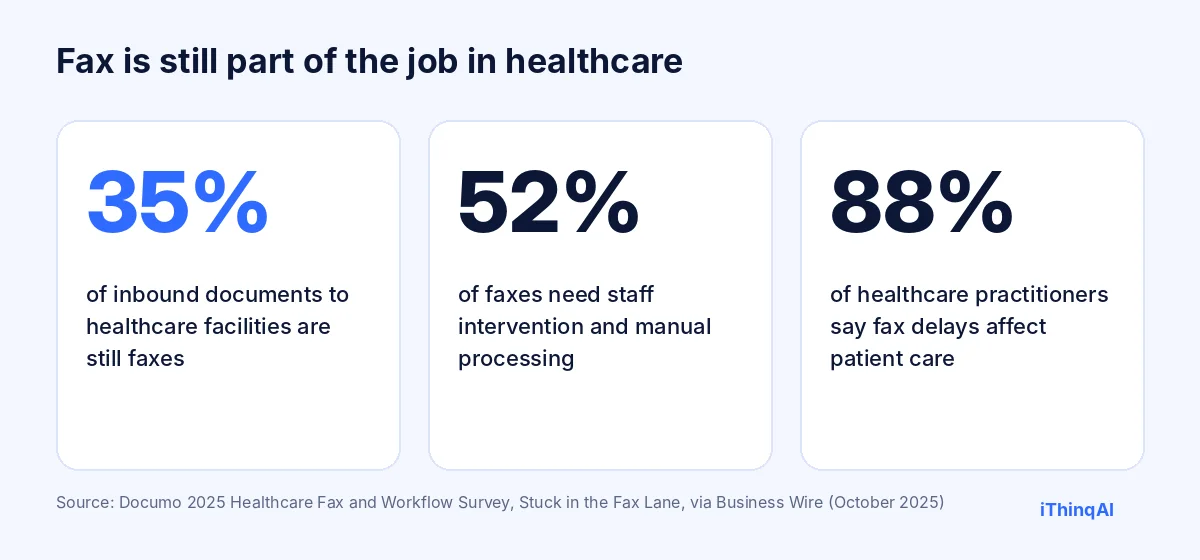
- Fax isn't going away in healthcare: Documo's 2025 survey found 35% of inbound documents to healthcare facilities are still faxes.
- One number for calls and faxes means fewer bills, fewer lost documents and faster action on referrals.
- On iThinqAI, every business number also receives faxes, on every plan. Hear it at 561-715-7686.
Can you have fax and phone on the same number?
Yes. With a modern cloud phone system, one business number can answer voice calls and receive faxes. When a call arrives, the system handles a fax differently from a voice call: the fax becomes a digital document in your inbox, and the voice call is answered by a person or an AI receptionist. On iThinqAI, every business number works this way, so you don't need a separate fax number.
The fax line nobody wanted to pay for
Every office manager has had this conversation. "Do we still need the fax line?" "Well, Dr. Lee's office still faxes referrals. And the insurance company sends forms that way. And the county." So the line stays. So does the machine, the toner, the paper tray and the separate bill.
Then someone signs up for an online fax service to get rid of the machine. Now there's a second fax number, a separate login, and faxes landing in an email inbox that only one person checks.
Here's the simpler question: why does a fax need its own number at all?
Fax still matters, especially in healthcare
Documo's 2025 Healthcare Fax and Workflow Survey found that 35% of inbound documents to hospitals and healthcare facilities are still faxes, 52% of faxes need staff intervention and manual processing, and 88% of healthcare practitioners say fax-related delays affect patient care (Business Wire).
Law firms, insurance agencies, title companies and many government offices still use fax too. The fax isn't the problem. The separate line, the separate inbox and the manual handling are.
Five easy wins from one number
1. One number on everything
Your website, letterhead, referral forms and Google profile show one number. Senders fax it, callers call it, and nothing gets confused.
2. One bill instead of three
No separate fax line, no fax machine maintenance and no stand-alone online fax subscription.
3. One inbox for everything
Faxes land next to the calls, texts and emails from the same person or company. The referral fax sits right beside yesterday's call from the patient.
4. Faster action
Because the AI sees faxes in the same inbox, it can act on them: file a referral, call the patient to book, or create a task for staff.
5. Fewer lost documents
No paper tray, no "I thought you had it." Every fax is stored, searchable and tied to a record.
How it works
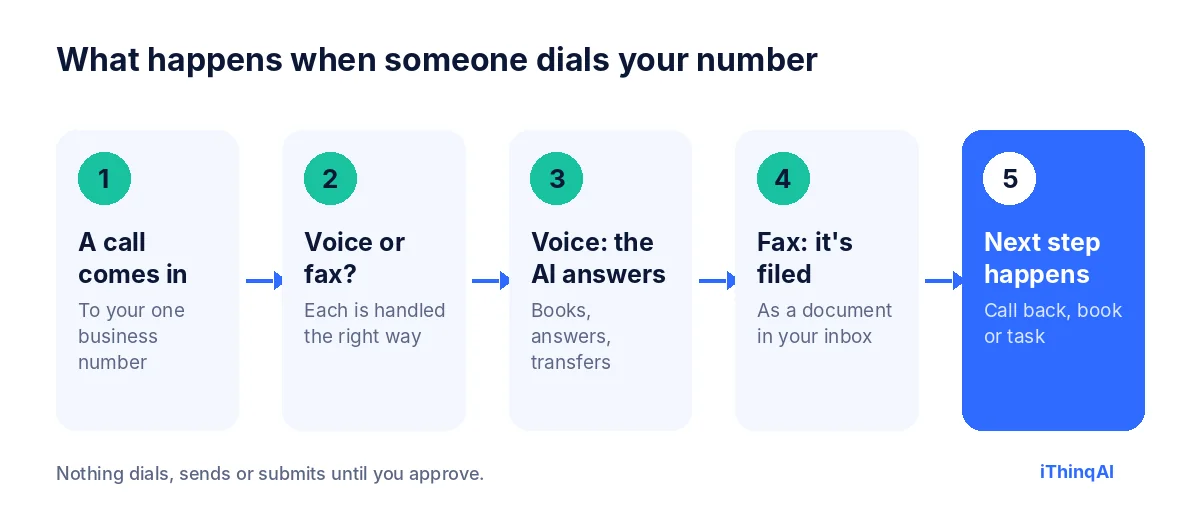
- A call comes in to your one business number.
- Voice or fax: each type of call is handled the right way.
- Voice calls are answered by the AI receptionist, which books appointments, answers questions and transfers to staff.
- Faxes are filed as documents in your inbox, attached to the right contact when the sender is known.
- The next step happens: a callback, a booking or a task for your team.
You can also send faxes from the same inbox, so outgoing faxes show the same number your contacts already know.
The old way vs. one number
| Separate fax line and machine | Separate online fax service | Fax and phone on the same number (iThinqAI) | |
|---|---|---|---|
| Numbers to publish | Two | Two | One |
| Paper and toner | Yes | No | No |
| Where faxes land | A tray | A separate email or app | The same inbox as calls and texts |
| Who sees them | Whoever walks by | Whoever checks that inbox | Your team, by role |
| Acts on the fax | A person, eventually | A person, eventually | The AI can file, call and book |
| Extra monthly bill | Yes | Yes | No, included |
It has its own computer
Filing is only the start. On the Scale plan, iThinqAI's agent works on its own computer, with a browser, files and your connected tools. It can upload a fax to a web-based system that has no integration, fill in and fax back a form you've approved, or look up a record before calling a patient about a referral. It asks before submitting anything, and you can watch every step.
The reason why this works
Albert Lasker's rule was to give people the reason why. Here's the reason one number works: every extra number, inbox and machine is another place for something important to get lost. Referrals, records requests and signed forms are often the most valuable documents an office receives. Putting them in the same place as everything else, where an AI can see them and act, means they get handled in minutes instead of days.
Who benefits most
| Business | Common faxes | What one number changes |
|---|---|---|
| Medical and dental offices | Referrals, records, prior authorizations | Referrals filed and patients called the same day |
| Physical therapy and home health | Referrals and orders | Faster intake and scheduling |
| Law firms | Records requests, agency correspondence | Documents tied to the matter immediately |
| Insurance agencies | Signed forms, carrier paperwork | Paperwork filed with the client record |
| Title and escrow | Signed documents | Fewer delays at closing |
| Any office that deals with government agencies | Forms and notices | Nothing lost in a tray |
Privacy for medical and legal offices
General information, not legal advice.
Faxes often contain protected health information or confidential legal material. If you're a HIPAA covered entity, sign a business associate agreement with your vendor before patient faxes flow through it; iThinqAI offers a HIPAA BAA. Limit who can see each type of document, set retention rules, and double-check numbers before sending sensitive documents. See our guide to a HIPAA compliant AI receptionist.
Moving off your old fax number
If you already publish a separate fax number, you have two easy paths:
- Tell your regular senders to use your main number from now on. Update your forms, website and letterhead.
- Keep the old fax number active for a while so faxes still arrive during the switch, and ask during your demo about the best way to bring that traffic into the same inbox.
Most offices find their regular senders switch within a few weeks.
What to measure
- Faxes received per week, and how many needed manual handling.
- Time from fax to action: filed, called or booked.
- Referrals converted to appointments.
- Monthly cost of fax lines, machines and services you've dropped.
- Lost or misfiled documents, which should drop to zero.
Online fax vs. fax and phone on the same number
An online fax service was the first step away from the machine: faxes arrive as PDFs instead of paper. But most online fax services still give you a separate fax number and a separate inbox. You've traded a paper tray for a digital one that someone still has to check.
Fax and phone on the same number goes one step further. There's no second fax number to publish, and faxes don't live in their own corner. They sit next to everything else about that patient, client or vendor, where your team and the AI already work. That's the difference between digitizing fax and actually putting it to work.
Why a separate fax number causes problems
A separate fax number seems harmless until you count the problems it creates:
- Two numbers to keep current on your website, forms, directories and letterhead.
- Wrong-number faxes when someone uses your main number for a fax, or your fax number for a call.
- Lost context: a referral arrives in one place, the patient's call in another.
- Extra cost for the line or service, every month.
- Single points of failure: one person who checks the fax inbox, and a backlog when they're out.
Fax and phone on the same number removes every one of these. One number to publish, one place to look and no special person in charge of the fax.
A referral, start to finish
- 9:02 AM: a specialist's office faxes a referral to your main number.
- 9:03 AM: it lands in your inbox as a document, next to the patient's record if they're known, or as a new contact if not.
- 9:05 AM: the AI calls the patient: "Dr. Lee referred you to us. Would Thursday at 10 work for your first visit?"
- 9:07 AM: the patient is booked and gets a text confirmation.
- 9:08 AM: a confirmation goes back to the referring office.
Six minutes, one number, no paper.
Setting up fax and phone on the same number
- Connect your business number to iThinqAI. You don't have to port it; it runs on the number you already have.
- Choose who sees faxes: by role, for example front desk for referrals and billing for invoices.
- Set filing rules: how referrals, records requests and forms should be handled.
- Tell your regular senders to fax your main number.
- Retire the old fax line once the switch is complete.
Most offices finish the setup in a day and the switch with senders within a few weeks.
What a fax number on your letterhead says about you
It sounds small, but customers and partners notice. Two numbers on a business card ("Phone" and "Fax") look like an office that hasn't changed in years. One number that does everything looks organized and modern. More importantly, it means every caller and every sender reaches the same, well-run front desk.
A week at the front desk, before and after
Before: faxes print on a machine by the copier. Some get stacked under insurance forms. A referral from Tuesday is found on Friday, and the patient has already booked elsewhere. Meanwhile, the phone rings through lunch and goes to voicemail. Two bills arrive each month: one for the phone line, one for the fax line.
After: every fax arrives as a document in the shared inbox, next to the calls and texts from the same people. Referrals are filed and patients called the same morning. Calls are answered on the first ring, even at lunch. One bill, one number, and a front desk that spends its time with the people in the waiting room.
Sending faxes without the machine
Outgoing faxes are just as simple. Attach a PDF, enter the recipient's number, add a cover page and send. You get a confirmation when it's delivered, and a copy stays in the conversation history with that contact. If it fails, you know right away instead of finding out days later. For documents you send often, such as records release forms or signed agreements, keep approved templates ready so the assistant can prepare them for your review.
What your staff will notice first
Staff usually notice three things in the first week. They stop walking to the machine. They stop asking "did anyone see the fax from…?" because it's in the shared inbox with the right person's name on it. And they stop calling patients and clients a day late, because the assistant has already called. Training takes an afternoon: where documents appear, how to send one, and how filing rules work.
Retention and record keeping
Decide how long to keep received documents and who can delete them. Medical and legal offices often have specific retention requirements, so check yours and set the rule once. Every document is stored with the date it arrived and the sender, which makes audits and records requests far easier than digging through paper files.
Multiple locations, one system
Offices with more than one location often have a tangle of phone and fax lines. On the Scale plan, each location can keep its own number for calls and faxes, while everything lands in one system with filing rules per location. The downtown office sees its referrals, the north office sees its own, and the owner sees everything. No more forwarding faxes between offices by hand.
When fax finally does go away
Healthcare is slowly moving toward direct electronic exchange, and someday fewer documents will arrive by fax. When that happens, nothing about your setup has to change: your number keeps taking calls, the inbox keeps handling messages and email, and the fax side simply gets quieter. You're not investing in fax. You're removing the extra line, machine and inbox that fax used to require.
The math on dropping the extra line
Add up what you pay each month for a separate fax line or service, the machine, toner, paper and repairs. Then add the staff time spent walking to the tray, sorting pages and retyping details. For most small offices, those costs disappear entirely when calls and faxes share one number and one inbox.
Common objections
"Our referring offices only fax to our fax number." Give them the new number once, on your next referral confirmation. Most update their records quickly.
"Won't faxes interrupt calls?" Faxes and voice calls are handled separately; a fax doesn't ring through to a person.
"We already have online fax." Does it sit in the same inbox as your calls, and does anything act on the faxes automatically? If not, you're still handling them by hand.
What it costs
iThinqAI's published plans, as of November 2026:
| Plan | Price | Includes |
|---|---|---|
| Starter | $299/mo | AI voice agent, fax on every business number, its own email address, inbox and CRM (2 seats, 1,000 AI minutes) |
| Growth | $799/mo | Adds campaigns, dialer, prospect discovery and automations (5 seats, 5,000 AI minutes) |
| Scale | $1,999/mo | Adds computer use, plus multiple locations and numbers (15 seats, 15,000 AI minutes) |
Prices at ithinq.ai/pricing.
Who it's not for
If you never send or receive faxes, you won't notice this feature. It pays off for offices that still get referrals, records or signed forms by fax.
Hear it now
Call 561-715-7686. That's the AI receptionist. Now picture faxes arriving on that same number and landing in the same inbox.
Then book a demo and bring a sample fax (with personal details removed). We'll show you the whole flow. Related: online fax for small business, AI receptionist for dental office and AI receptionist without porting.

P.S. Somewhere in your office, a fax line is billing you every month to receive a few referrals. Call 561-715-7686 today and put calls and faxes on one number.
Sources
Frequently Asked Questions
Can one phone number receive both calls and faxes?
Yes. On iThinqAI, every business number takes voice calls and receives faxes.
Where do the faxes go?
Into the same inbox as your calls, texts and email, as documents you can search and file.
Can I send faxes from the same number?
Yes. You send faxes from the inbox, and they show your business number.
Is fax included on every plan?
Yes. Every business number also receives faxes, on every plan.
Is it HIPAA compliant?
That depends on setup and a signed BAA. iThinqAI offers a BAA; review it with your compliance advisor.