Online Fax for Small Business: 5 Simple, Effective Wins
Quick answer: online fax for small business lets you send and receive faxes over the internet instead of a fax machine and phone line. Incoming faxes arrive as digital documents, and outgoing faxes are sent from your computer. The best setups put faxes in a unified inbox with your calls, texts and messages, so referral faxes get filed and acted on, not left in a tray. iThinqAI keeps faxes next to calls, and its AI can file referral faxes and book the next step.
Key takeaways
- Fax isn't going away in healthcare, legal, insurance and government work. Documo's 2025 survey found 35% of inbound documents to healthcare facilities are still faxes.
- The cost of fax isn't the machine. It's the manual sorting, retyping and waiting: 52% of faxes need manual processing.
- Online fax in a unified inbox keeps every document next to the conversation it belongs to.
- iThinqAI sends and receives faxes next to your calls, and its AI can file referral faxes and book the appointment. Hear it at 561-715-7686.
What is online fax for small business?
Online fax for small business is a service that sends and receives faxes digitally, without a physical fax machine or a dedicated analog phone line. Incoming faxes arrive as PDFs or images in an inbox or app, and you send faxes by uploading a document. Modern platforms also keep fax records searchable, control who can see them, and connect faxes to other tools like your CRM or scheduling system.
The referral that sat in the tray
A specialist's office faxes over a referral on Tuesday afternoon. It prints onto a tray next to the copier. Your front desk is slammed. Someone stacks it with the insurance forms.
Thursday, the patient calls the specialist: "Nobody ever called me." The specialist's office calls you. You find the fax under a pile on Friday. By then, the patient has booked with another practice that called them on Wednesday.
That's not a technology problem. It's a workflow problem. And it's happening in practices, law offices and agencies everywhere.
Fax is still a big deal
It's easy to joke about fax. The data says it's still central to how many industries work.
Documo's 2025 Healthcare Fax and Workflow Survey found (Business Wire):
- 88% of healthcare practitioners say fax-related delays impact patient care.
- 35% of inbound documents to hospitals and healthcare facilities are still faxes, and over 45% for higher-volume organizations.
- 52% of faxes require staff intervention and manual processing.
- 44% of faxes are labeled time-sensitive.
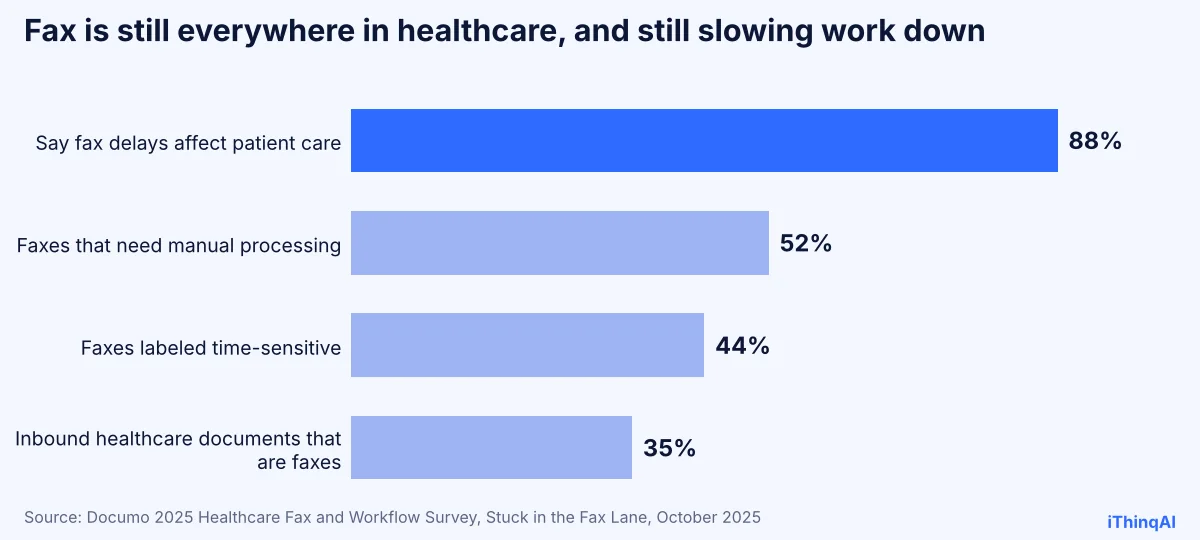
The fax isn't the bottleneck. The tray is. The retyping is. The "I thought you had it" is.
Who still needs to fax
| Industry | What gets faxed | Why it matters |
|---|---|---|
| Dental and medical | Referral faxes, records requests, prior authorizations | Each one is a patient waiting for care |
| Law firms | Records requests, some court and agency filings | Deadlines don't wait for a tray |
| Insurance | Signed forms, claim documents, carrier paperwork | Missing paperwork delays policies |
| Pharmacies and labs | Orders and results | Time-sensitive by definition |
| Title, mortgage and real estate | Signed documents, authorizations | Closings depend on them |
| Government-facing businesses | Forms to agencies that still require fax | No fax, no filing |
Five simple, effective wins from online fax
1. No more lost paper
Every fax arrives digitally, stored and searchable. Nothing slides behind the copier.
2. Faxes in a unified inbox
Instead of a separate fax app nobody checks, faxes land in the same unified inbox as your calls, texts and messages. The referral from Dr. Lee shows up right next to the patient's phone call from yesterday.
3. Faster action on referral faxes
When referral faxes are visible and filed in minutes, patients get called the same day. That's the difference between keeping a referral and losing it.
4. Send from anywhere
Send a fax from your laptop at home or your phone in the parking lot. No walking to the machine, no busy signal.
5. Better privacy
Paper faxes sit in the open. Digital faxes can be limited to the people who need them, with access controls and records of who viewed what.
How it works with iThinqAI
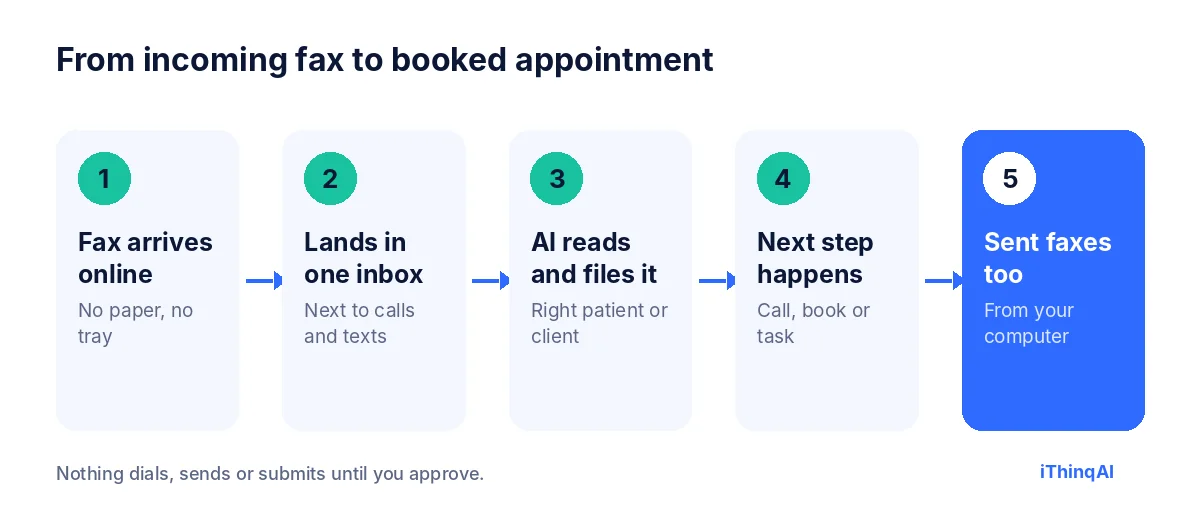
- A fax arrives online, with no paper and no tray.
- It lands in one inbox, next to your calls, texts and messages. iThinqAI describes it as sending and receiving faxes next to your calls.
- The AI reads and files it with the right patient or client, based on rules you set.
- The next step happens: the AI calls the patient to book, creates a task, or flags it for staff.
- You send faxes too, from your computer, with the record kept in the same history.
It has its own computer
Here's what makes this more than another online fax service. iThinqAI's agent works on its own computer, with a browser, files and your connected tools. iThinqAI's own examples say the agent sends and files referral faxes. On the Scale plan, that means it can:
- Read an incoming referral, match it to the right patient or create a new record.
- Call or text the referred patient to book, the same day the fax arrives.
- Fill in and fax back a form you've approved.
- Upload a fax to a web-based system that has no integration.
You can watch each step and stop it at any time. It asks before submitting anything.
The reason why this works
Albert Lasker's rule was to give the reason why. Here's ours. Fax doesn't lose referrals. Separate systems do. When the fax is in one place, the phone in another and the calendar in a third, nobody owns the handoff. Put them in one inbox with an assistant that acts on each document, and the handoff happens automatically. The referral becomes an appointment, not a piece of paper.
Privacy and compliance
General information, not legal advice.
Faxes often contain protected health information or confidential legal material. With any online fax service:
- Sign a business associate agreement if you're a HIPAA covered entity. iThinqAI offers a HIPAA BAA.
- Limit access to the staff who need each type of document.
- Set retention rules for how long faxes are kept.
- Use cover sheets with a confidentiality notice for outgoing faxes.
- Double-check fax numbers before sending sensitive documents.
For more, see our guide to a HIPAA compliant AI receptionist.
Fax machine vs. online fax vs. online fax in a unified inbox
| Fax machine | Basic online fax | Online fax in a unified inbox | |
|---|---|---|---|
| Paper | Yes | No | No |
| Phone line needed | Yes | No | No |
| Searchable | No | Yes | Yes |
| Next to calls and texts | No | No | Yes |
| AI files and acts on it | No | No | Yes |
| Send from anywhere | No | Yes | Yes |
A sample referral workflow
- 10:14 AM: Dr. Lee's office faxes a referral for Maria Santos.
- 10:15 AM: the fax lands in your unified inbox. The AI matches it to a new patient record and files it.
- 10:17 AM: the AI calls Maria: "Hi Maria, this is the assistant for Bright Smile Dental. Dr. Lee referred you to us. Would Thursday at 9:00 work for your first visit?"
- 10:19 AM: Maria is booked and gets a text with forms.
- 10:20 AM: a note goes back to Dr. Lee's office confirming the appointment.
Six minutes from fax to booked patient.
What to measure
- Time from referral fax to first patient contact.
- Referrals booked ÷ referrals received.
- Faxes needing manual handling before and after.
- Missed or lost faxes, which should drop to zero.
- Staff time spent on fax each week.
Why referral faxes deserve their own workflow
Referral faxes are the most valuable paper most practices receive. Another professional has already vouched for you, the patient already expects your call, and the hard part of marketing is done. Yet referral faxes are often treated like any other document: printed, stacked and handled when someone gets a minute.
Give them their own path. When a referral arrives, it should be identified as a referral, filed to the right record, and followed by a call to the patient the same day. A confirmation should go back to the referring office so they know the patient was seen to. That last step builds the relationship that sends you the next referral. With online fax in a unified inbox, every step can be tracked, and with an AI assistant, most of them can happen automatically.
How to choose online fax for small business
Ask every provider:
- Can we send and receive faxes without a fax machine or analog line?
- Do faxes arrive in the same unified inbox as our calls, texts and messages?
- Can we limit who sees which faxes?
- Will you sign a business associate agreement if we handle health information?
- Can incoming faxes trigger a task, a call or a booking?
- Are fax records searchable and exportable?
- What does it cost per page or per month, and are there limits?
Any online fax for small business you choose should answer those questions clearly before you move your fax traffic over.
Moving off the fax machine in one week
Day 1: list everyone who faxes you regularly, such as referring offices, carriers and labs, and the types of documents they send.
Day 2: set up online fax and decide which staff see which types of faxes in the unified inbox.
Day 3: test sending and receiving with a friendly referring office.
Days 4 and 5: set rules for referral faxes: file, call the patient, confirm with the sender.
Days 6 and 7: tell your regular senders about any number change, if one is needed, and keep the old machine connected until traffic has fully moved.
The unified inbox advantage
A unified inbox means one history per customer or patient, no matter how they reached you. The phone call, the text, the Instagram message, the email and the fax all sit together. When a patient calls to ask "Did you get my referral?", whoever answers, person or AI, can see the fax right there and answer in seconds. No checking three systems. No "let me call you back."
For a small team, that's the real win of online fax for small business: not just getting rid of paper, but getting every piece of the conversation into one place where it can be acted on.
A day at the front desk, before and after
Before: the fax machine beeps all morning. Someone pulls pages off the tray between phone calls, sorts them by guesswork and leaves a stack for the office manager. Two referral faxes and a records request get mixed into the insurance forms. By Friday, one patient has gone elsewhere and a records request is late.
After: every fax lands online, labeled and filed. Referral faxes trigger a same-day call to the patient. The records request becomes a task with a due date. The front desk never touches paper, and the office manager reviews a short list instead of a pile.
Sending faxes without the hassle
Outgoing faxes are where the old way wastes the most time: printing, walking to the machine, dialing, waiting for the busy signal to clear, then checking whether it went through. Online, you attach a PDF, enter the number, add a cover page and send. You get a confirmation when it's delivered, and a copy stays in the conversation history. If it fails, you know right away instead of finding out a week later when the other office says they never got it.
For documents you send often, such as records release forms, prior authorization forms or signed agreements, keep approved templates ready. The assistant can fill in the routine details you allow and prepare the fax for your review before it goes out.
Cost: what you save beyond the machine
The obvious savings are the machine, toner, paper and a dedicated phone line. The bigger savings are hidden in staff time: the minutes spent walking to the tray, sorting pages, retyping information and hunting for documents that went missing. Multiply ten minutes a day by a year, and a busy office loses dozens of hours to paper handling. Then add the patients or clients who went elsewhere because a document sat unnoticed. That's the real price of the fax machine.
Fax and the rest of your front office
Fax rarely arrives alone. A referral comes in, the patient calls to ask about it, the referring office follows up by phone, and the patient texts a question about parking. When all of that lives in one place, the team sees the whole story at a glance. When it's scattered across a machine, a phone, a cell and an email account, the story falls apart. Bringing fax online is often the first step toward a front office where nothing falls through the cracks.
Keeping your senders happy
The offices that fax you don't need to learn anything new. They keep using the same machines and workflows they always have. What they notice is that you respond faster: the patient they referred gets a call the same day, the form they needed comes back promptly and their follow-up calls get an answer. Over time, that responsiveness turns into more referrals, because people send work to the offices that make them look good to their own patients and clients.
Training staff in an hour
Show your team three things: where incoming faxes appear, how to send one from the computer, and how referral rules work. Walk through one real example together, from arrival to booked appointment. That's usually all it takes, because nobody has to learn a new phone system or a new habit, just a better place to find the documents they already handle.
Objections we hear
"Our fax machine works fine." It sends and receives. The problem is everything after the fax arrives.
"We already have an online fax service." Is it in the same inbox as your calls? Does anyone act on faxes within minutes?
"Our referring offices only use fax." Perfect. They keep faxing. You stop handling paper.
What it costs
iThinqAI's published plans, as of November 2026:
| Plan | Price | Best for |
|---|---|---|
| Starter | $299/mo | Answering calls, booking, unified inbox and CRM (2 seats, 1,000 AI minutes) |
| Growth | $799/mo | Adds campaigns, dialer and automations (5 seats, 5,000 AI minutes) |
| Scale | $1,999/mo | Adds computer use, multiple locations and numbers (15 seats, 15,000 AI minutes) |
Check the pricing page to confirm which plans include fax and current rates.
Who it's not for
If you send one fax a year and never receive any, a free online fax tool is enough. iThinqAI makes sense when faxes are part of how work and referrals arrive, and when you want them handled alongside your calls.
Hear it now
Call 561-715-7686 and hear the assistant that answers your calls. Then picture it filing the referral fax that came in this morning.
Then book a demo and bring a sample referral (with patient details removed). We'll show you the whole flow. More reading: AI receptionist for dental office, AI phone system for small business and AI employee for small business.
P.S. There's probably a referral sitting in a tray right now. Call 561-715-7686 today and see how it would have been booked by now.
Sources
Frequently Asked Questions
What is online fax?
A way to send and receive faxes over the internet, without a fax machine or analog phone line.
Can I receive referral faxes online?
Yes. They arrive as digital documents, and with iThinqAI they land next to your calls, where the AI can file them.
Is online fax secure?
It can be, with access controls, encryption and, for healthcare, a signed business associate agreement.
Can the AI send faxes for me?
iThinqAI's examples say the agent sends and files referral faxes. You approve what it sends.
Do referring offices need to change anything?
No. They fax the same way they always have.