AI Personal Assistant for Business Owners: 9 Easy Wins
Quick answer: an AI personal assistant for business owners is an AI employee you can text like a staff member. Send it a task on WhatsApp, Telegram or SMS, and it answers your calls, manages its own email inbox, books and moves meetings, follows up with customers, updates your CRM and reminds you of what matters. It asks before anything important goes out. iThinqAI's AI personal assistant also answers your business line, so the owner who does everything finally gets a second set of hands.
Key takeaways
- Most owners don't need another app. They need someone to hand work to.
- A human executive assistant is valuable but costly, and only covers about 40 hours a week.
- The best AI personal assistant takes instructions by text, does the work, and checks with you before anything important goes out.
- iThinqAI answers calls, handles email, books meetings and follows up. Hear it at 561-715-7686.
What is an AI personal assistant for business owners?
An AI personal assistant for business owners is software that handles the owner's administrative and customer-facing tasks: answering calls, managing email, scheduling, follow-ups, reminders and simple research. The best versions take instructions in plain language by text or chat, work across the business's phone line, inbox, calendar and CRM, and ask for approval before sending or submitting anything important.
The owner who is the whole office
You're the salesperson, the scheduler, the customer service line and the person who remembers to call back the client from Tuesday. Your phone holds 40 unread texts, 12 voicemails and an inbox you're afraid to open.
You don't need a productivity app. You've tried those. You need to be able to say, "Call back everyone who asked about a quote this week and book them," and have it happen.
That's what an AI personal assistant is for.
Why owners don't hire an assistant (yet)
Hiring a person is the classic answer, and a good executive assistant is worth a lot. But the math is real. The median pay for secretaries and administrative assistants was $22.82 an hour in May 2024 (BLS), and for full-time private industry workers, benefits made up 31.5% of total compensation costs in June 2026 (BLS). Then there's recruiting, training, sick days and turnover.
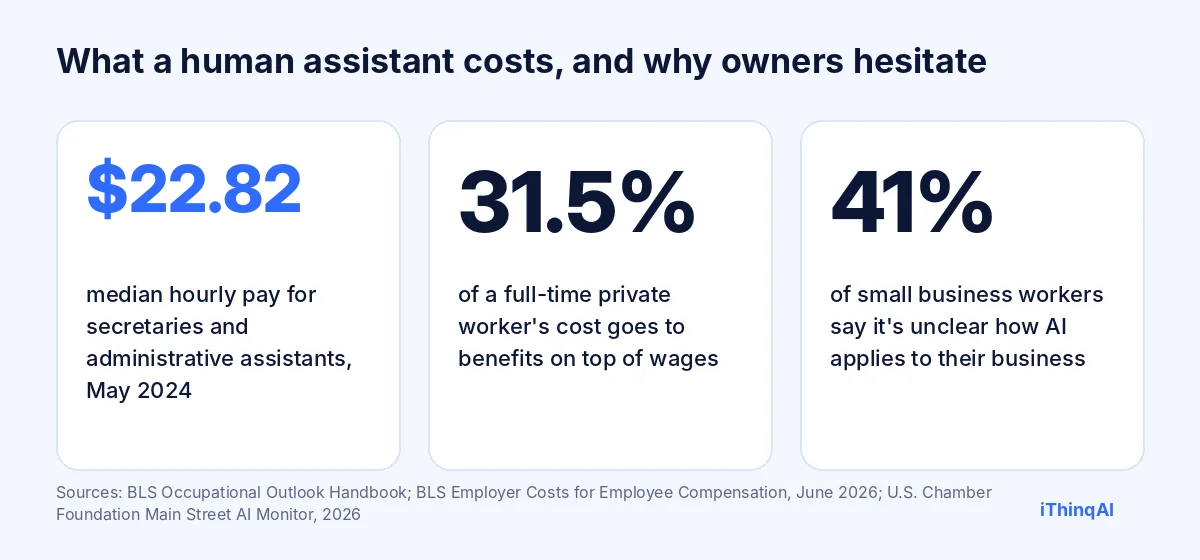
And AI? The U.S. Chamber of Commerce Foundation's 2026 Main Street AI Monitor found 41% of small business workers say it's unclear how AI applies to their business (U.S. Chamber Foundation). The answer is simpler than it sounds: give it the jobs you'd give an assistant.
Nine easy wins from an AI personal assistant
1. Your phone gets answered
Every call to your business number is answered, day or night. Callers get answers, appointments get booked, and you get a short summary instead of a voicemail.
2. Its own email inbox
On every plan, you connect an email address for the AI to use. It sends, answers and follows up on email, and flags anything that needs you.
3. Your calendar runs itself
"Move my 2 PM to Thursday and tell the client." Done, with a confirmation sent to them and a note to you.
4. Follow-ups actually happen
"Follow up with every quote from last week." The AI calls or texts each one, logs the answers, and books the ones who are ready.
5. Reminders that reach you
A morning summary of today's appointments, overnight calls and tasks due. Automations like this run on the Growth plan.
6. Customer records stay current
Every call, text and email is summarized in your CRM, so you never have to remember who said what.
7. Quick research
"Find three suppliers for commercial water heaters near Henderson." It searches, summarizes and sends you a short list.
8. Faxes handled
Every business number also receives faxes, and the AI files them in the same inbox as your calls.
9. Errands in your web apps
On the Scale plan, it works on its own computer in web apps and portals you use: downloading invoices, updating listings, checking an order status. It asks before submitting anything.
How you delegate tasks by text
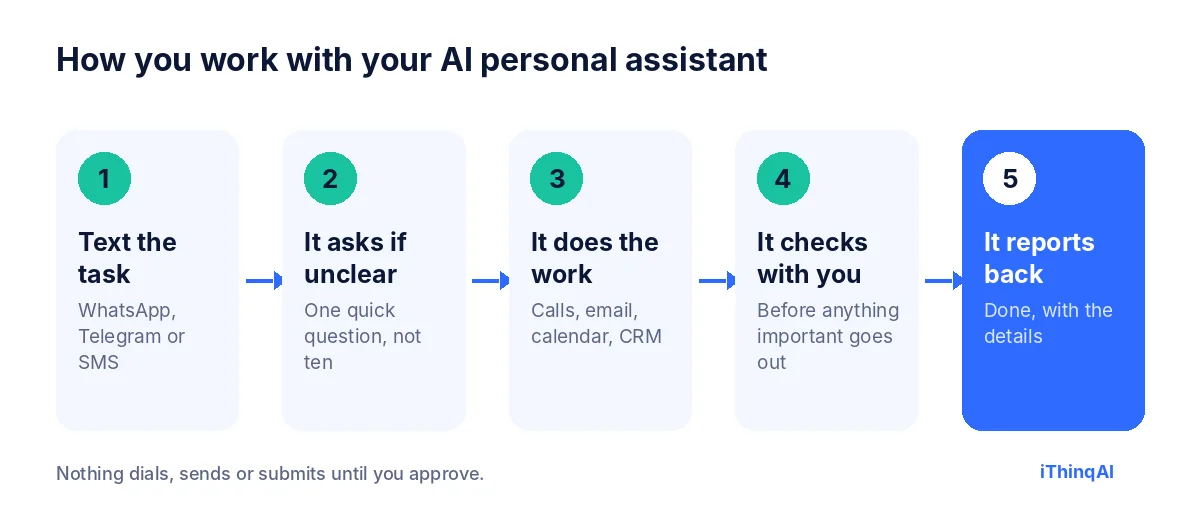
- Text the task on WhatsApp, Telegram or SMS, the way you'd text an employee.
- It asks if anything is unclear, usually one quick question.
- It does the work across your phone, email, calendar and CRM.
- It checks with you before anything important goes out: a quote, a big email, a form submission.
- It reports back: "Done. Called 6 people, booked 3, 2 want a callback next week, 1 asked to stop."
Examples of texts you can send
- "Call back everyone who asked about a water heater this week and book them for Thursday or Friday."
- "Email the Johnsons a reminder that their invoice is due Friday. Keep it friendly."
- "What's on my calendar tomorrow? Move anything before 10 to the afternoon."
- "Send me a list of every lead from the website this month who didn't book."
- "Text tomorrow's appointments a reminder at 5 PM today."
- "Find the fax from Dr. Lee's office and add it to Maria Santos's record."
It has its own computer
What makes iThinqAI's AI personal assistant different from a chatbot is that it can actually do the work. On the Scale plan, it works on its own computer, with a browser, files and your connected tools. It can log into the web apps you use, download what you need, fill in forms (asking before submitting) and move information between systems that don't connect. You can watch each step and stop it at any time.
The reason why this works
Albert Lasker's rule was to always give the reason why. Here's the reason an AI personal assistant works for business owners: you don't run out of ideas, you run out of hours. Every task you hand off is an hour back for selling, serving customers or going home on time. And because you hand it off the same way you'd text an employee, there's nothing new to learn. The best system is the one you'll actually use from a job site with one thumb.
AI personal assistant vs. human executive assistant
| Human executive assistant | AI personal assistant | |
|---|---|---|
| Hours available | About 40 a week | Every hour |
| Answers the business phone | Yes, when free | Yes, every call |
| Handles several tasks at once | One at a time | Several at once |
| Judgment on sensitive matters | Strong | Escalates to you |
| Personal relationships | Strong | Polite and consistent |
| Monthly cost | Wages plus benefits | Plan price |
Many owners use both: a person for judgment-heavy work and the AI for everything repetitive, after hours and in between.
How to delegate tasks well
Delegating to an AI works best with the same habits that work with people:
- Say the outcome: "Book them," not "contact them."
- Give the limits: "Only Thursday or Friday, no weekends."
- Name what needs approval: "Show me any quote over $1,000 before it goes out."
- Ask for a report: "Tell me who booked and who didn't."
Start with small, repeatable tasks. As you see the results, hand off more.
Permissions you control
You decide what the assistant can do on its own and what needs your OK. Common settings: it can book appointments and send reminders freely, but it asks before sending quotes, discounts or emails to a large list. It never shares information you haven't approved. Everything it does is logged next to the conversation that triggered it.
What to measure
- Calls answered that used to go to voicemail.
- Tasks completed from your texts each week.
- Follow-ups done on time.
- Hours back in your week.
- Bookings the assistant created.
Why an AI personal assistant for business owners is different from a chatbot
A chatbot answers questions. An AI personal assistant for business owners does the work behind the answer. When a customer asks for a Thursday appointment, a chatbot says "please call the office." An AI personal assistant for business owners checks your calendar, books Thursday at 2, texts a confirmation and adds a note to the customer's record. That's the difference between information and help, and it's why owners who tried chatbots and gave up are often surprised by what an assistant that acts can do.
What an executive assistant does that the AI copies
A great executive assistant protects the owner's time. They screen calls, keep the calendar sane, chase loose ends and make sure nothing important slips. The AI copies the parts of that job that repeat every day:
- Screening: it answers every call, handles what it can and passes on what needs you.
- Scheduling: it books, moves and confirms meetings without back-and-forth.
- Chasing: it follows up on unanswered quotes, invoices and emails.
- Preparing: it sends you a short summary before your day starts.
What it doesn't copy is the judgment an experienced executive assistant brings to delicate situations. Those it routes to you, with everything you need to decide quickly.
The tasks owners delegate first
When owners start to delegate tasks to an AI personal assistant for business owners, the same five usually come first:
- Returning missed calls and booking the people who want appointments.
- Appointment reminders the day before.
- Quote follow-ups a few days after sending.
- Inbox cleanup: answering the simple emails and flagging the rest.
- Weekly summaries: who called, who booked, what's still open.
Each one is small. Together, they're often eight to ten hours of an owner's week.
How to delegate tasks you're nervous about
Some tasks feel too important to hand off. The trick is to delegate tasks in stages. First, ask the AI to draft and show you, without sending. Then let it send routine versions on its own while you approve the unusual ones. Finally, let it handle the whole task and send you a report. You stay in control at every stage, and you only move forward when the results earn your trust.
Choosing an AI personal assistant for business owners
Ask any vendor:
- Can I give it instructions by text, the way I'd text an employee?
- Does it answer my existing business number?
- Does it have its own email address to send and answer email?
- Can it book directly on my calendar and update my CRM?
- Can I set what it does alone and what needs my approval?
- Can it work in web apps that don't have an integration?
- Are prices published?
An AI personal assistant for business owners should answer all of these clearly. If it can only chat, it's a chatbot, not an assistant.
A day with an AI personal assistant for business owners
- 6:45 AM: a text summary of today's appointments, two overnight calls (both booked) and one invoice due.
- 9:10 AM: from a job site, you text: "Move my 11 AM to tomorrow and tell Mr. Diaz." Done in two minutes.
- 11:30 AM: a customer emails the AI's address with a question about your warranty. It answers from your approved policy.
- 1:00 PM: it runs the quote follow-ups you asked for on Monday. Two people book.
- 3:20 PM: a fax arrives from a supplier. It files it and texts you the total.
- 5:00 PM: tomorrow's customers get reminder texts.
- 8:40 PM: a new caller asks for an estimate. The AI books them for Thursday.
That's what an AI personal assistant for business owners looks like in practice: no new software to learn, just fewer things on your mind.
Executive assistant habits worth stealing
The best executive assistant you've ever worked with had a few habits: they closed loops, they confirmed in writing, and they never let a promise slip. Build the same habits into your AI personal assistant for business owners. Ask it to confirm every booking by text, to send a written summary after every task, and to remind you of anything you said you'd do. Those small habits are what make a business feel organized to customers.
What to delegate tasks around, and what to keep
Delegate tasks that are repeatable, time-sensitive and easy to check: calls, reminders, follow-ups, scheduling and data entry. Keep tasks that need your judgment, your relationships or your license: pricing big jobs, handling an upset customer, giving professional advice. The AI makes the first group disappear, so you have time for the second.
Privacy and security basics
Your assistant sees your calendar, customers and messages, so treat its access like a trusted employee's. Give it only the accounts it needs, use two-step verification on your iThinqAI account, set team roles so staff see only what they should, and review the activity log now and then. Your data is protected with encryption, and you can change permissions at any time.
Common objections
"I'll spend more time explaining than doing." Short texts work. "Call back the quotes from this week" is enough.
"I don't trust AI with my customers." It answers from information you approve, identifies itself as an AI and asks before anything important.
"My business is too unique." The tasks aren't: calls, email, scheduling and follow-up look similar everywhere. Your details go in its instructions.
What it costs
iThinqAI's published plans, as of November 2026:
| Plan | Price | What your assistant can do |
|---|---|---|
| Starter | $299/mo | Answer every call, its own email address, calendar, tasks, inbox and CRM (2 seats, 1,000 AI minutes) |
| Growth | $799/mo | Adds campaigns, dialer, prospect discovery and automations like a daily summary (5 seats, 5,000 AI minutes) |
| Scale | $1,999/mo | Adds computer use for work in web apps and portals, plus multiple locations and numbers (15 seats, 15,000 AI minutes) |
Every business number also receives faxes. Prices at ithinq.ai/pricing.
Who it's not for
If you already have an excellent assistant and your calls are always answered, you may only need the AI for after-hours coverage. It pays off most for owners who do everything themselves and keep losing time to calls, email and follow-up.
Your first week
Day 1: connect your number, calendar, CRM and the email address you'll give the AI.
Day 2: write down the ten things you do every week that you wish someone else would do.
Days 3 to 7: hand off two of them by text. Watch the reports. Add two more next week.
Hear it now
Call 561-715-7686. Ask it to book you a time, or ask a question your customers ask every day.
Then book a demo and bring your list of ten tasks. Related: WhatsApp AI assistant, AI employee vs virtual assistant and AI employee for small business.
P.S. The next text you send from a job site could be the one that clears your whole afternoon. Call 561-715-7686 today and meet the assistant who'll take it.
Sources
Frequently Asked Questions
What can an AI personal assistant do for a business owner?
Answer calls, manage email, schedule, follow up with customers, update the CRM, send reminders and do simple research.
Can I text instructions to it?
Yes. You can send tasks by WhatsApp, Telegram or SMS, the way you'd text an employee.
Does it have its own email?
Yes. On every plan, you connect an email address for the AI to send and answer email.
Will it act without asking me?
Only within the permissions you set. Important actions wait for your approval.
Is it cheaper than an executive assistant?
Usually, yes. But many owners use both: a person for judgment and the AI for everything repetitive.