HIPAA Compliant AI Receptionist: 7 Essential Risk Checks
This article is general information, not legal or compliance advice. Work with your privacy officer or healthcare attorney before using any AI tool with patient information.
Quick answer: a HIPAA compliant AI receptionist is an AI phone assistant set up and contracted to protect patients' health information. In practice, that means the vendor signs a business associate agreement (BAA) with your practice before handling any patient calls, applies the Security Rule's administrative, physical and technical safeguards, limits what it says to the minimum necessary, and gives you records and access controls. There's no official HIPAA certification, so be wary of any vendor that says "HIPAA certified." iThinqAI offers a BAA.
Key takeaways
- HHS doesn't issue or recognize "HIPAA certifications." Compliance comes from contracts, safeguards and how you use the tool.
- If a vendor handles protected health information for you, you generally need a signed BAA first.
- A HIPAA compliant AI receptionist should verify callers, share only what's necessary and keep a clear record of patient calls.
- iThinqAI answers patient calls on your number and books on the call, and it offers a HIPAA BAA. Hear it at 561-715-7686.
What makes an AI receptionist HIPAA compliant?
An AI receptionist is HIPAA compliant when the vendor and the practice together meet HIPAA's requirements for how patient information is handled. That includes a signed BAA, safeguards required by the HIPAA Security Rule, privacy practices that follow the minimum necessary standard, breach notification procedures, and configuration choices by the practice, such as what the AI may discuss and who can see call records. Compliance is shared and ongoing. It's not a feature you switch on.
The badge that means nothing
Search for an AI receptionist for your practice and you'll see it everywhere: a little shield that says "HIPAA Certified."
Here's the problem. HHS has said it doesn't endorse or otherwise recognize private organizations' certifications under the Security Rule, and that an outside "certification" doesn't prevent HHS from later finding a violation (HHS). HHS also says it does not certify any persons or products as "HIPAA compliant" (HHS).
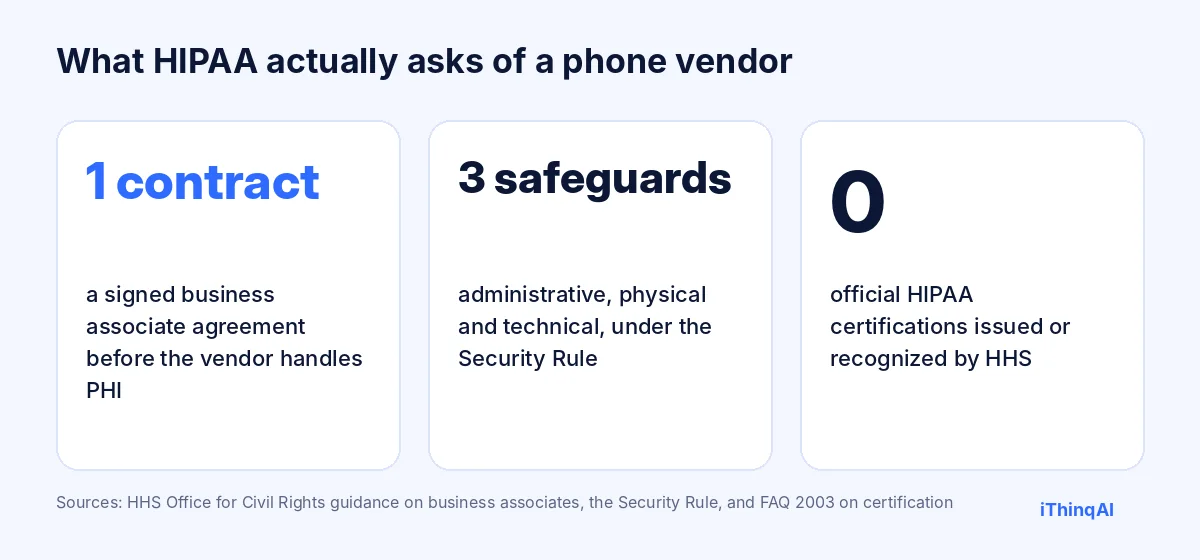
So a badge tells you nothing on its own. What matters is the paperwork, the safeguards and the setup. That's what this guide walks through.
Why patient calls are high-risk and high-reward
Patient calls carry more protected health information than almost any other channel: names, dates of birth, symptoms, medications, insurance, appointment reasons. A careless answering setup can expose all of it.
But missed patient calls cost care, too. CallRail's 2025 survey of 1,000 consumers found 82% would call a competitor if a business didn't answer, and only 42% would leave a voicemail (CallRail). For a practice, that's a patient who doesn't get scheduled, a referral that goes elsewhere, a follow-up that slips.
The goal isn't to avoid AI. It's to use a HIPAA compliant AI receptionist that answers every call and protects every patient.
The 7 essential checks
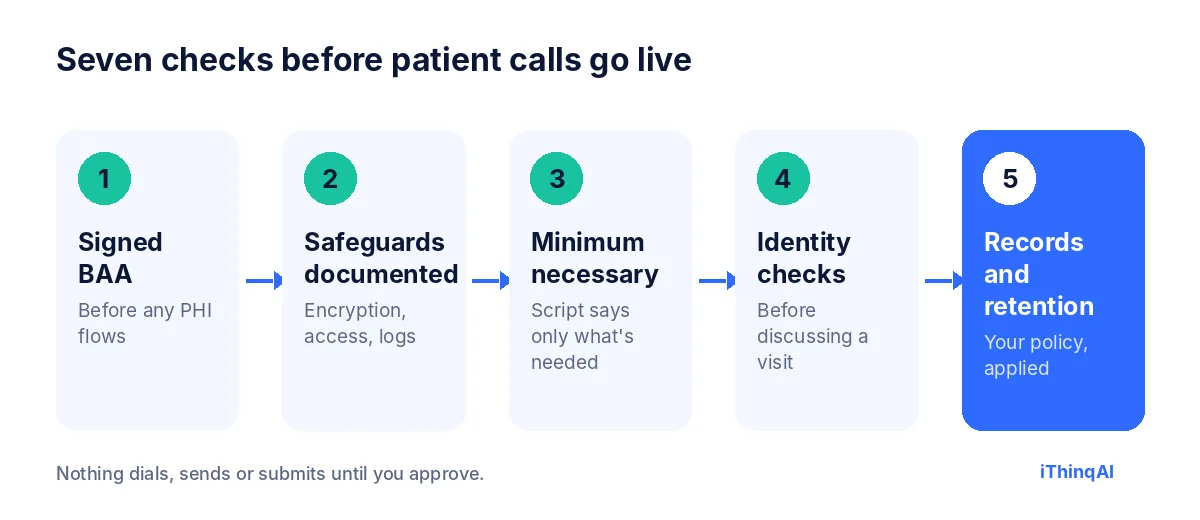
1. A signed BAA before any PHI flows
HIPAA generally requires covered entities to have contracts with business associates that ensure they'll appropriately safeguard protected health information (HHS). An AI vendor that answers, records or summarizes patient calls for you is generally a business associate. Get the BAA signed before you turn it on, and have your privacy officer review it against HHS's sample provisions.
2. Documented safeguards
The Security Rule requires administrative, physical and technical safeguards for electronic PHI. Ask the vendor to describe, in writing, how it handles encryption, access controls, audit logs, backups and incident response. iThinqAI states that data is protected with encryption and offers two-step verification, team roles and session controls.
3. Minimum necessary in the script
Configure the AI to collect and share only what's needed for the task. Booking a visit needs a name, contact and reason category, not a full medical history. Set the script so the AI doesn't read back sensitive details unprompted.
4. Identity checks before discussing appointments
Before the AI confirms, changes or discusses an existing appointment, it should verify the caller using details you choose, such as name and date of birth. If verification fails, it takes a message instead.
5. Careful voicemails and texts
Keep outbound messages minimal: practice name, a callback number and a general reason like "about your upcoming appointment." Avoid diagnoses, test results or treatment details in voicemails and texts, and honor patients' requests for confidential communications.
6. Access control on call records
Recordings, transcripts and summaries are PHI. Limit access by role, require two-step verification, and review who can export data.
7. Records, retention and breach response
Decide how long call records are kept, how they're deleted, and how the vendor will notify you of a security incident. Your BAA should cover breach reporting.
What the AI should and shouldn't do on patient calls
| The AI can | The AI shouldn't |
|---|---|
| Book, confirm and reschedule visits after verifying identity | Give medical advice or interpret symptoms |
| Share office hours, location, accepted insurance and prep instructions you approve | Read back test results or diagnoses |
| Take refill requests and route them to staff | Approve refills or change medications |
| Receive and file referral faxes | Share records with anyone not verified |
| Direct emergencies to 911 | Delay an emergency to finish intake |
How iThinqAI fits
- BAA: iThinqAI offers a HIPAA BAA. Ask for it during your demo.
- Your number: it answers on the number you already have, with no porting.
- Booking on the call: visits go straight onto your calendar, with text confirmations you approve.
- Referral faxes: iThinqAI's medical example says the agent sends and files referral faxes, in the same inbox as your calls.
- Security controls: encryption, two-step verification, team roles and session controls.
We don't call ourselves "HIPAA certified," because no such official certification exists. We'd rather show you the BAA and the safeguards.
It has its own computer, under your rules
On the Scale plan, iThinqAI's agent works on its own computer, with a browser, files and your connected tools. In a practice, that can mean filing referral faxes, checking a web-based schedule before a call, or preparing tomorrow's confirmation list. Treat that access like any staff member's: give it only the systems and permissions it needs, review its activity, and make sure your BAA covers the work. You can watch each step and stop it at any time, and it asks before submitting anything.
The reason why this works
Albert Lasker's rule was to give the reason why. Here's ours. Practices don't lose patients because they cared too much about privacy. They lose them because nobody answered. A HIPAA compliant AI receptionist lets you do both: answer every patient, and protect every patient's information. Patients feel the first. Regulators look for the second. A good setup delivers both on every call.
Questions to ask any vendor
- Will you sign our BAA, or provide yours for our review?
- Where is call data stored, and is it encrypted in transit and at rest?
- Who at your company can access our recordings and transcripts?
- Do you use our patient data to train models? If so, can we opt out?
- How do you notify us of a security incident, and how fast?
- Can we set retention periods and delete records?
- What access controls and audit logs do we get?
If a vendor can't answer those in writing, it isn't ready for your patient calls.
A sample patient call
Caller: "Hi, I need to move my appointment on Thursday."
AI: "I can help with that. I'm the AI assistant for Valley Family Medicine. To protect your privacy, can you confirm your full name and date of birth?"
Caller: "Jordan Ellis, March 3, 1985."
AI: "Thank you, Jordan. I see a Thursday morning visit. Would Friday at 2:00 or Monday at 9:30 work instead?"
Caller: "Monday."
AI: "You're moved to Monday at 9:30. I'll text a confirmation to the number on file."
No diagnosis discussed. No details read aloud. Identity verified. Visit moved.
What to measure
- Answer rate for patient calls.
- Visits booked and rescheduled by the AI.
- Verification failures, and how they were handled.
- Escalations to staff for clinical questions.
- Access reviews: who viewed call records each month.
What counts as protected health information on a phone line
Protected health information is broader than most people expect. It's any health-related information that can be tied to a person, held or sent by a covered entity or its business associates. On a phone line, that includes the obvious, like symptoms and medications, and the less obvious: the fact that someone is a patient at all, the date of their next visit, the name of their specialist, or a callback number attached to a reason for calling.
That's why the whole call matters, not just the medical parts. The recording, the transcript, the summary, the text confirmation and the calendar entry can all contain protected information. A sound setup treats every one of them with the same care.
Should you record calls?
Recordings are useful for quality and training, but they're also sensitive records you must protect, store and eventually delete. Many practices choose summaries instead of full recordings for routine calls, keeping only what's needed for the patient's record and the front desk's follow-up. Others record everything for a short period and then delete. Either can work. What matters is a written policy, applied consistently, with access limited to the people who need it. Check state recording-consent laws as well, since some states require every party's consent to record.
Training your team
Technology only protects patients if people use it correctly. Before you go live, walk your staff through four things: what the AI will and won't discuss, how verification works, where call summaries live and who can see them, and what to do if a patient reports a problem. Add the AI to your annual privacy training and your risk analysis, the same way you'd add a new EHR module or fax service. Document that you did it.
Your rollout plan
Week 1: your privacy officer reviews and signs the business associate agreement, and you document the vendor in your risk analysis.
Week 2: configure the script with minimum necessary questions, verification steps and escalation rules. Set role-based access and two-step verification for every user.
Week 3: run test calls covering new patients, reschedules, refill requests, a failed verification and an emergency. Review every summary.
Week 4: go live after hours first, then add lunch-hour and overflow coverage. Review access logs and summaries weekly for the first month.
When something goes wrong
Even good systems have incidents: a summary sent to the wrong staff member, a text to an outdated number, a verification that shouldn't have passed. Plan for it. Know who investigates, how you assess whether a breach occurred, and how the vendor will report problems on its side. HIPAA's Breach Notification Rule sets requirements for notifying affected individuals and HHS when unsecured protected information is breached. Your agreement with the vendor should say how quickly they'll tell you. A practiced response turns a scary moment into a manageable one.
Faxes, forms and the rest of the front desk
Phone calls aren't the only place patient information arrives. Referrals still come by fax, intake forms by email and questions by text. Keeping those channels in one secure inbox, with the same access controls, is safer than a paper tray, a shared email password and a personal cell phone. iThinqAI keeps calls, texts and faxes together, so your privacy controls apply in one place instead of five.
Patients' rights still apply
Automation doesn't change patients' rights under HIPAA. Patients can ask how their information is used, request access to their records, ask for confidential communications at a different number or address, and ask for restrictions. Make sure your front desk knows how those requests reach them when the AI takes the call: the assistant should record the request clearly and route it to the right person, not try to resolve it on its own. A short line in your notice of privacy practices about how you use technology to answer calls can also help set expectations.
Emergencies always come first
No intake script should stand between a patient and emergency care. Set the assistant to recognize emergency language, such as chest pain, trouble breathing, signs of stroke or thoughts of self-harm, and respond immediately: tell the caller to hang up and dial 911, or connect to a crisis line where appropriate, and alert your staff. Verification and booking can wait. Test those scenarios before you go live, and retest whenever you change the script.
A one-page summary for your files
Keep a single page in your compliance binder that lists: the vendor's name, the date the agreement was signed, what the assistant is allowed to do, what it's not allowed to do, who has access to call records, the retention period, and the date of your last review. When an auditor, a new manager or your own memory asks how phone automation fits your privacy program, the answer is already written down.
Review it every quarter
Set a calendar reminder every three months to check four things: who has access to call records and whether they still need it, whether the script still matches your policies, whether any new channels or integrations were added, and whether the vendor's agreement and security documents are current. It takes less than an hour, and it keeps your setup as careful in its second year as it was on day one.
Objections we hear
"AI and HIPAA don't mix." HIPAA doesn't ban technology. It requires safeguards and contracts. Many practices already use cloud phones, EHRs and fax services under BAAs.
"Patients won't trust it." Patients trust being answered and being protected. Verification and careful messages show both.
"We'll just keep using voicemail." Voicemail holds PHI too, and most callers won't leave one.
What it costs
iThinqAI's published plans, as of November 2026:
| Plan | Price | Best for |
|---|---|---|
| Starter | $299/mo | Answering every call, booking, inbox and CRM (2 seats, 1,000 AI minutes) |
| Growth | $799/mo | Adds reminder campaigns, dialer and automations (5 seats, 5,000 AI minutes) |
| Scale | $1,999/mo | Adds computer use, multiple locations and numbers (15 seats, 15,000 AI minutes) |
Prices at ithinq.ai/pricing. Ask about the BAA when you book your demo.
Who it's not for
If your organization requires on-premises systems only, or forbids any cloud vendor from handling PHI, an AI phone assistant won't fit your policy. For most independent practices that already use cloud tools under BAAs, it fits naturally.
Hear it now
Call 561-715-7686. Call it like a patient moving an appointment, and listen to how it verifies before discussing anything.
Then book a demo and ask for the BAA. We'll walk through the safeguards with your privacy officer. More reading: AI receptionist for dental office, online fax for small business and after hours answering service.
P.S. Don't trust a badge. Trust a signed BAA and a demo you've tested yourself. Call 561-715-7686 today, and then ask us for the paperwork.
Sources
Frequently Asked Questions
Is there such a thing as HIPAA certified software?
No official one. HHS doesn't certify products as HIPAA compliant or recognize private certifications.
Do I need a BAA with an AI receptionist vendor?
Generally yes, if the vendor handles protected health information for your practice. Confirm with your privacy officer.
Does iThinqAI sign a BAA?
iThinqAI offers a HIPAA BAA. Ask for it during your demo and review it before going live.
Can an AI receptionist discuss test results?
It shouldn't. Configure it to route clinical questions and results to staff.
What should appointment reminder texts say?
Keep them minimal: practice name, date and time, and a callback number. Avoid diagnoses or treatment details.