Best AI Phone System for Small Business: 6 Proven Wins
Quick answer: the best AI phone system for small business does more than route calls. It answers every call on your existing number, books appointments into your calendar, follows up by text and email, calls leads back from lists you approve, and keeps every conversation in one CRM. iThinqAI combines the AI voice agent, outbound calling, a dialer, a CRM, a calendar and one inbox for calls, texts, email, social messages and fax. Six separate tools for the same jobs cost about $813 a month at list price; iThinqAI Growth is $799.
Key takeaways
- Most small businesses run five or six tools to handle calls and follow-up, and their people are the glue between them.
- That glue fails: 69% of missed business calls get no callback within 48 hours.
- An AI front office puts the call, the calendar, the CRM and the follow-up in one place, so the AI can finish the job in one motion.
- iThinqAI's agent also has its own computer, so it can work in websites and apps that have no integration. Hear it at 561-715-7686.
What is an AI phone system for small business?
An AI phone system for small business is a phone platform with an AI voice agent built in. Instead of only ringing your desk or sending callers to voicemail, it answers in your business's name, handles routine questions, books appointments, sends confirmations and records each call in a CRM. The more complete ones also call leads back and do the follow-up work, so the phone system becomes a front office.
That last part is what separates an AI phone system from a business phone system with a chatbot bolted on.
Count the logins on your desk
Go ahead. Count them.
The answering service. The dialer your salesperson begged for. The CRM nobody updates. The booking link. The texting app. The online fax account you open twice a month and resent every time.
Six logins. Six bills. Six places a customer's name can live, and none of them agree with each other.
The "glue tax" every small business pays
Here's the hidden cost of a stitched-together front office: your people are the glue.
The answering service emails a message. Someone copies it into the CRM. Someone else opens the dialer to call back. They book on the calendar, then open the texting app to confirm. If the lead faxed a referral, that's a fourth screen.
Every copy-and-paste is a place for the lead to fall through. And they do. Quo's 2026 analysis of 16.7 million missed calls found that 69% got no callback within 48 hours (Quo). That isn't because owners don't care. It's because the follow-up lives in a different app than the call.
The six tools most small businesses pay for
| Job | Typical tool | What falls through the gap |
|---|---|---|
| Answering calls | Answering service or voicemail | Messages that never get returned |
| Calling leads back | Dialer or someone's cell phone | Callbacks that happen tomorrow, or never |
| AI or automated calling | Separate AI calling tool | Lists and results that don't reach the CRM |
| Customer records | CRM | Notes nobody typed in |
| Booking | Scheduling link | Bookings that don't match real availability |
| Faxes | Online fax account | Referrals sitting in an inbox nobody checks |
On our homepage we priced six popular tools covering these jobs. At their list prices the total came to about $813 a month, versus $799 for iThinqAI Growth. Prices change, so check them yourself. The savings are small. The point is what disappears: five logins, five bills and every gap in between.
Why a business phone system that only routes calls isn't enough
A traditional business phone system rings phones, forwards calls and records voicemail. That's useful, but it assumes a person is always free to pick up. Most small businesses don't have that person.
The result shows up in the data. Invoca's 2026 benchmark of more than 70 million calls found 44% of callers never reach a person (Invoca). In CallRail's 2025 survey, 82% of consumers said they'd call a competitor if a business didn't answer (CallRail).
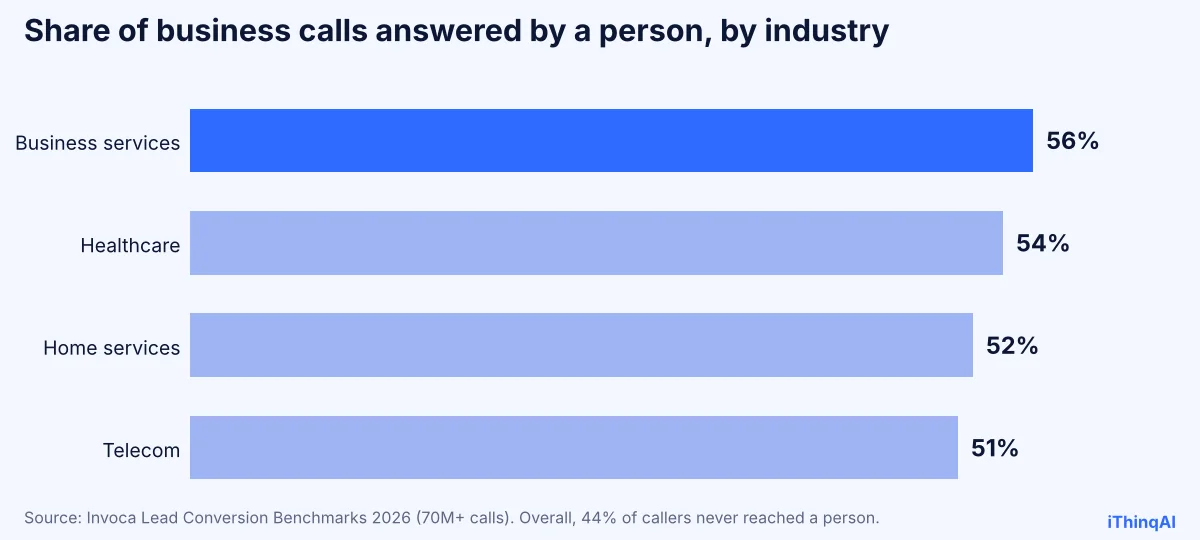
Routing calls faster doesn't fix that. Answering them, and finishing what the caller wanted, does.
What an AI front office replaces
iThinqAI is organized into four jobs:
| Module | What it handles | Replaces |
|---|---|---|
| Answer | AI voice agent on inbound calls 24/7, callbacks, unified inbox, fax filing | Answering service, voicemail, fax account |
| Grow | Prospect discovery and research (with your approval), AI calling campaigns, dialer | AI calling tool, power dialer, list research |
| Manage | Contacts, leads and companies CRM, pipeline, calendar, tasks | CRM, scheduling tool |
| Run | AI team roles, voices and knowledge, automations, reports, team and security settings | Automation glue, manual reporting |
One inbox covers phone, SMS, email, WhatsApp, Telegram, Instagram, Facebook, Slack, TikTok, web chat and fax. The agent speaks 12 languages. And it works on your existing number, with no porting.
Why one platform can do six jobs: it has its own computer
Here's the reason the pieces fit together. iThinqAI's agent isn't a phone bot bolted onto apps. It works on its own computer, with a browser, files and your connected tools, the way a new hire would. So it can:
- Move information between your tools instead of you copying it.
- Work in websites and older apps that have no integration (Scale plan), asking before it submits.
- Draft emails and texts in your voice for you to review before anything goes out.
- Run jobs on a schedule, such as a 7 AM summary of overnight calls.
- Take instructions by text on channels like WhatsApp, Slack or Telegram, the way you'd message an employee.
- Remember past conversations, so returning customers never start over.
No other AI phone system for small business on page one describes itself that way, because most of them are still just phone systems.
The reason why this works better than six tools
Albert Lasker built modern advertising on "reason-why" copy, so here's the reason why, without adjectives.
When the call, the calendar, the CRM and the follow-up live in the same place, the AI can do the whole job in one motion. A caller asks for Thursday. The agent checks the calendar, books it, texts the confirmation, creates the contact, moves the deal to "booked" and sets a reminder call for Wednesday. No human copies anything, so nothing gets lost in the copying.
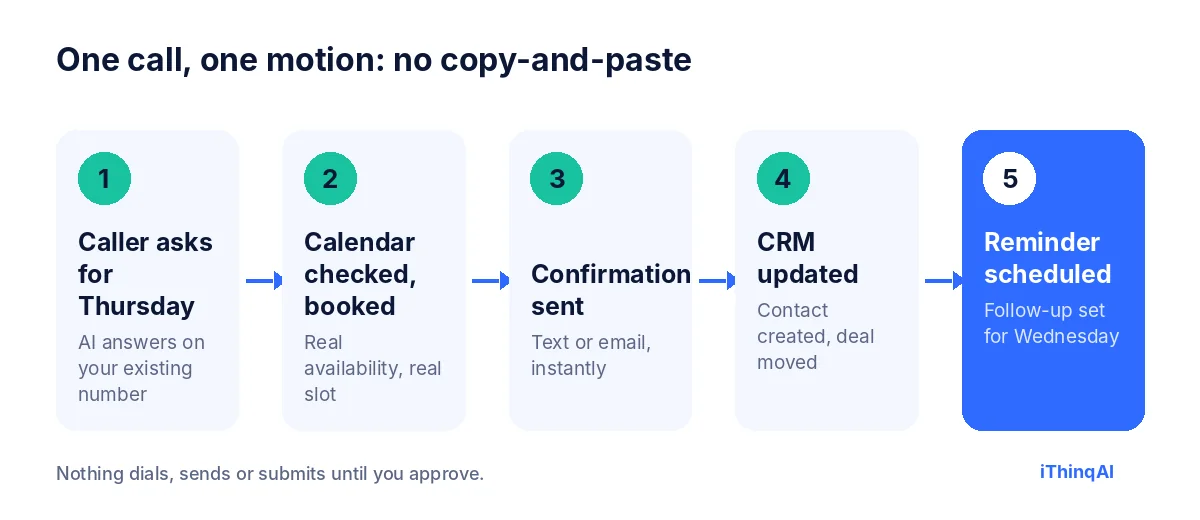
That's the difference between software that answers and software that works.
Business phone system vs AI phone system
| Traditional business phone system | AI front office (iThinqAI) | |
|---|---|---|
| Answers when you're busy | Voicemail | AI agent, on the first ring |
| Handles many calls at once | Hold queue | Yes |
| Books appointments | No | Yes, into your calendar |
| Calls leads back | No | Yes, from approved lists |
| Keeps customer history | Call logs | Full CRM with pipeline and tasks |
| Texts, social messages, fax | Separate tools | One inbox |
| Does work after the call | No | Yes, on its own computer |
"But I love my CRM"
Then keep it. iThinqAI connects to 250+ tools, including Google Calendar, Google Sheets, Gmail, Outlook, Slack, HubSpot and Stripe. Plenty of businesses use the built-in CRM for calls and follow-up and sync results to the system they already run. Replacing everything on day one isn't required. Removing the gaps is.
What to look for in an AI phone system for small business
Use this checklist when you compare platforms:
- Works on your existing number. No porting, no downtime.
- Answers from your own knowledge base. Hours, services, price ranges and policies you control.
- Books into your real calendar. With your appointment types, lengths and rules.
- Calls leads back safely. Only lists you approve, inside calling windows, with Do Not Call controls.
- One inbox for every channel. Calls, texts, email, social messages and fax, with one history per customer.
- A real CRM. Contacts, pipeline, tasks and reports, or clean sync to yours.
- Work after the call. Follow-ups, records and reports done for you, with your approval.
- Clear controls. AI disclosure, recording notices, two-step sign-in and role-based team access.
If a vendor checks only the first three, you're buying a better answering machine, not an AI front office.
A week with six tools vs. a week with one
With six tools: Monday's voicemails get returned Tuesday. A web lead waits in the form inbox until Wednesday. The CRM is updated on Friday, from memory. A referral fax sits unread until someone remembers to log in. The owner spends Saturday morning catching up on callbacks.
With one AI front office: Monday's calls are answered and booked as they come in. The web lead gets a call back within minutes. The CRM is current because the AI wrote every record. The referral fax lands in the same inbox and becomes a task. The owner spends Saturday morning with the family.
Same business. Same customers. One system instead of six.
AI phone system for small business, by industry
Every industry uses the same platform differently. Here's where an AI phone system for small business pays off first:
| Industry | First job to hand the AI | Next job |
|---|---|---|
| HVAC and plumbing | After-hours answering and emergency triage | Quote follow-up and seasonal tune-up campaigns |
| Law firms | Intake questions and consultation booking | Morning list of new matters for attorneys |
| Real estate | Sign calls and showing requests | Callbacks to portal leads within minutes |
| Insurance agencies | Service calls and quote intake | Renewal campaigns and carrier portal entry |
| Medical, dental and medspa | Booking and two-way reminders | Waitlist fills and referral fax filing |
| IT support and MSPs | After-hours triage and ticket summaries | Status updates and morning reports |
Start with the first column, prove it out for a month, then add the second. That's how an AI front office grows without disrupting anything your customers rely on.
Security and compliance in an AI phone system for small business
Letting an AI talk to your customers is a trust decision, so the controls matter as much as the features. iThinqAI includes:
- Approval gates: nothing dials, sends or submits until you approve it.
- Calling windows and daily limits for outbound calls.
- TCPA and Do Not Call controls built into the dialer. In February 2024 the FCC confirmed AI-generated voices count as "artificial" voices under the TCPA, so consent rules apply (Mayer Brown).
- AI disclosure at the start of calls, and recording notices where recording is on.
- Two-step sign-in, role-based team access and session controls.
- HIPAA support with a Business Associate Agreement for healthcare practices.
Ask every vendor for the same list. A business phone system that can't explain its controls shouldn't be talking to your customers.
Questions to ask any AI phone system vendor
- Can I keep my current number, or do I have to port it?
- What does the AI do after the call: who sends the follow-up and updates the CRM?
- Who approves outbound calls, and how is Do Not Call handled?
- How does pricing change when my call volume doubles?
- Which features are locked to higher tiers?
- Can I call a live demo line right now?
The answers separate a true AI phone system for small business from a business phone system with a voice bot attached.
The real cost: phone system plus add-ons vs. one platform
A business phone system often looks cheap until you add what it doesn't do. Voicemail transcription, an answering service for overflow, a dialer, a CRM seat for each person, a scheduling tool and online fax each add a line to the bill. Price the phone system plus every add-on you'd still need, then compare it to one AI front office that does all of those jobs. That's the only fair comparison, and it's usually the one that ends the debate.
Who should not switch
If your business gets a few calls a week and never calls anyone back, you don't need a front office. A basic answering tool will do.
And if you've built a complex workflow in a big CRM, start with iThinqAI Starter for answering and inbox, and connect it, rather than ripping anything out.
How much does an AI phone system for small business cost?
iThinqAI published prices, as of November 2026:
| Plan | Price | Seats | AI minutes | Highlights |
|---|---|---|---|---|
| Starter | $299/mo | 2 | 1,000 | Inbound AI voice agent, unified inbox, CRM, pipeline, calendar, tasks |
| Growth | $799/mo | 5 | 5,000 | Adds AI calling campaigns, dialer, prospect discovery, automations |
| Scale | $1,999/mo | 15 | 15,000 | Adds computer use, multiple locations and numbers |
Annual billing includes two months free. See current pricing and the full feature list.
How to move from six tools to one in 30 days
- Week 1: Answer. Put the AI on after-hours calls on your existing number. Load the knowledge base.
- Week 2: Book. Connect your calendar and let the AI book on every call, day and night.
- Week 3: Follow up. Approve callback lists for missed calls and web leads.
- Week 4: Consolidate. Cancel the tools the AI front office now covers, starting with the ones you resent the most.
Most owners find they can drop at least two subscriptions in the first month.
What owners notice in the first month
Owners who move to an AI front office tend to report the same small surprises, and they're worth knowing in advance:
- The voicemail light stops blinking. Calls get answered, booked or transferred, so there's nothing to return in the morning.
- The CRM becomes trustworthy. Because the AI writes every record, the pipeline finally reflects reality.
- The team's day gets quieter. Fewer interruptions, fewer double-booked lines, fewer "did anyone call her back?" moments.
- Gaps in the knowledge base show up fast. Reading the first week's calls tells you exactly which answers to add.
None of that requires a new phone number or a new way of working for your customers. They simply get answered.
Mistakes to avoid when you switch
- Switching everything on day one. Start with nights and weekends and expand.
- Skipping the knowledge base. The AI is only as good as the answers you give it.
- Forgetting the team. Show your staff that the AI takes the busywork, not their jobs.
- Turning on outbound too early. Get inbound right, then approve your first list.
See the whole thing in one call
Call 561-715-7686. Ask it to book you an appointment. Then ask for a text confirmation. That's three of your six tools, working together, in about a minute.
Then book a demo and bring your list of logins. We'll show you which ones can go. For pricing context, read AI answering service cost; for vendor tests, see the best AI receptionist guide.
P.S. Add up what you paid last month for answering, dialing, CRM, scheduling, texting and fax. If it's anywhere near $800, call 561-715-7686 before your next renewal date.
Sources
Frequently Asked Questions
What is the best AI phone system for small business?
One that answers, books, follows up and logs every call in one place. iThinqAI combines an AI voice agent, dialer, CRM, calendar and unified inbox on your existing number.
Can iThinqAI replace my CRM?
It includes a CRM with pipeline, calendar and tasks. If you prefer to keep yours, it connects to 250+ tools, including HubSpot.
Does it include fax?
Yes. Faxes arrive in the same inbox as calls and messages.
Do I need a new phone number?
No. iThinqAI works on your existing number after verification.
How is an AI phone system different from a business phone system?
A business phone system routes and records calls. An AI phone system answers them, books appointments, follows up and keeps the records for you.