AI Receptionist Without Porting: 5 Easy, Proven Setup Steps
Quick answer: an AI receptionist without porting answers calls on your existing number while your number stays with your current carrier. You don't transfer, cancel or reprint anything. With iThinqAI, you verify your business number, choose when the AI answers (every call, overflow, or after hours), connect your calendar and CRM, and test it. iThinqAI says businesses can start once their number is verified, often the same day, and outbound calls go out from your verified business number.
Key takeaways
- Your phone number is on your signs, trucks, cards, listings and years of customer contacts. You shouldn't have to risk it to try a new tool.
- Number porting is a normal, regulated process, but it adds paperwork, waiting and a small risk of disruption.
- An AI receptionist without porting keeps your carrier and your number exactly where they are.
- iThinqAI runs on the number you already have, with no wait on a port. Hear it at 561-715-7686.
What is an AI receptionist without porting?
An AI receptionist without porting is an AI phone assistant that answers your business calls on your existing number without moving that number to a new provider. Your carrier, phone bill and number stay the same. Calls reach the AI through your phone setup, typically call forwarding, and the AI can call and text customers back from your verified number.
Why your number is worth protecting
Think about where your business phone number lives right now:
- On your truck wraps and yard signs.
- On your Google Business Profile, Yelp page and website.
- On business cards, invoices and estimates.
- In the phones of every customer who ever called you.
- On listings, directories and partner websites you forgot about.
That number is years of marketing. It's the thing your customers know. Any change that risks it, even briefly, deserves caution.
What number porting actually involves
Number porting means moving your phone number from one provider to another. It's legal, common and regulated. The FCC says you can generally keep your number when you switch providers in the same area, and simple ports (one line, no complex changes) must be completed within one business day (FCC).
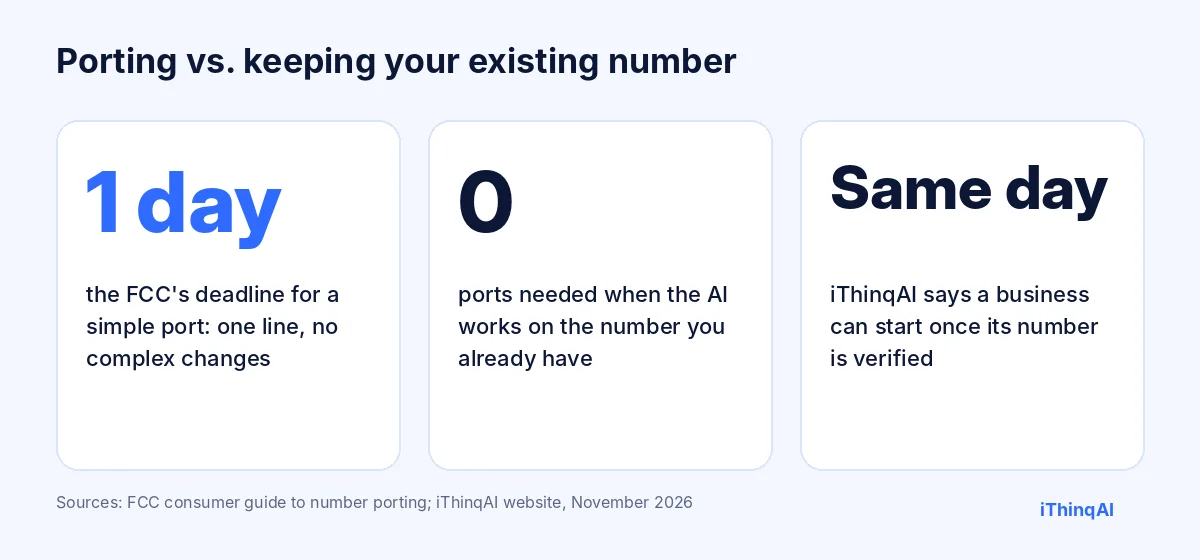
But many business ports aren't simple. Multiple lines, toll-free numbers, hunt groups, account-holder mismatches and old contracts all add steps. The FCC also advises keeping your existing service active until the new service has started, and notes that 911 callback and location features may be affected during some transitions.
None of that is a reason to fear number porting. It's a reason not to do it unless you have to. And to try an AI receptionist, you don't have to.
Why "no porting" matters more than it sounds
- No downtime risk. Your phone keeps working the whole time.
- No paperwork. No letters of authorization, account numbers or PINs to dig up.
- No lock-in. Your number stays with your carrier, so you're never stuck with a vendor because it holds your number.
- No reprinting. Signs, cards and listings stay correct.
- Faster start. iThinqAI says it's set up in minutes, not days, once your number is verified.
Five easy, proven steps to set it up
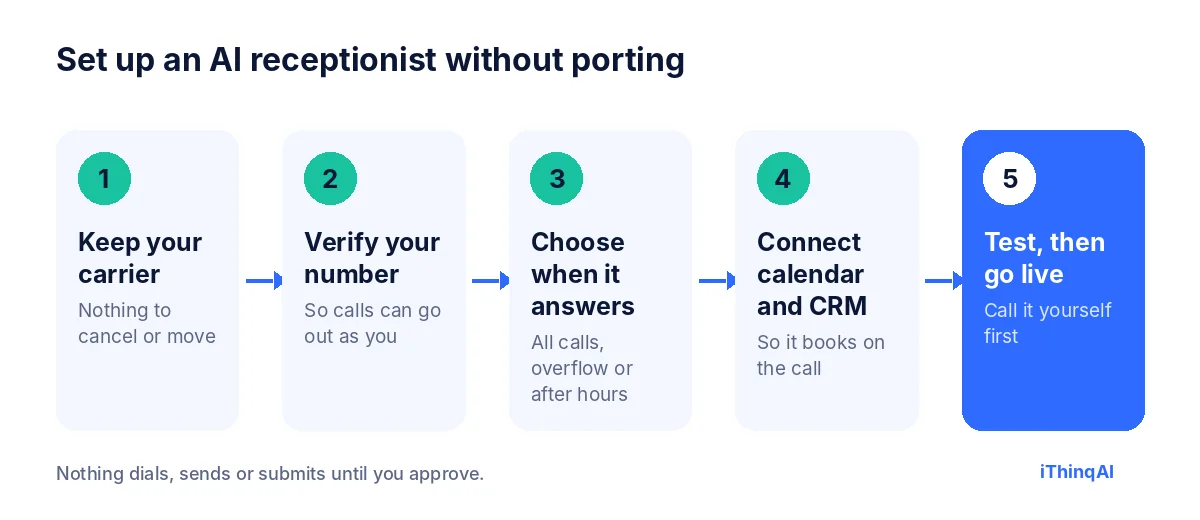
1. Keep your carrier
You don't cancel anything or switch providers. Your existing number stays with the company you pay today.
2. Verify your number
You confirm you own the number, so the AI can call and text customers back from it. iThinqAI says outbound calls go out from your verified business number, which helps people recognize you.
3. Choose when the AI answers
Most businesses pick one of three setups:
| Setup | How it works | Best for |
|---|---|---|
| Every call | All calls go to the AI first, which transfers to staff as needed | Busy offices that want every call handled the same way |
| Overflow | Your team answers first; unanswered or busy calls go to the AI | Teams that want to keep answering but never miss a call |
| After hours | The AI answers when you're closed | Businesses that are covered during the day |
The exact forwarding options depend on your carrier and phone system. Your onboarding confirms which one fits.
4. Connect your calendar and CRM
So the AI can book appointments on the call, not just take messages. iThinqAI connects with 250+ tools, including Google Calendar, Outlook and HubSpot.
5. Test, then go live
Call your own number from your cell. Book a test appointment. Ask a tricky question. Check the summary. When you're happy, turn it on.
What changes for your customers
Nothing they'll notice, except that someone answers. They dial the same number they always have. When the AI calls or texts them back, it comes from that same number, so they know it's you. There's no "we've moved" message, no new number to save, and no confusion.
What changes for your team
| Before | After |
|---|---|
| Calls go to voicemail at lunch and after hours | Every call is answered |
| Messages pile up for the morning | Appointments are booked on the call |
| Staff juggle phones and customers in front of them | Overflow goes to the AI automatically |
| Callbacks happen when someone has time | Texts and callbacks go out in seconds |
| Notes live in someone's head | Every call is summarized in your inbox and CRM |
It has its own computer
Keeping your number is only the start. iThinqAI's agent works on its own computer, with a browser, files and your connected tools. On the Scale plan, it can work in web apps that have no integration, pull lists from spreadsheets, update records and draft follow-ups, all on the same existing number your customers already trust. You can watch each step and stop it at any time.
The reason why this works
Albert Lasker's principle: always give the reason why. Here's ours. The biggest barrier to trying a better phone system isn't price. It's fear of breaking what already works. An AI receptionist without porting removes that fear. Your number, your carrier and your customers' habits all stay put. The only thing that changes is that every call gets answered.
When number porting does make sense
To be fair, there are good reasons to port a number:
- You're leaving a carrier you're unhappy with anyway.
- You're consolidating many numbers into one phone system.
- Your current provider can't forward calls the way you need.
If that's you, number porting is a normal process, and the FCC rules protect you: your old company can't refuse a port because of an unpaid balance, though it may charge a fee (FCC). But it's a separate decision. You can start with the AI on your existing number today, and decide about your carrier later, on your own schedule.
A sample day on your existing number
- 7:42 AM: a customer calls before you open. The AI books a 10:00 appointment and texts a confirmation from your number.
- 12:15 PM: your front desk is at lunch. Two calls are answered and one estimate is booked.
- 2:30 PM: your team is busy, so a call rolls over to the AI. It answers a question about hours and transfers a billing issue to your office manager.
- 8:50 PM: an urgent call comes in. The AI follows your rules and alerts the on-call person.
Same number all day. No port.
What to check with your carrier
Before you start, find out:
- Does your plan support call forwarding, and does it include conditional forwarding (busy or no answer)?
- Is there a per-minute charge for forwarded calls?
- Can you set forwarding on a schedule, or do you turn it on and off manually?
- Who on your account can change forwarding settings?
Most business lines support forwarding. If yours has limits, your onboarding will help you find the best workaround.
Why an AI receptionist without porting is the safer first step
Every new system carries some risk. The question is how much you have to bet before you see results. With number porting, you bet your phone line on day one. With an AI receptionist without porting, you bet nothing: your existing number stays with your carrier, and if anything feels off, you switch forwarding off and you're exactly where you started.
That changes how you evaluate the tool. Instead of a big switch-over weekend, you can start with after-hours calls only, watch a week of results, then add overflow, then decide whether the AI should answer first. Each step is reversible in minutes. Owners who start this way usually move faster, not slower, because there's nothing to be nervous about.
Multiple locations and numbers
Businesses with several locations often have a tangle of numbers: one per office, a main line, a toll-free number, maybe a tracking number for ads. Number porting all of them at once is where things go wrong. Keeping each existing number with its current carrier and forwarding the right calls to the AI avoids that tangle. On the Scale plan, iThinqAI supports multiple locations and numbers, so each office can keep its own greeting, calendar and rules while everything lands in one inbox.
Tracking numbers and marketing attribution
If you use call tracking numbers for ads, keep them. They can forward to your main line or straight to the AI, and your reports keep working. Because every conversation is summarized in one inbox, you'll also see what callers actually asked for by source, which tells you more about your marketing than a call count ever did.
What happens to texts on your existing number
Many customers text a business number instead of calling, especially younger ones. Ask your carrier whether your number can receive texts and whether those can be routed to another platform. iThinqAI's inbox keeps calls and texts in one conversation history, so whichever way a customer reaches you, the next reply knows what came before. Your onboarding will confirm what's possible with your current setup.
A checklist before you turn it on
- Your existing number is verified.
- You've chosen when the AI answers: every call, overflow or after hours.
- Forwarding is set with your carrier and tested from a cell phone.
- Your calendar and CRM are connected, so it can book on the call.
- Transfer rules are set for calls that need a person.
- Your greeting, hours, services and approved prices are loaded.
- You've made at least five test calls and read the summaries.
Tick every box and you're ready to go live, with no number porting and no downtime.
How transfers to your team work
The AI doesn't trap callers. You decide which calls go to a person and how: a billing dispute to the office manager, a large job to the owner, an existing client to their account rep. During business hours, the AI can transfer the call with a quick summary so your team knows who's on the line and why. After hours, it books a callback at a specific time instead, and texts the customer a confirmation. Either way, nobody has to repeat their story, and nobody hears "please leave a message."
What your greeting should say
Keep it short, warm and honest. Something like: "Thanks for calling Rivera Plumbing. This is our AI assistant. I can book an appointment, answer questions or get you to the right person. How can I help?" Three sentences tell the caller who they reached, what they're talking to and what's possible. Skip the long menu. The assistant understands what people say in their own words, so there's no need to press 1 for anything.
Measuring the first month
Track a few simple numbers from the start:
- Calls answered that would have gone to voicemail.
- Appointments booked directly on the call.
- Transfers to staff, and whether they were the right ones.
- After-hours calls, which most owners underestimate.
- Customer feedback, from reviews and from your team.
Compare them with the month before. Because nothing about your phone line changed except who answers, the difference is easy to see.
Training your staff in an afternoon
Your team needs to know three things: when calls go to the AI, how transfers arrive, and where to find call summaries. Walk them through a few test calls together, show them the inbox, and agree on who follows up on which kinds of messages. Most teams are comfortable within a day, because their phones, numbers and habits haven't changed. The only difference is fewer voicemails and more booked appointments waiting for them.
Security and access on your phone account
Because your number stays with your carrier, control of it stays with you. Only the people on your carrier account can change forwarding or authorize a port, so protect that account like you would your bank login: use a strong password, add a PIN if your carrier offers one, and limit who can make changes. Inside iThinqAI, team roles, two-step verification and session controls decide who can see call summaries and change settings. Your number, your carrier account and your AI receptionist each have their own lock, and you hold the keys to all three.
Seasonal and holiday hours
Holidays, staff vacations and weather closures are when calls get missed most. With forwarding on your existing number, changing who answers is a settings change, not a project. Set the AI to answer all calls on the day before a holiday, update the greeting with your holiday hours, and switch back afterward. Customers still reach your business, still get booked and still hear from you, even when the office is dark.
Objections we hear
"Won't forwarding make calls sound worse?" Call quality depends on your carrier and connection. Test it yourself before going live.
"What if I want to stop using it?" Turn forwarding off. Your number never left your carrier.
"Can it still call people back as my business?" Yes. Once your number is verified, outbound calls go out from it.
What it costs
iThinqAI's published plans, as of November 2026:
| Plan | Price | Best for |
|---|---|---|
| Starter | $299/mo | Answering every call on your number, booking, inbox and CRM (2 seats, 1,000 AI minutes) |
| Growth | $799/mo | Adds callbacks, calling campaigns, dialer and automations (5 seats, 5,000 AI minutes) |
| Scale | $1,999/mo | Adds computer use, multiple locations and numbers (15 seats, 15,000 AI minutes) |
Telecom pass-through charges may apply. Prices at ithinq.ai/pricing.
Who it's not for
If you're already planning to move your whole phone system to a new provider this month, it may make sense to port once and set everything up together. For everyone else, starting on your existing number is the low-risk way in.
Hear it now
Call 561-715-7686. That's the AI receptionist. Ask it anything a customer would ask. Then picture it answering your own number tomorrow.
Then book a demo and we'll walk through your carrier's forwarding options live. More reading: AI phone system for small business, best AI receptionist and voicemail alternative for business.
P.S. You don't need a new number, a new carrier or a week of paperwork to stop missing calls. Call 561-715-7686 today, and you could be answering every call on your existing number this week.
Sources
Frequently Asked Questions
Can I use an AI receptionist without porting my number?
Yes. iThinqAI runs on the number you already have, with no wait on a port.
How do calls reach the AI if I don't port?
Typically through call forwarding from your current carrier: every call, overflow, or after hours. Your onboarding confirms the right option.
Will customers see my existing number when the AI calls them?
Yes. Once your number is verified, outbound calls go out from your business number.
How long does setup take?
iThinqAI says setup takes minutes once your number is verified, and many businesses start the same day.
What if I decide to port later?
You can. Number porting is a separate decision, and you can make it on your own schedule.