Talking to AI: 7 Surprising Truths Callers Actually Love
Quick answer: most callers don't mind talking to AI on the phone if it answers fast, says clearly that it's an AI, understands plain speech, and actually solves the problem or connects them to a person. CallRail's 2025 survey of 1,000 U.S. consumers found 52% say businesses using AI assistants after hours provide superior service, and 50% would use AI to book an appointment. What callers hate is waiting, phone menus and voicemail. A good AI receptionist experience removes all three.
Key takeaways
- Callers are more open to AI than most owners assume, especially younger callers: 66% of millennials rate AI after hours as superior service.
- The real enemy of caller experience is hold time and voicemail: 41% hang up after one to two minutes on hold.
- People want honesty. Say it's an AI, and make it easy to reach a person.
- iThinqAI picks up on the first ring, identifies itself, books on the call and texts a confirmation. Hear it at 561-715-7686.
What is it like talking to AI on the phone?
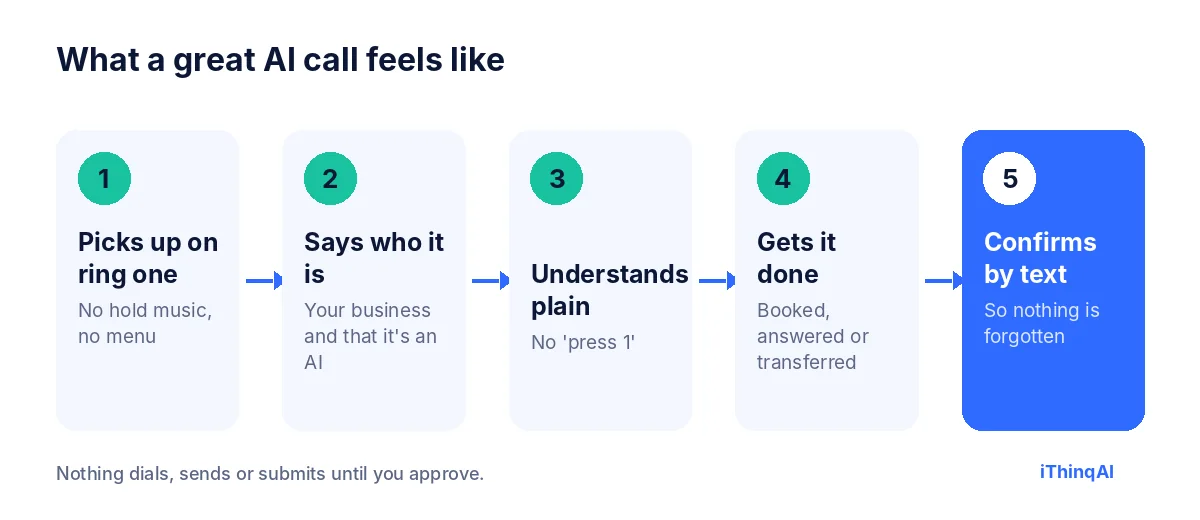
Talking to AI on the phone today feels like talking to a fast, polite receptionist who never puts you on hold. You speak normally, without menus or keypad options. The AI understands the request, asks short follow-up questions, and books an appointment, answers a question or transfers you to a person. Good systems say upfront that they're AI, handle interruptions naturally, and send a text confirmation afterward.
The owner's fear
"My customers will hate it."
Almost every business owner says some version of this before trying an AI receptionist. They picture the phone trees of the 2000s: "Please say or press one." Robotic voices. Endless loops. Shouting "REPRESENTATIVE" at a machine.
That fear is reasonable. Those systems were terrible. But they weren't what callers actually hated. Callers hated not being helped.
What callers actually say
CallRail surveyed 1,000 U.S. consumers in 2025. The results surprise most owners (CallRail):
- 52% say businesses using AI assistants after hours provide superior service.
- That rises to 66% of millennials and 61% of Gen Z.
- 50% say they'd use AI to book an appointment.
- 41% hang up after one to two minutes on hold.
- Only 42% leave a voicemail when a business doesn't answer.
- 82% would call a competitor if a business didn't answer.
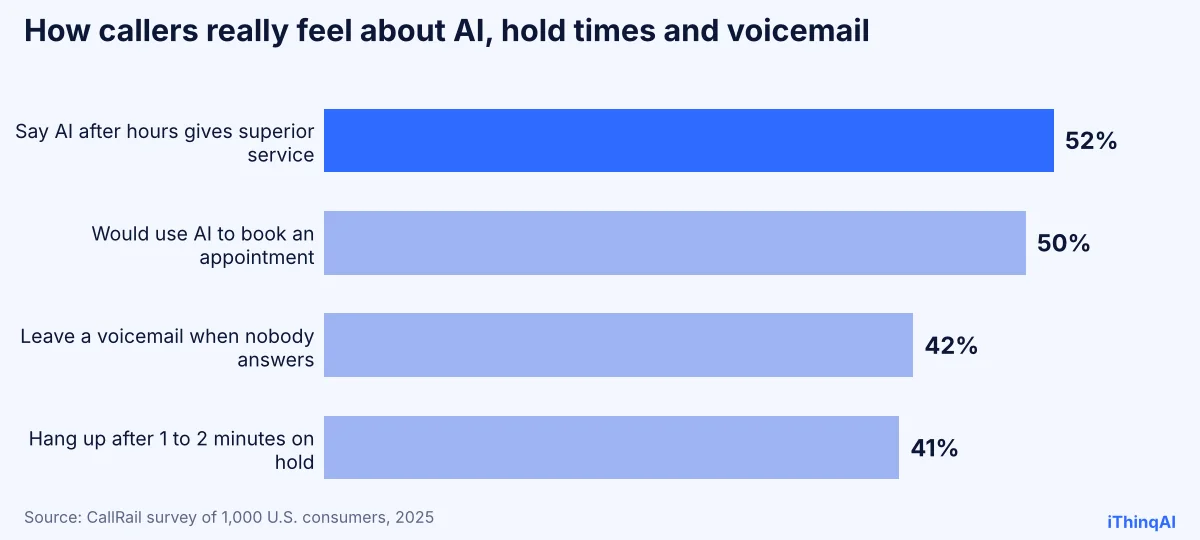
Read those numbers together. Callers aren't choosing between talking to AI and talking to a person. Most of the time, they're choosing between an AI that answers now and nobody at all.
Seven surprising truths about talking to AI
1. Speed beats species
The single biggest driver of caller experience is how fast someone helps. An AI that answers on the first ring and books in 90 seconds beats a person who answers after four minutes on hold.
2. Honesty builds trust
Callers are wary: Hiya found nearly one in three people received a deepfake voice call in the past year (Hiya). Pretending to be human backfires. Saying "I'm the AI assistant for Rivera Plumbing" upfront puts people at ease.
3. Menus are the real villain
"Press 1 for sales" is what people hate. Natural conversation, where callers simply say what they need, removes the most frustrating part of business phone calls.
4. Younger callers prefer it
With 66% of millennials and 61% of Gen Z rating AI after hours as superior service, the generations driving most new business are the most comfortable talking to AI.
5. People want a way out
The best AI receptionist experience always includes an easy path to a human. Knowing you can ask for a person makes people more willing to let the AI help first.
6. A text confirmation changes everything
A call that ends with "I'll text you the details" feels finished. The caller has proof, a time and an address. That small step lifts trust more than any voice quality improvement.
7. Nobody misses voicemail
Only 42% of callers leave a voicemail. The other 58% just leave. An AI that answers every call is replacing silence, not a person.
What makes a great AI receptionist experience
| Great | Terrible |
|---|---|
| Answers on the first ring | Hold music and "your call is important to us" |
| Says it's an AI and who it works for | Pretends to be a person |
| Understands normal speech | "Please say or press 1" |
| Handles interruptions and changes of mind | Starts the script over |
| Books, answers or transfers | "Please leave a message" |
| Sends a text confirmation | Nothing in writing |
| Remembers the caller's history | Asks the same questions every time |
How iThinqAI handles the call
- Picks up on the first ring on your existing number, day or night.
- Introduces itself: your business name and that it's an AI assistant.
- Understands plain speech in English, Spanish and other major languages.
- Gets it done: books on your calendar, answers from information you approve, or transfers to your team.
- Confirms by text with the details.
Every conversation lands in one inbox with calls, texts and messages together, so the next interaction picks up where the last one ended.
It has its own computer, so it can actually help
A big part of a bad caller experience is the AI that can only take messages. iThinqAI's agent works on its own computer, with a browser, files and your connected tools. On the Scale plan, it can look up information in web apps, update records and prepare follow-ups, so the caller gets a real answer or a real next step, not "someone will call you back." You can watch each step and stop it at any time.
The reason why this works
Albert Lasker built his career on the reason why. Here's the reason talking to AI works for callers: people call a business to get something done. Book a visit. Ask a price. Report a problem. When the thing gets done quickly and politely, they're satisfied. When it doesn't, they're frustrated, no matter who answered. The AI earns trust the same way your best employee does: by being fast, honest and useful.
Caller experience mistakes to avoid
- Hiding that it's an AI. People figure it out, and then they feel tricked.
- Making it hard to reach a person. Always honor "can I talk to someone?"
- Long greetings. Three sentences, maximum.
- Reading a menu. Ask "How can I help?" and let them talk.
- No follow-through. If it promises a callback, the callback has to happen.
- Never listening to calls. Review summaries weekly and fix the moments where callers got stuck.
A sample call
AI: "Thanks for calling Glow Aesthetics. I'm the AI assistant. How can I help?"
Caller: "Um, I wanted to book a facial, but actually, do you do lash lifts?"
AI: "We do. A lash lift is $85 and takes about an hour. Would you like to book that, the facial, or both?"
Caller: "Both, if they can be back to back."
AI: "I have Saturday at 11:00 for the facial and 12:15 for the lash lift with Mia. Does that work?"
Caller: "Perfect."
AI: "You're booked. I'll text you the details now."
The caller changed her mind mid-sentence. The AI kept up. That's what modern talking to AI sounds like.
How to introduce AI to your customers
- Tell them. "We've added an AI assistant so you can reach us any time."
- Keep the human option. "If you'd like a team member, just ask."
- Ask for feedback. A one-question text after the call tells you how it's going.
What to measure
- Answer rate: calls answered ÷ calls received.
- Resolution rate: calls that ended with a booking, answer or successful transfer.
- Transfer requests: how often callers ask for a person.
- Hang-ups in the first 10 seconds: a sign the greeting needs work.
- Feedback scores from post-call texts.
Why caller experience is a revenue number
Caller experience sounds soft, like a customer-service metric for a report nobody reads. It isn't. Every call that ends in frustration is a lost booking, a bad review or a customer who quietly tries someone else next time. Every call that ends with a booked time and a text confirmation is revenue on the calendar. When owners compare their numbers before and after adding an AI receptionist, the caller experience shows up in the places that matter: more appointments, fewer voicemails and fewer complaints about not being able to get through.
Talking to AI vs. waiting on hold
Picture two calls to the same dental office on a busy Monday.
Call one: the caller hears ringing, then hold music, then "Your call is important to us." After three minutes, she hangs up. She'll try again later, maybe.
Call two: the caller hears a friendly voice on the first ring. It says it's the office's AI assistant and asks how it can help. She asks for a cleaning. Ninety seconds later, she's booked for Thursday and has a text confirmation.
Ask anyone which experience they'd prefer. Talking to AI isn't the compromise in that comparison. The hold queue is.
What a good AI receptionist experience sounds like
A good AI receptionist experience has a few things you can hear within the first 30 seconds:
- A short, clear greeting with your business name and the fact that it's an AI.
- A natural pace, not too fast and not robotic, with brief pauses where a person would pause.
- Real listening: it lets the caller finish, handles interruptions and adapts when plans change.
- Specific answers from information you approved, not vague filler.
- A clear ending: "You're booked for Thursday at 10. I'll text you the details."
If you can hear all five on a test call, your customers will be comfortable talking to AI on your line.
How to test the caller experience yourself
Before you put any AI on your phone line, call it like a customer would, five different ways:
- The simple request: book a standard appointment.
- The mind-changer: start with one service and switch halfway.
- The vague caller: "I think I need someone to look at my, um, thing."
- The person-seeker: ask for a human in the first ten seconds.
- The tough question: ask about price, policy or something it shouldn't answer.
Listen for speed, honesty and whether the call ends with something done. If it passes all five, it's ready for your customers. If it stumbles, adjust the script and test again.
Improving the caller experience over time
The first week is the starting line, not the finish. Read the call summaries every few days and look for patterns: questions the AI couldn't answer, moments where callers asked for a person, places where the conversation took too long. Add the missing answers, shorten the slow parts and tighten the greeting. Small weekly tweaks add up quickly. Most businesses find that after a month, callers rarely ask for a person unless they genuinely need one.
Tips for callers: how to get the most from an AI receptionist
If you're on the other end of the line, a few habits make the call faster:
- Say what you need in one sentence. "I need to move my Thursday appointment" works better than a long backstory.
- Give details when asked. Name, phone number and the day you prefer help it book quickly.
- Interrupt if it's wrong. Good assistants handle "no, I meant Friday" without starting over.
- Ask for a person if you need one. It should transfer you or book a callback.
- Check the text confirmation. If anything looks off, reply or call back.
Why honesty matters more than a perfect voice
Owners often obsess over whether the voice sounds human enough. Callers care far less. What they notice is whether the assistant was upfront, whether it understood them and whether the problem got solved. A slightly synthetic voice that says "I'm the AI assistant" and books the appointment wins every time over a flawless voice that dodges the question "Am I talking to a real person?" Be honest first. Polish second.
How different industries use it
| Industry | What callers usually want | What a good AI handles |
|---|---|---|
| Home services | A technician, fast | Triage, booking and arrival windows |
| Healthcare and dental | An appointment or a reschedule | Verified booking and reminders |
| Legal | To be heard and get a consultation | Structured intake and a booked consult |
| Real estate | Showings and answers about listings | Instant response and calendar booking |
| Medspas | Prices and availability | Approved pricing and same-day booking |
Across all of them, the pattern is the same: fast, honest, useful, confirmed.
What your team gains
When the phone stops interrupting every conversation at the front desk, your team's day changes. They spend time with the customers in front of them, return the calls that genuinely need a person, and start each morning with a list of booked appointments instead of a voicemail box. Staff who were worried about being replaced usually become the biggest fans, because the AI takes the repetitive calls they liked least and leaves them the conversations they're best at. A better caller experience and a better team experience turn out to be the same project.
After-hours: where talking to AI shines
The strongest case for AI on the phone is the call nobody would have answered anyway. Evenings, weekends, holidays and lunch hours are when many customers finally have time to call, and when most businesses are closed. In those hours, the choice isn't AI or a person. It's AI or a recording. That's exactly where CallRail found callers most positive about AI assistants.
Objections we hear
"Older customers won't like it." Older callers often dislike phone menus most. Natural conversation and an easy path to a person work for every age.
"It'll sound robotic." Call it and judge for yourself.
"We pride ourselves on personal service." Personal service starts with answering. The AI makes sure nobody hits voicemail, and your team gets more time for the conversations that need them.
What it costs
iThinqAI's published plans, as of November 2026:
| Plan | Price | Best for |
|---|---|---|
| Starter | $299/mo | Answering every call, booking, inbox and CRM (2 seats, 1,000 AI minutes) |
| Growth | $799/mo | Adds callbacks, campaigns, dialer and automations (5 seats, 5,000 AI minutes) |
| Scale | $1,999/mo | Adds computer use, multiple locations and numbers (15 seats, 15,000 AI minutes) |
Prices at ithinq.ai/pricing.
Who it's not for
If your business depends on long, emotional or highly personal conversations on every call, such as counseling, keep people on the phone and use AI only for scheduling and after-hours coverage.
Try it yourself
Call 561-715-7686. Ask it something hard. Change your mind halfway through a sentence. Ask for a person. Then decide how your customers would feel talking to AI.
Then book a demo and we'll set it up with your business details so you can hear your own greeting. More reading: AI vs human receptionist, best AI receptionist and Spanish AI receptionist.
P.S. Your customers aren't comparing your AI to a perfect receptionist. They're comparing it to voicemail. Call 561-715-7686 now and hear the difference.
Sources
Frequently Asked Questions
Can people tell they're talking to AI?
Often, yes, and that's fine. iThinqAI says it's an AI upfront. What callers care about is whether they got helped.
Do customers like AI receptionists?
CallRail's 2025 survey found 52% say businesses using AI after hours provide superior service, and 50% would use AI to book.
Can I still reach a person?
Yes. A good AI receptionist experience always includes a quick transfer or a booked callback when you ask.
Does it understand accents and other languages?
iThinqAI handles callers in English, Spanish and other major languages. Test it with your own callers' voices.
What's the biggest mistake businesses make?
Hiding that it's AI, or making it hard to reach a person. Honesty and an easy exit build trust.