Reactivate Old Leads: 7 Proven Steps to Win Back Lost Sales
Quick answer: to reactivate old leads, pull everyone who asked about your services but never bought, clean and segment the list, confirm you have permission to contact them, and reach out with a short, specific reason to talk now. An AI agent can run lead reactivation across the whole approved list in days instead of months: it calls and texts, books the interested ones into your calendar, and logs every answer in your CRM.
Key takeaways
- Most old leads didn't say no. They just never got a second call.
- Database reactivation works because those people already know you, and their problem may still be unsolved.
- The plan: pull, clean, segment, check permission, give a real reason, approve, let the AI work the list, and close the hot ones yourself.
- iThinqAI runs reactivation campaigns from lists you approve, and cleans the list on its own computer first. Hear it at 561-715-7686.
What does it mean to reactivate old leads?
To reactivate old leads means contacting people who previously showed interest in your business, such as past inquiries, unaccepted quotes, no-shows and former customers, to restart the conversation and turn that interest into a sale. Lead reactivation is usually the cheapest source of new revenue a small business has, because the marketing cost was already paid when the lead first came in.
You already paid for these customers
Every name in your CRM cost you something. An ad click. A referral fee. A trade show booth. An hour of your time on a quote.
Then most of them went quiet. Not because they said no, but because nobody called twice.
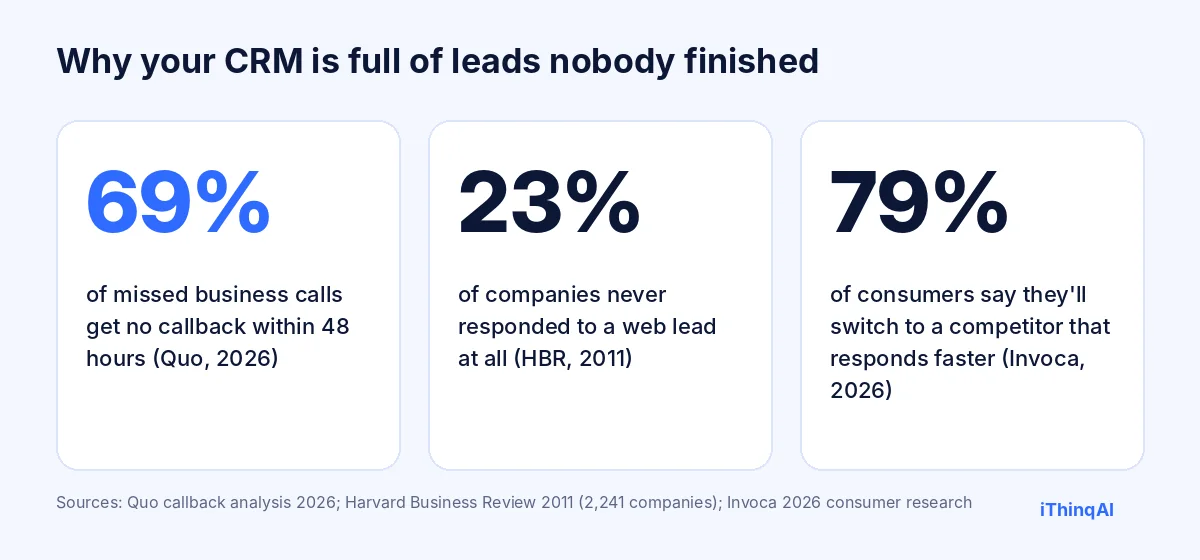
How common is that? Across 16.7 million missed business calls, Quo found 69% got no callback within 48 hours (Quo). Harvard's audit of 2,241 companies found 23% never responded to a web lead at all (HBR, 2011). If that's what happens to fresh leads, imagine what happened to last spring's quotes.
Those names aren't dead. They're waiting for someone to ask.
Why old leads are worth more than new ones
- They already know you. No cold introduction needed.
- Their problem may still be unsolved. The roof still leaks. The policy still renews. The tooth still hurts.
- Timing changes. "Not now" in March is often "yes" in October.
- Your competitors forgot them too. Whoever calls first gets the second chance.
The 7-step plan to reactivate old leads
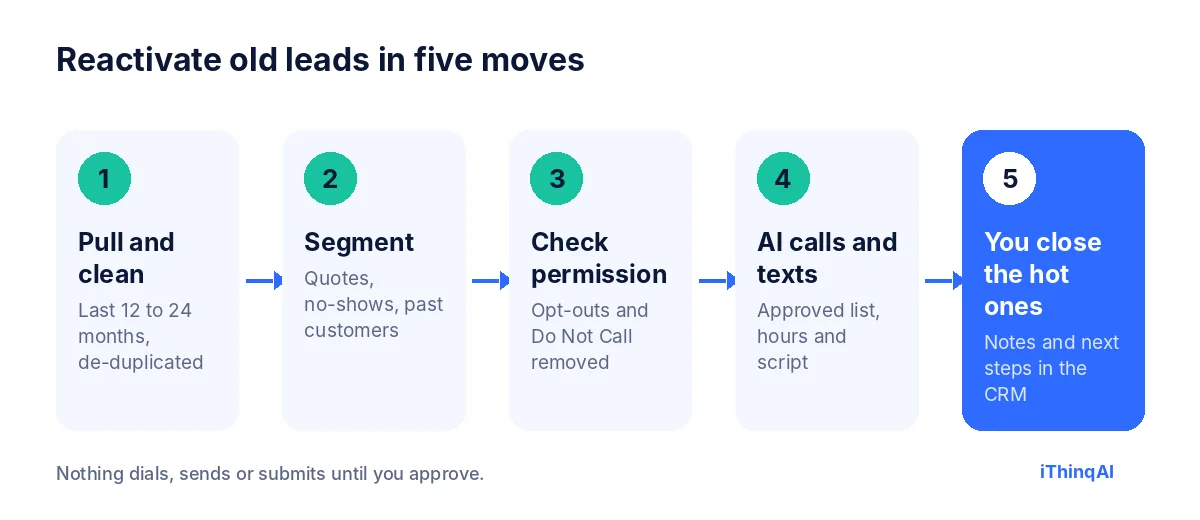
- Pull the list. Everyone from the last 12 to 24 months who inquired, got a quote, or booked and didn't show. Add past customers due for service.
- Clean it. Remove duplicates, wrong numbers and existing active customers.
- Segment it. Quotes not accepted. No-shows. Past customers. Each group gets a different reason to talk.
- Check permission. Remove anyone who opted out or is on Do Not Call for marketing. Confirm your consent language covers calls and texts, especially AI-voice calls, with your attorney.
- Write a short, honest reason to call. "You asked about a water heater quote in May. We have openings this week and wanted to check if you still need it." No tricks.
- Approve the campaign and let the AI work it. Set the calling window, daily limit and script. Nothing dials until you say so.
- Close the hot ones yourself. The CRM shows who said yes, who said later and who said stop.
It cleans the list before it calls it
Database reactivation usually stalls at step two, because nobody has time to clean the list. iThinqAI's agent works on its own computer, with a browser, files and your connected tools, so it can:
- Sort an exported spreadsheet and flag duplicates and missing phone numbers.
- Group leads by segment, date and service.
- Draft the call script and text message for each group.
- Bring all of it back to you for review before a single call is approved.
Scripts that work (and why)
| Segment | Opening line | The reason why it works |
|---|---|---|
| Quote not accepted | "You asked us for a quote on [service] in [month]. Is that still on your list?" | Specific and easy to answer |
| No-show | "We missed you on [date]. Want to grab a new time this week?" | No guilt, just an easy next step |
| Past customer | "It's been about a year since your last [service]. Want us to get you on the schedule?" | Service reminders feel helpful, not salesy |
| Renewal | "Your [policy] renews on [date]. Want to review options before then?" | A real deadline the customer cares about |
The reason why lead reactivation works
Albert Lasker's rule was to give the reason why. Here's ours: interest doesn't disappear; it goes dormant. People who asked about your service had a real need. Some solved it elsewhere. Many simply got busy. A respectful, specific reminder at the right moment brings that interest back, and you're the only business in their memory with their details already on file.
Lead reactivation by industry
Database reactivation looks different in every business. Here's where it usually pays first:
| Industry | Best list to start with | Typical reason to call |
|---|---|---|
| HVAC and plumbing | Unaccepted install quotes, last year's tune-up customers | Seasonal openings, maintenance reminders |
| Insurance | Quotes that didn't bind, upcoming renewals | Rate review before renewal |
| Real estate | Past buyers and sellers, old portal inquiries | Market update, home value check-in |
| Dental and medspa | Patients overdue for recall, unbooked consultations | Open appointments, follow-up treatment |
| Law firms | Consultations that didn't retain | Check-in where appropriate under bar rules |
| B2B services | Proposals that stalled | New capacity, updated pricing |
Start with the row closest to your business, and the segment with the most recent activity. That's where you'll reactivate old leads fastest.
How to measure database reactivation
Track five numbers for every campaign:
- Contacts attempted: how many leads got at least one call or text.
- Connect rate: how many conversations actually happened.
- Booked rate: appointments set per conversation.
- Revenue from reactivated leads: sales within 60 days.
- Opt-outs: a rising number means the list or the message needs work.
Run the same campaign on a small batch first. Compare results by segment, then put more of the list behind the segment that performs best.
How often to run lead reactivation
Reactivation isn't a one-time cleanup. The best businesses run it as a rhythm:
- Monthly: quotes from 30 to 90 days ago that didn't close.
- Quarterly: past customers due for service or a check-in.
- Seasonally: the whole eligible database, with a seasonal reason to talk.
- Before renewals: every client whose contract or policy renews in the next 60 days.
Set it up once and an AI front office can run each cycle on a schedule, sending you the list for approval before each one starts.
What to say to people who say "not now"
"Not now" is the most valuable answer in database reactivation, because it tells you when to call back. Ask one question: "Would it help if we checked in around [month]?" Then set the reminder in the CRM. Months later, that lead is warmer than any new inquiry you can buy, and it's already in your system.
Texts vs. calls in reactivation
Use both. A short text first, "Hi, it's Rivera Plumbing. You asked about a water heater quote in May. Still on your list? Reply YES and we'll call," lets people raise their hand with no pressure. Then the AI calls the ones who replied, plus anyone who didn't respond after a few days. Texts get read; calls get decisions. Together they reactivate old leads far better than either one alone.
Common objections
"Those leads are too old to care." Some are. Many still have the need, and nobody else is calling them.
"It'll annoy people." A specific, honest reminder with an easy opt-out rarely annoys anyone. Mass, vague blasts do.
"We don't have time to clean the list." That's exactly the part the AI can do on its own computer, then hand back to you for approval.
10 reasons to call that aren't "just checking in"
"Just checking in" gives people nothing to respond to. When you reactivate old leads, lead with a real reason:
- New openings this week or next.
- A seasonal service that's due: tune-ups, cleanings, policy reviews.
- A price or package that changed since their quote.
- A deadline that matters to them, like a renewal date.
- A new service that solves the problem they asked about.
- A missed appointment that's easy to rebook.
- The anniversary of their last service.
- A local event that affects them: a storm, a rate change, a new regulation.
- A follow-up promised in a past conversation.
- A simple question: "Is this still on your list?"
Every one of those gives the person a reason to say yes, no or later, which is all you need to move them forward.
How to segment your database for reactivation
Segmentation is what separates database reactivation from spam. Split your list by:
- Stage reached: inquiry only, quote sent, booked but didn't show, past customer.
- Recency: last 90 days, 3 to 12 months, 12 to 24 months.
- Service: what they asked about, so the message is specific.
- Value: large quotes deserve a human follow-up after the AI reconnects them.
A good database reactivation campaign sends a different first sentence to each segment. One generic message to everyone wastes your best leads and annoys the rest.
A sample reactivation call
AI: "Hi James, this is the AI assistant for Summit Roofing, following up on the roof inspection quote you requested in April. Is that still something you're thinking about?"
James: "Actually, yes. We got busy and forgot."
AI: "Totally understandable. We have inspection openings Tuesday at 9 and Thursday at 1. Would either work?"
James: "Thursday."
AI: "You're booked for Thursday at 1. I'll text you the details. Anything else I can help with?"
That's how you reactivate old leads: specific, polite, easy to say yes to, and booked before the call ends.
Lead reactivation compliance checklist
Before any lead reactivation campaign starts, confirm:
- Each contact came from a real interaction with your business.
- Your consent language covers the channel you plan to use, including AI-voice calls.
- Opt-outs and Do Not Call numbers are removed for marketing calls.
- Calling windows and daily limits are set for the recipients' time zones.
- The script identifies your business and says it's an AI.
- Every opt-out request is recorded and honored.
Database reactivation done this way is respectful, defensible and far more effective than buying new lists.
What results look like
Results vary widely by industry, list age and offer, so treat any promise of a fixed percentage with suspicion. What you can count on is direction: when you reactivate old leads with a specific reason, fast follow-up and a booked next step, a meaningful share of people who still have the need will take it. Measure your own campaign, then double down on the segments that respond. Keep notes on which reasons to call worked best, because the same reasons usually work again next season with the next batch of quiet leads.
What your team does while the AI calls
Your team's job changes from dialing to closing. While the AI works the approved list, your people handle the conversations that matter: the reactivated customer who wants a detailed quote, the past client with a complicated question, the high-value prospect who asked for a person. Each one arrives with notes, so nobody starts cold. Most teams find they can handle the extra appointments without adding staff, because the hours they used to spend dialing and leaving messages are gone. That's the quiet advantage of an AI that dials: your people only pick up the phone when there's someone worth talking to on the other end.
Turn reactivated leads into repeat customers
Winning back a lead is only the start. Once someone books, put them on a simple care plan: a thank-you after the visit, a review request, a reminder when the next service is due, and a check-in before their next likely need. The same system that helped you reactivate old leads keeps new customers from going dormant in the first place. Over time, your lead reactivation campaigns get smaller, because fewer customers ever drift away.
Your first campaign in one week
Monday: export leads from the last 12 to 24 months and hand the spreadsheet to the AI to clean and segment.
Tuesday: review the segments, remove anyone who shouldn't be contacted, and approve one segment to start, usually unaccepted quotes from the last six months.
Wednesday: approve the text message and call script for that segment, plus the calling window and a modest daily limit.
Thursday and Friday: the AI texts, then calls. You read the summaries each evening and handle the hot leads yourself.
Next Monday: review bookings, replies and opt-outs, then decide which segment goes next. One week, one segment, real results, and a plan for the rest of the list.
What it costs to run
AI calling campaigns, the dialer and automations are in the iThinqAI Growth plan: $799 a month with 5 seats and 5,000 AI minutes. Prices as of November 2026 (ithinq.ai/pricing).
Compare that to what one reactivated customer is worth to you. Then compare it to what you paid to get that lead the first time.
What not to do
- Don't call purchased lists of strangers and call it "reactivation."
- Don't hide that the caller is an AI.
- Don't call at 8 AM on a Sunday.
- Don't blast everyone at once. Use daily limits so your team can handle the callbacks.
Picture the end of the month
You pulled 400 old leads. The AI reached the ones who picked up, texted the rest, and booked a stack of appointments you didn't have last week. The CRM now shows who's ready, who's "call me in January" and who's done. Every one of them got a second chance at you.
Start with a test call
Call 561-715-7686 and hear the voice that would make these calls. Ask it a question one of your old leads might ask.
Then book a demo and bring a small export of old leads. We'll show you exactly how a campaign would run. Before you start, read is AI cold calling legal, and for new leads see AI appointment setter.
P.S. Somewhere in your CRM is a quote you sent six months ago to someone who still needs you. Call 561-715-7686 today. This week, they could hear from you before they hear from anyone else.
Sources
Frequently Asked Questions
What is lead reactivation?
Reaching back out to past inquiries, quotes and customers who didn't buy, to restart the conversation.
Can AI call my old leads?
Yes, if you have permission to contact them. iThinqAI calls only lists you approve, inside your calling window, with Do Not Call controls.
How many old leads can AI call in a day?
As many as you allow. iThinqAI uses daily limits you set so your team can handle the responses.
Do I need consent to call old leads with AI?
AI-voice calls fall under the TCPA's artificial-voice rules, which generally require prior consent. Check your consent language with an attorney.
How old is too old for a lead?
Most businesses get the best results from leads 12 to 24 months old. Older lists need more cleaning and a careful permission check.