AI Answering Service for IT Support: 5 Proven Safe Wins
Quick answer: an AI answering service for IT support answers every call to your help desk, around the clock, on your existing number. It identifies the client and contact, opens a ticket with the symptoms and business impact, triages by your priority rules, and pages your on-call technician for outages. It never resets passwords, changes MFA or grants access by phone. For an MSP, that means complete after-hours support coverage without waking a tech for every printer problem, and without handing attackers a friendly voice to exploit.
Key takeaways
- Clients call when something is broken. Voicemail at that moment damages trust fast.
- Help desks are a known social-engineering target. CISA has documented attackers phoning help desks to get passwords and MFA reset.
- An AI answering service for IT support opens clean tickets, triages consistently and pages only for real emergencies.
- iThinqAI answers on your number, logs every call and follows the guardrails you set. Hear it at 561-715-7686.
What is an AI answering service for IT support?
An AI answering service for IT support is a voice assistant that answers calls to a help desk or managed service provider, collects the caller's identity and issue, creates or updates tickets, sorts issues by urgency, and alerts on-call technicians when needed. It works 24/7, follows your service-level rules, and leaves account changes and access decisions to verified human processes.
The 2:13 AM call
A dental clinic you support opens at 7:00. At 2:13 AM, the office manager can't reach the server remotely to prep for a morning of patients. She calls your support line.
Voicemail. She leaves a rushed message, then emails, then texts the owner of your MSP directly. Nobody sees any of it until 6:45. The clinic opens late. By noon, she's asking whether you're the right provider.
Now imagine the same call answered on the first ring. A calm assistant confirms who she is, logs the issue, recognizes a site-down event for a client on your premium plan, and pages your on-call tech. She gets a ticket number and a text saying a technician is on it. The tech calls her at 2:21.
Same problem. Completely different client relationship.
Why IT support lines are hard to staff
- Calls are spiky. Monday mornings, patch nights and outages bring floods. Quiet hours bring a few calls that really matter.
- After-hours support is expensive. Paying a person to sit by the phone all night is hard to justify when most nights are quiet.
- Most calls are routine. Password lockouts, printer issues, new-user requests: important, but not emergencies.
- A few calls are critical. The server down, the ransomware note, the internet outage at a client with 50 people waiting.
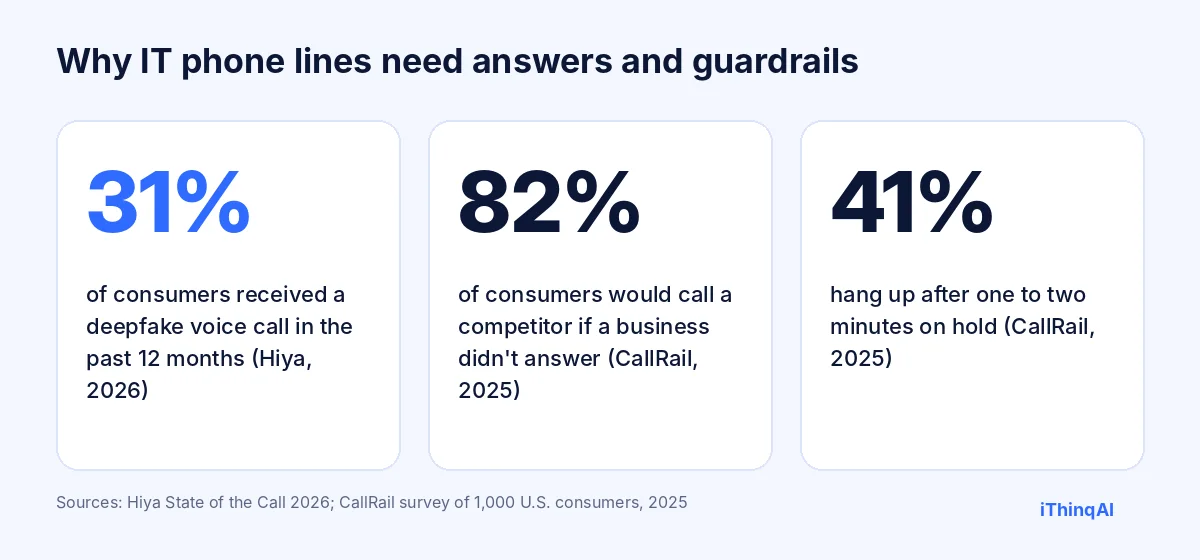
CallRail's 2025 survey found 82% of consumers would call a competitor if a business didn't answer, and 41% hang up after one to two minutes on hold (CallRail). Business clients are just as impatient when their systems are down, and they can switch providers at contract renewal.
The security problem nobody should ignore
Help desks are built to be helpful, and attackers know it. CISA's advisory on the Scattered Spider group describes attackers using phone calls and social engineering to convince IT help desk staff to reset passwords and MFA tokens (CISA). Voice fraud is also rising: Hiya's State of the Call 2026 found nearly one in three people (31%) received a deepfake voice call in the past 12 months (Hiya).
So the rule for any phone assistant at an MSP is simple: it never resets passwords, changes MFA, or grants access on a phone call. It opens a ticket and routes the request into your verified process, such as a callback to the number on file or a self-service reset portal with its own identity checks.
What the AI handles for an MSP
| Call | What the AI does | What reaches your team |
|---|---|---|
| Site down or server unreachable | Confirms client and impact, opens a P1 ticket, pages on-call | An urgent page within seconds |
| Possible security incident | Collects details, advises not to pay or click anything, pages your security lead | An immediate escalation |
| Password lockout | Opens a ticket and points the user to your verified reset process | A ticket, never a reset by phone |
| New user or change request | Collects details and approver name | A complete request for the next business day |
| Printer, email or app issue | Logs symptoms and impact, sets priority | A clean ticket in the queue |
| Status check | Shares the ticket status you allow, or takes a message | Fewer interruptions for techs |
How it works with iThinqAI
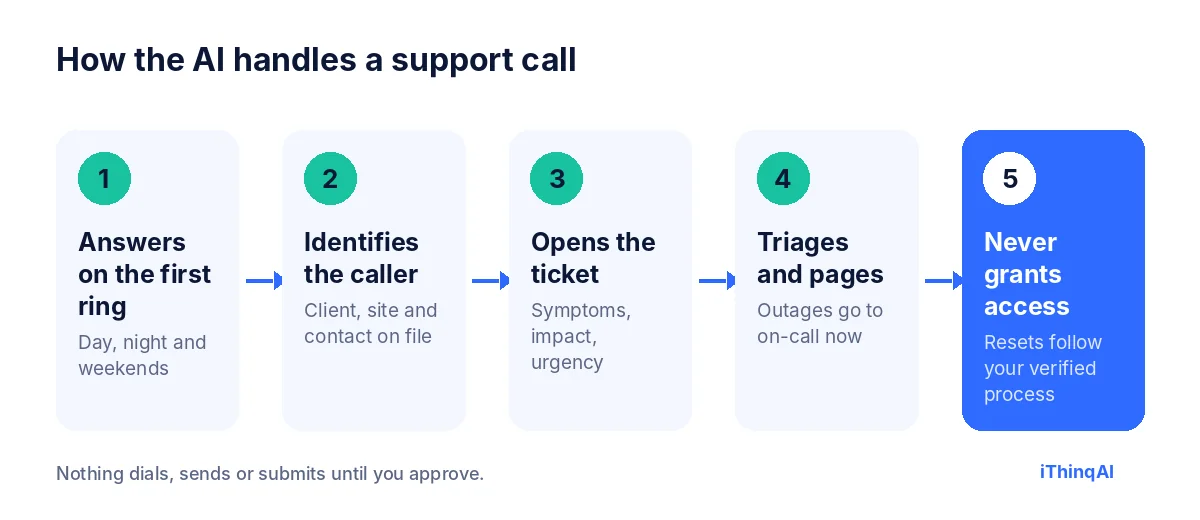
- It answers on the first ring, on your existing support number, 24/7.
- It identifies the caller: client, site and contact, checked against what you have on file.
- It opens the ticket with symptoms, business impact and urgency in the caller's words.
- It triages and pages: outages and security incidents go to on-call now; routine issues wait for the morning queue.
- It never grants access. Resets and account changes follow your verified process.
It has its own computer
Most answering services stop at a message. iThinqAI's agent works on its own computer, with a browser, files and your connected tools. On the Scale plan, that means it can:
- Create and update tickets in your web-based PSA or help desk when there's no direct integration.
- Check a client's public status page or an ISP's outage page and add the result to the ticket.
- Pull a list of clients affected by a known outage and send approved status updates.
- Draft the morning summary of overnight calls for your service manager.
It works under the permissions you give it, you can watch each step, and it asks before submitting anything. It doesn't get admin access to client systems just because it answers the phone.
Five proven, safe wins for after-hours support
- Every after-hours call gets a human-sounding answer and a ticket number. Clients know they've been heard.
- On-call techs get paged only for real emergencies. Your rules decide what's P1.
- Morning queues start organized. Overnight tickets are complete, prioritized and ready.
- Social engineering hits a wall. No resets or access changes by phone, ever.
- Clients get updates. During a known outage, they're told what's happening instead of waiting on hold.
The reason why this works
Albert Lasker's rule was to give the reason why. Here's the reason an AI answering service for IT support works. Clients don't judge an MSP by how often things break. Things always break. They judge you by what happens in the first five minutes after they call. Answered, understood, ticketed and escalated feels like competence. Voicemail feels like abandonment, even if your tech fixes it by morning.
Triage rules to set on day one
| Priority | Example | AI action |
|---|---|---|
| P1 critical | Site down, server offline, suspected ransomware | Page on-call immediately, text the client the ticket number |
| P2 high | One department can't work, VPN down for remote staff | Page during extended hours; otherwise first in the morning queue |
| P3 normal | Single-user issue, printer, slow PC | Ticket for the next business day |
| P4 request | New user, software install, change request | Ticket with approver details |
| Security | Phishing click, strange login alert, ransom note | Page security lead, give approved safety guidance |
A sample after-hours call
Caller: "Hi, this is Maria at Lakeside Dental. Nobody can get into the patient system and we open at 7."
AI: "Thanks, Maria. I'm the AI assistant for Summit IT. I see Lakeside Dental on our client list. Is this affecting everyone in the office, or just one computer?"
Caller: "Everyone."
AI: "Understood. I'm opening a critical ticket and paging our on-call engineer now. Your ticket number is 48213. You'll get a text confirmation, and an engineer will call you back at this number within 15 minutes."
Caller: "Also, my password expired. Can you reset it?"
AI: "For your security, I can't reset passwords by phone. I've added it to the ticket, and you can use the self-service reset link we'll text you, or the engineer can verify you through our usual process."
What to measure
- Answer rate for business hours and after hours.
- Time to page for P1 tickets.
- Ticket completeness: share of tickets with client, contact, impact and symptoms filled in.
- False pages: on-call alerts that turned out not to be urgent.
- Client satisfaction after overnight incidents.
The economics of after-hours support for an MSP
Every MSP faces the same math. After-hours support is a promise clients pay for, but staffing it is expensive and the work is uneven. Most nights bring a handful of calls. A few nights bring an outage that needs every hand. Hiring a person to sit by the phone for the quiet nights is hard to justify, and rotating techs through on-call duty wears them out.
An AI answering service for IT support changes the math. The phone is answered every time, routine issues become clean tickets for the morning, and your on-call tech is woken only when your rules say the issue can't wait. You keep the promise of after-hours support without paying for empty hours or burning out your best people.
How an MSP should write its call script
A good script is short and built around your service agreement:
- Greeting: your MSP's name and that the caller is speaking with an AI assistant.
- Identify: company name, caller name, callback number and site.
- Describe: what's happening, in their words, and when it started.
- Impact: how many people are affected and whether work has stopped.
- Security check: any suspicious emails, pop-ups, login alerts or ransom messages.
- Next step: ticket number, what happens now and when they'll hear back.
Keep the questions the same on every call. Consistency is what makes tickets useful and triage reliable.
What clients hear during a known outage
When a major provider goes down, every client calls at once. Your techs can't answer 40 calls while they're working the problem. The assistant can. It recognizes callers from affected clients, tells them what you know, adds them to the incident ticket and promises an update by text when service is restored. Your MSP looks organized during the worst hour of the month, and your techs get to fix the problem instead of repeating the same explanation 40 times.
Choosing an AI answering service for IT support
Ask every vendor:
- Does it answer on our existing support number, with no porting?
- Can it create tickets in our PSA or help desk?
- Will it follow our priority matrix and page on-call by our rules?
- Is it set up to refuse password resets, MFA changes and access requests by phone?
- Does it verify callers against our client and contact lists?
- Does it keep a record of every call for our review?
- Are prices published?
An AI answering service for IT support that can't answer the security questions clearly isn't ready for your phone line.
Rolling it out at your MSP
Week 1: connect your number and ticketing, load client and contact lists, and write your priority matrix.
Week 2: run test calls for each priority, including a fake password-reset request, to confirm the guardrails hold.
Week 3: turn on after-hours support first, with your on-call rotation set up for paging.
Week 4: add daytime overflow and review false pages, ticket completeness and client feedback. Adjust the rules, then tell clients about the new support line in your next newsletter.
A Monday morning, before and after
Before: at 8:05 AM, the phones explode. A client's internet is out, three users are locked out, someone's laptop won't boot and a new hire starts today with no account. Two techs answer calls while the rest work tickets. Callers wait on hold, some give up and email, and some call the owner's cell. By 10:00, half the tickets are missing details and the team is working from memory.
After: every call is answered on the first ring. Each caller gets a ticket number and a clear next step. The internet outage is flagged as a priority and assigned to a tech immediately. The lockouts are routed to the self-service reset process. The new-hire request is logged with the manager's approval details. By 8:30, the board is organized, complete and prioritized, and the techs are fixing things instead of answering phones.
Why consistent tickets matter
A ticket that says "computer broken, call Bob" costs a technician ten minutes before work even starts. A ticket that lists the client, the user, the device, the error message, when it started and how many people are affected lets the tech start fixing right away. Over hundreds of tickets a month, that difference adds up to days of recovered time. It also makes reporting honest: you can see which clients, issues and devices drive the most calls, and fix the root causes.
Training your clients
Tell clients what's changing and why. A short note works: "Our support line is now answered 24/7 by an AI assistant. It will open your ticket, give you a ticket number and get a technician moving for urgent issues. For your security, it will never reset passwords or change account access by phone." Clients appreciate the faster response, and the security message reassures them that you take their data seriously.
Objections from MSP owners
"Our clients expect a tech, not a bot." They expect a response. The AI responds instantly and gets a tech moving when it matters.
"What if it escalates everything?" It follows your triage rules. You decide what's critical.
"Isn't an AI on the phone a security risk?" It's safer than a tired person at 2 AM, because it never makes access changes by phone. Resets go through your verified process.
What it costs
iThinqAI's published plans, as of November 2026:
| Plan | Price | Best for |
|---|---|---|
| Starter | $299/mo | Answering every call, ticket intake, inbox and CRM (2 seats, 1,000 AI minutes) |
| Growth | $799/mo | Adds outbound status updates, dialer and automations (5 seats, 5,000 AI minutes) |
| Scale | $1,999/mo | Adds computer use in web-based PSAs, multiple numbers (15 seats, 15,000 AI minutes) |
Compare that with the cost of staffing nights and weekends. Prices at ithinq.ai/pricing.
Who it's not for
If you run an internal IT team with an existing 24/7 operations center, you may not need it. It pays off for MSPs and IT support firms that need after-hours support coverage, lose calls during busy periods or want cleaner tickets from every call.
Hear it now
Call 561-715-7686. Call it like a client whose email just went down, and listen to how it triages.
Then book a demo and bring your priority matrix. We'll show you how every after-hours call would be handled. More reading: after hours answering service, AI employee for small business and AI phone system for small business.
P.S. Something will break tonight at one of your clients. Call 561-715-7686 now and hear what they'd hear when they call you.
Sources
Frequently Asked Questions
Can an AI answering service reset passwords?
It shouldn't, and iThinqAI is set up not to. Password and MFA resets go through your verified process.
Can it page my on-call technician?
Yes. It pages based on the priority rules you set, such as site-down events and security incidents.
Does it create tickets in my PSA?
iThinqAI connects with 250+ tools. On the Scale plan, it can also work in web-based PSAs on its own computer.
How does it verify callers?
It checks the client, site and contact against what you have on file, and flags anything that doesn't match.
Is it good for after-hours support only?
It's most valuable after hours, but MSPs also use it for daytime overflow when every tech is busy.