AI Receptionist for Law Firms: 5 Proven Ways to Win Clients
This article is general information about intake technology, not legal or ethics advice. Check your state bar's rules before changing how your firm handles prospective clients.
Quick answer: an AI receptionist for law firms answers every call from prospective and current clients, day or night, on your firm's existing number. It runs a structured legal intake, screens for practice area and location, books consultations on the right attorney's calendar, and sends confirmations and reminders. It does not give legal advice or accept representation. In Clio's 2024 secret-shopper study, only 40% of firms answered the phone, so simply answering puts your firm ahead of most competitors.
Key takeaways
- Clio's researchers called 500 firms as potential clients. Only 40% answered, down from 56% in 2019.
- People call a lawyer when something urgent has happened. If you don't answer, they call the next firm.
- An AI receptionist for law firms handles legal intake and scheduling; attorneys handle conflicts, advice and engagement.
- iThinqAI answers on your number, books consults on the call and follows up. Hear it at 561-715-7686.
What is an AI receptionist for law firms?
An AI receptionist for law firms is a voice and text assistant that answers a law firm's phone, gathers intake information from prospective clients, schedules consultations, and routes calls from existing clients, courts and opposing counsel. It follows the intake questions and rules your firm approves, identifies itself as an AI, and passes anything requiring legal judgment to an attorney or staff member.
The call that came in at 9:47 PM
A woman was rear-ended on the way home from work. Her car is towed, her neck hurts, and the other driver's insurer has already called her twice. At 9:47 PM, she searches for a personal injury lawyer and calls the first firm she finds.
Voicemail. She calls the second. Voicemail. The third firm answers, takes her information calmly, and books her for a consultation at 10:00 the next morning.
The first two firms will never know she called.
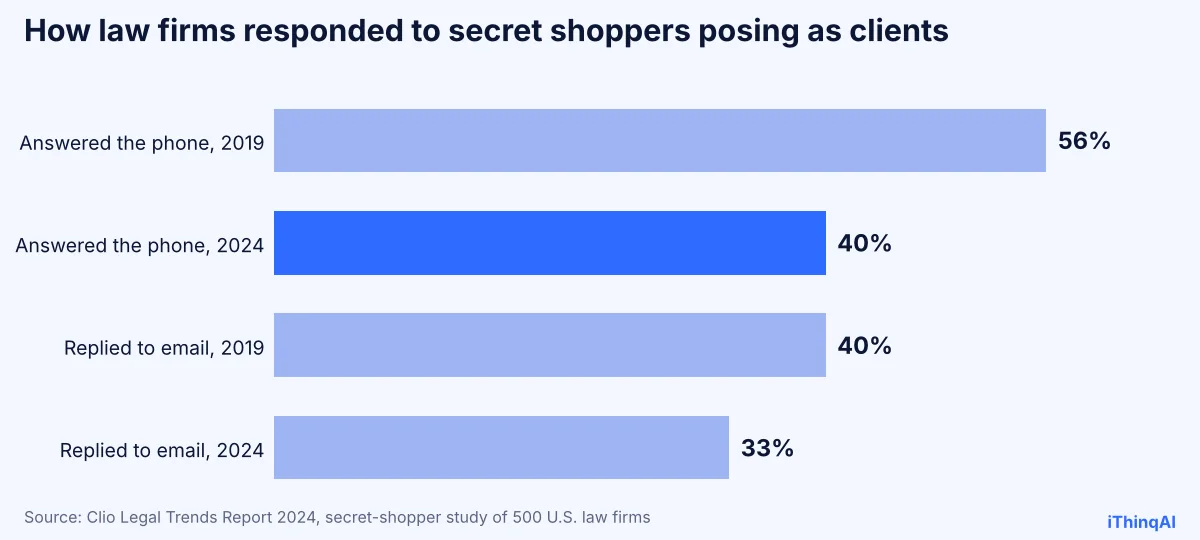
This isn't a rare case. In its 2024 Legal Trends Report, Clio had researchers contact 500 law firms posing as potential clients. Only 40% answered the phone, down from 56% in 2019. Counting callbacks, 52% answered or returned the call, which left 48% essentially unreachable. Only 33% replied to email (Clio).
Your firm may be excellent in the courtroom. None of that matters to the client who never reached you.
Why legal intake breaks down
Legal intake is hard to staff for three reasons:
- Calls arrive when nobody's there. Accidents, arrests and family emergencies don't happen during business hours.
- Your staff is busy with existing clients. The paralegal answering phones is also drafting, filing and calling the court.
- Intake is repetitive but important. The same ten questions, asked carefully, every time, with every answer recorded.
That's the kind of work an AI does well: consistent, patient, available at 9:47 PM, and never too busy to pick up.
What the receptionist handles at a law firm
| Caller | What the AI does | What reaches your team |
|---|---|---|
| New prospective client | Runs legal intake: name, contact, matter type, key dates, other parties | A complete intake and a booked consult |
| Existing client | Takes a detailed message or routes to the assigned attorney | A message with case reference and urgency |
| Court or opposing counsel | Routes to the right person or takes a precise message | Nothing missed, nothing misrouted |
| Matter outside your practice areas | Politely explains and offers referral information you approve | No wasted consult slots |
| Spanish-speaking caller | Conducts the intake in Spanish | The same complete intake, in English for your file |
| Urgent matter (arrest, deadline) | Flags it and alerts the on-call attorney | An immediate notification |
How it works with iThinqAI
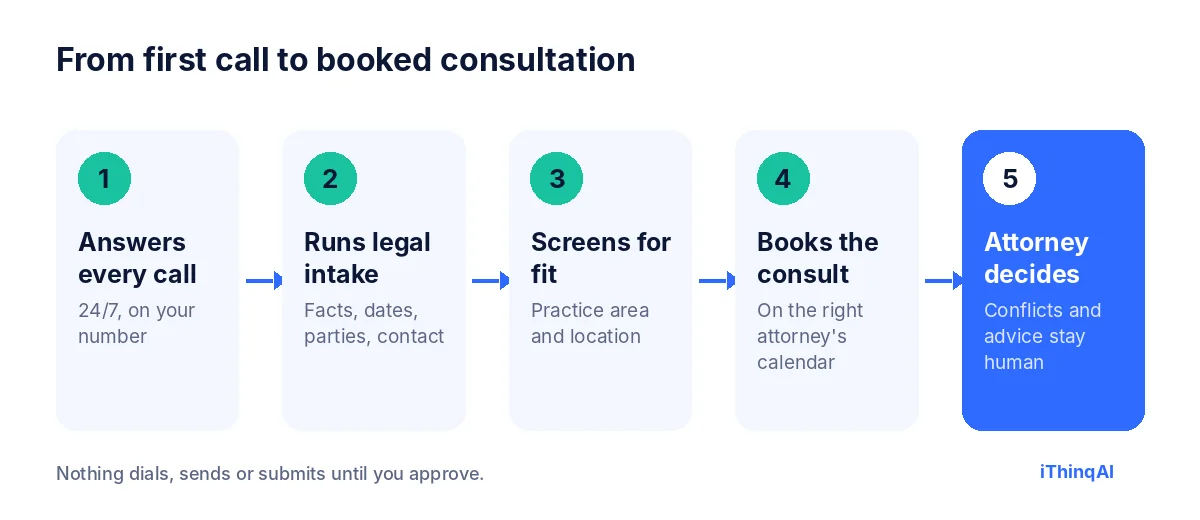
- It answers every call on your firm's existing number, 24 hours a day.
- It runs your legal intake script: the questions your firm approves, in your order, with every answer recorded.
- It screens for fit: practice area, jurisdiction, and any criteria you set.
- It books the consultation on the right attorney's calendar, and sends a confirmation with what to bring.
- The attorney decides everything that needs judgment: conflicts, advice, fees and engagement.
It has its own computer
Most answering tools stop at the message. iThinqAI's agent works on its own computer, with a browser, files and your connected tools. On the Scale plan, it can:
- Enter intake details into your practice management system or a web form, so staff don't retype them.
- Pull public information, like a court date from a public docket page, when you ask it to.
- Prepare a consult summary and a document checklist for the attorney before the meeting.
- Draft follow-up emails for your review.
You can watch each step and stop it at any time. It asks before submitting anything.
The reason why this works
Albert Lasker's principle was to give people the reason why. Here's the reason an AI receptionist for law firms works: a potential client calling a lawyer is usually scared, stressed and in a hurry. They don't compare credentials at 9:47 PM. They hire the firm that answered, listened and gave them a clear next step. Answering is not a courtesy. It's the first act of representation the client ever sees from you.
Ethics guardrails every law firm should set
General information only. Your state's rules control.
- No legal advice. The AI collects facts and schedules. It doesn't evaluate cases, predict outcomes or recommend actions.
- No attorney-client relationship formed by intake. The script tells callers that a consultation with an attorney is the next step.
- Conflict checks stay with the firm. The AI collects names of other parties so your team can run conflicts before the consult.
- Confidentiality. Treat intake information as confidential, limit who can see it, and review your vendor's security and data handling.
- Outbound calls. Bar rules restrict solicitation of people who haven't contacted the firm. Use AI calling for people who reached out first, appointment reminders and existing clients, and check your state's rules. AI-voice calls also fall under the TCPA's artificial-voice rules (Mayer Brown).
- Clear identification. The assistant says it's an AI working for your firm.
By practice area
| Practice area | Biggest intake problem | What the AI fixes |
|---|---|---|
| Personal injury | Calls after hours and on weekends | Immediate intake and next-morning consults |
| Criminal defense | Urgent calls from family members | On-call attorney alerts within seconds |
| Family law | Emotional, detailed first calls | Patient, consistent intake with every detail recorded |
| Immigration | Spanish-speaking and multilingual callers | Intake in the caller's language |
| Estate planning | Price-shoppers comparing several firms | Fast booking before they call the next firm |
| Bankruptcy | Callers needing reassurance and a plan | Clear next step and document checklist |
A sample legal intake call
Caller: "Hi, I was in a car accident yesterday and I don't know what to do."
AI: "I'm sorry to hear that. I'm the AI assistant for Martinez Law. I can't give legal advice, but I can set you up with one of our attorneys. Are you safe right now?"
Caller: "Yes, just sore."
AI: "Thank you. Can I get your name, the date and city of the accident, and whether a police report was made?"
Caller: "Ana Ruiz, yesterday in Henderson, and yes, there's a report."
AI: "Thank you, Ana. Attorney Martinez has openings tomorrow at 10:00 or 1:30. Which works better?"
Caller: "10:00."
AI: "You're booked for 10:00. I'll text you a confirmation and a short list of what to bring, including the police report number if you have it."
What to measure
- Answer rate: calls answered live ÷ calls received.
- Intake completion rate: callers who finished the intake.
- Consults booked per hundred new-client calls.
- Consult show rate, with and without reminders.
- Signed matters from those consults.
Clio's numbers give you a benchmark: if fewer than half your new-client calls are answered live today, the upside is large.
Five proven ways an AI receptionist for law firms wins clients
- It answers the call your competitors miss. With most firms in Clio's study unreachable on the first try, simply answering puts you in front.
- It finishes legal intake while the caller is motivated. Facts, dates and contact details are captured in the first conversation, not three callbacks later.
- It books the consult on the spot. A date on the calendar is a commitment. A promised callback is not.
- It cuts no-shows. Confirmations and reminders by text keep consults on the calendar, with a document checklist so the meeting is productive.
- It follows up with people who aren't ready. Callers who want to think it over get a polite check-in on the schedule you approve.
How to build your legal intake script
A good legal intake script is short, ordered and specific to each practice area. Start with the basics every law firm needs:
- Caller's name, phone, email and preferred contact method.
- Type of matter and a one-sentence description in the caller's words.
- Key dates: incident, arrest, filing, hearing or deadline.
- Location and jurisdiction.
- Names of other parties, for your conflict check.
- How they heard about the firm.
Then add practice-specific questions. For personal injury: was there a police report, was medical treatment received, has an insurer called? For family law: are there children, is there an existing order, is anyone in danger? Keep it to what the attorney needs before the consult. Everything else can wait for the meeting.
Rolling it out at your law firm
Week 1: connect your number, calendars and practice management system. Write the greeting, intake questions and routing rules for existing clients, courts and opposing counsel.
Week 2: run test calls from your own staff, playing different callers. Turn on after-hours and weekend answering first.
Week 3: add overflow during business hours, so calls your staff can't reach go to the AI instead of voicemail.
Week 4: review intake completion, consults booked and show rates. Adjust scripts by practice area.
Most firms are surprised by how many calls arrived when no one was there to answer.
Why an AI receptionist for law firms beats a voicemail greeting
A voicemail greeting asks a stressed person to wait. An AI receptionist for law firms asks them a question, writes down the answer and gives them an appointment. One leaves the caller alone with their problem. The other gives them a plan before they hang up. That feeling, of being heard and having a next step, is often what earns your firm the engagement.
What callers say about talking to an AI first
Some attorneys worry callers will feel brushed off. In practice, people calling about a legal problem care about three things: someone answered, someone listened, and something happened next. A clear, polite assistant that identifies itself, takes their details carefully and books them with a lawyer meets all three. Callers who want a person right away can ask, and the call is routed to staff or a callback is booked. Nobody is trapped in a phone tree, and nobody is left talking to a beep.
Keeping your intake records clean
Every call produces a written summary and the answers to your intake questions, stored in one place. That makes conflict checks faster, gives attorneys context before the consult, and creates a clear record of when the person first contacted the firm and what they said. Decide with your team how long to keep intake records for callers who never retain you, and apply that policy consistently.
What happens to calls from existing clients
New clients aren't the only callers who get frustrated by voicemail. Existing clients call to ask about status, send documents or report something new in their case. When those calls go unanswered, clients feel ignored, and that feeling shows up in reviews and referrals. The assistant answers, confirms who's calling, takes a precise message with the case reference, and tells the client when to expect a response. Urgent messages are flagged to the assigned attorney or paralegal right away. Clients feel looked after, and staff get organized messages instead of a voicemail box full of half-heard names.
Courts, opposing counsel and vendors
Calls from a clerk's office or opposing counsel can't wait in a pile of messages. You decide the routing rules: transfer immediately during office hours, alert the attorney by text after hours, or take a detailed message with a callback number and deadline. Vendors and solicitors get a polite note and a request to email, so they don't eat into your staff's day.
Phone, text and web forms in one place
Many potential clients don't call at all. They text the number on your website, fill in a contact form or send a message on social media. iThinqAI keeps those conversations in the same inbox as your calls, with the same intake questions and the same booking flow. Whether someone calls at midnight or fills in a form at lunch, they get the same fast, consistent response.
Is your law firm ready?
Ask three questions. Do calls ever go to voicemail during business hours? Do new-client calls come in after 5 PM or on weekends? Does legal intake depend on whoever happens to be free? If any answer is yes, an AI receptionist for law firms will pay for itself in signed matters. The law firm that answers, runs a clean legal intake and books the consult on the first call is the firm that gets hired.
Objections from attorneys
"Clients expect a person at a law firm." They expect a response. The AI responds immediately and books them with a person.
"It might say something that sounds like advice." The script is built to avoid that, and it tells callers plainly that the attorney will advise them.
"We already use an answering service." Ask whether it completes intake, books the consult and enters data into your system. If it only takes messages, the client is still waiting.
What it costs
iThinqAI's published plans, as of November 2026:
| Plan | Price | Best for |
|---|---|---|
| Starter | $299/mo | Answering every call, intake, booking, inbox and CRM (2 seats, 1,000 AI minutes) |
| Growth | $799/mo | Adds follow-up campaigns, dialer and automations (5 seats, 5,000 AI minutes) |
| Scale | $1,999/mo | Adds computer use, multiple offices and numbers (15 seats, 15,000 AI minutes) |
Compare that to the fee from one signed matter. Prices at ithinq.ai/pricing.
Who it's not for
If your firm takes only referrals from other attorneys and rarely gets calls from the public, you may not need it. It pays off for firms that advertise, rely on search, or get calls after hours and on weekends.
Hear it now
Call 561-715-7686. Call it the way a new client would, with a realistic question, and listen to how the intake flows.
Then book a demo and bring your current intake form. We'll show you how it would run on your phone line. Related: mystery shopper call test, after hours answering service and missed call statistics.
P.S. Tonight, someone in your city will need a lawyer and call three firms. Call 561-715-7686 today and hear what they'd hear if your firm were the one that answered.
Sources
Frequently Asked Questions
Can an AI receptionist give legal advice?
No. It collects intake information, schedules consultations and routes calls. Attorneys give advice.
Is AI legal intake confidential?
Treat it like any intake channel: limit access, review your vendor's security, and follow your state's confidentiality rules.
Can it run conflict checks?
It collects the names of other parties so your team can run conflicts before the consultation.
Can it handle Spanish-speaking callers?
Yes. iThinqAI handles callers in English, Spanish and other major languages.
Can a law firm use AI to call prospective clients?
Bar rules restrict solicitation. Use AI calls for people who contacted you first, existing clients and reminders, and check your state's rules.