Answering Service vs AI: 5 Proven Ways Messages Lose Sales
Quick answer: in the answering service vs AI comparison, a traditional answering service picks up and takes a message, and you call back later. An AI receptionist can finish the job on the first call: answer the question, book the appointment, text the confirmation and log it in your CRM. If your callers need a sympathetic human, a staffed service still makes sense. If they need an answer or an appointment, "we'll take a message" is the most expensive thing that can happen to your call.
Key takeaways
- A message is a promise to call back. Harvard research found the average response to a new lead was 42 hours.
- 69% of missed business calls get no callback within 48 hours, so many messages are never returned.
- AI connected to your calendar and CRM books on the call instead of passing a note along.
- iThinqAI answers on your existing number, books, follows up and does the paperwork on its own computer. Hear it at 561-715-7686.
What's the difference in answering service vs AI receptionist?
A traditional answering service uses people, often working from a script, to answer your calls and take a message you return later. An AI receptionist answers with a voice agent connected to your systems, so it can answer questions, book appointments, send confirmations and update your CRM during the call. The first records the request. The second completes it.
Both pick up the phone. Only one of them can finish what the caller wanted.
For 50 years, the promise was "we'll take a message"
The traditional answering service promise was simple: "Your phone will never go unanswered."
And they kept it. A friendly person picks up, writes down a name and a number, and emails it to you.
Then what?
Then it's your job. Somebody has to read the message, call back, catch the customer at a good moment, answer the question, book the appointment and write it down somewhere. And this is exactly where leads go to die.
What really happens after you take a message
The research on the gap between a message and a callback is brutal.
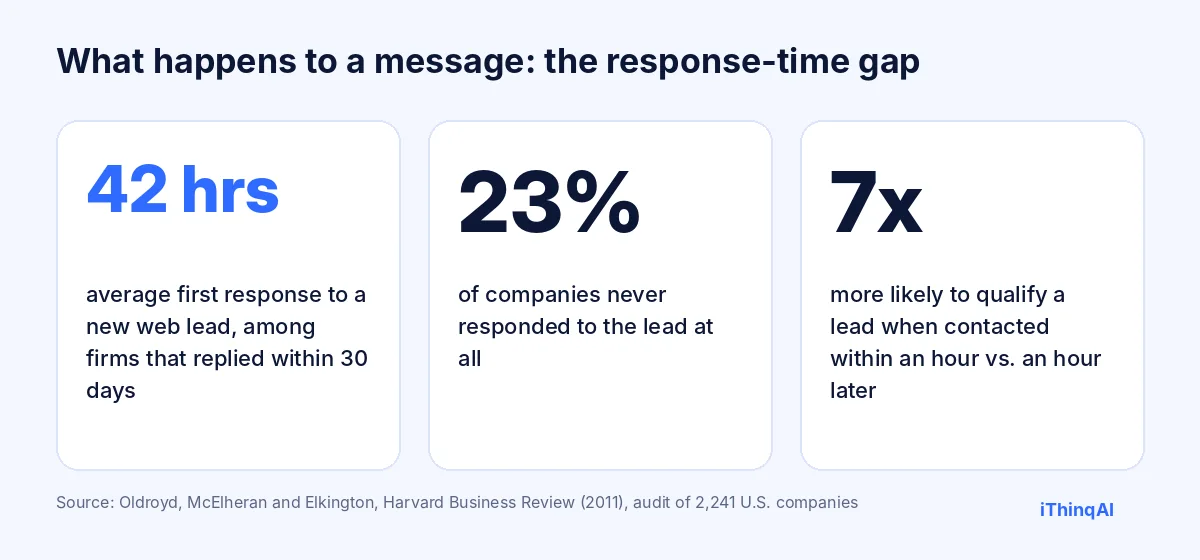
- In Harvard Business Review's audit of 2,241 U.S. companies, the average response time to a new lead was 42 hours, among firms that responded within 30 days, and 23% never responded at all (Oldroyd, McElheran and Elkington, 2011).
- The same research found firms that tried to contact a lead within an hour were nearly 7 times more likely to qualify it than firms that waited even one hour longer.
- In 2026, across 16.7 million missed calls, Quo found 69% got no callback within 48 hours (Quo).
So the answering service did its job. The phone was answered. And the customer still went to whoever called them back first.
Answering service vs AI vs AI front office: side by side
| Traditional answering service | Basic AI answering tool | iThinqAI AI front office | |
|---|---|---|---|
| Who answers | Trained humans | AI | AI that says it's an AI |
| Takes messages | Yes | Yes | Yes |
| Books into your calendar on the call | Sometimes | Sometimes | Yes |
| Calls the lead back | No | Rarely | Yes, after you approve list, hours and script |
| Updates your CRM | Usually no | Usually no | Yes, built in |
| Does follow-up work after the call | No | No | Yes, on its own computer |
| Handles many calls at once | Depends on staffing | Yes | Yes |
| Empathy on hard calls | Strong | Limited | Good on routine calls; transfers to your team |
| Pricing | Often per minute or per call | Often flat or per minute | Seats plus usage, from $299/mo |
The reason why AI changes the math
Albert Lasker's rule for advertising was to give the reason why. Here it is for the answering service vs AI decision.
A human answering service sits outside your business. They don't see your calendar. They can't change your CRM. They work from a script and a message pad. That's not a criticism of the people; it's a limit of the setup.
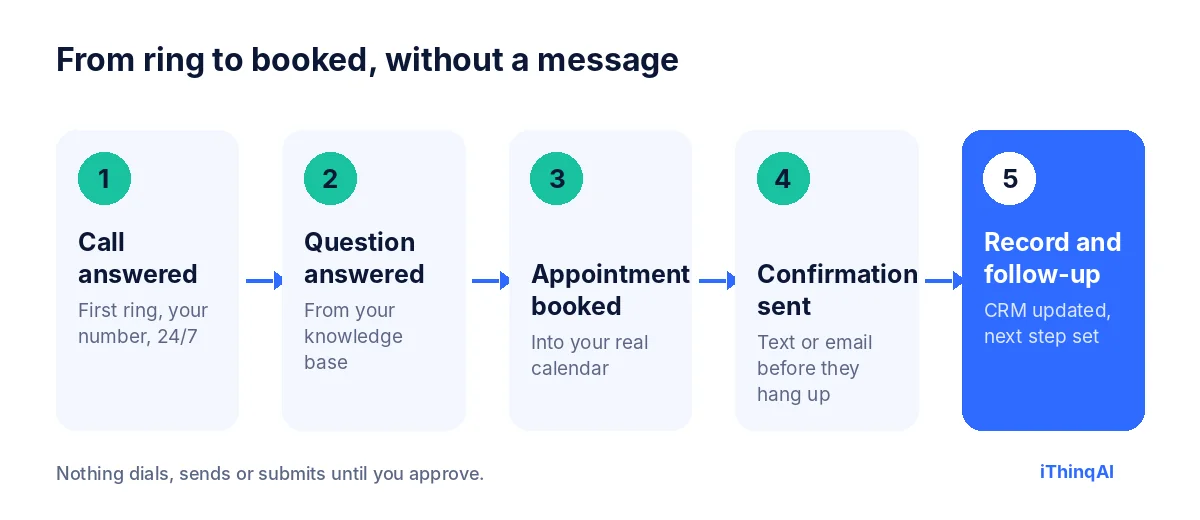
An AI receptionist connected to your systems sits inside your business. iThinqAI reads from a knowledge base you control, books into a connected calendar, logs the call in the built-in CRM, and sends the confirmation by text or email before the caller hangs up.
And when a web form arrives at 9 PM, or a call slips through, it can call the lead back. It does that only after you approve the list, the script and the calling window, with daily limits and Do Not Call controls in place.
That's the difference between "we'll take a message" and "you have a new appointment at 10:30."
After the call, it keeps working
A message pad can't do anything with a message. iThinqAI's agent has its own computer, with a browser, files and the tools you connect, so after the call it can:
- Create the CRM record and move the deal to the right stage.
- Book the follow-up and send the confirmation.
- Email the form, price sheet or intake questionnaire the caller asked for.
- Research the caller's business before your team calls back, if you ask it to.
- Send you a morning summary of every call, on a schedule you set.
The call is the start of the work, not the end of it. That's the part a traditional answering service was never built to do.
One Monday, two front offices
With a traditional answering service
At 8:05 AM, three calls arrive at once. The service answers all three and emails three messages. At 9:40 the owner reads them between jobs. The first caller has already booked elsewhere. The second wanted a price range, which the receptionist didn't have. The third is a returning customer who had to explain her history again. At 4 PM a web form arrives. Nobody sees it until Tuesday.
With an AI front office
At 8:05 AM, the same three calls arrive. The AI answers all three at once. The first caller gets a confirmed 10:30 slot and a text. The second gets the price range from the knowledge base and books a quote visit. The third is recognized as a returning customer, and the agent books her follow-up. At 4 PM the web form arrives, and within minutes the agent calls back from the approved list and books Wednesday.
Both businesses answered every call. Only one of them booked the work.
When to keep a traditional answering service
We'll be straight with you. Keep a staffed service, or put humans in the loop, if:
- Your callers are often upset, grieving or in crisis. People do this better.
- Every intake requires a judgment call no script can cover.
- Your clients expect a human voice and would leave over an AI.
- You need someone to take a message for a small number of calls and never need booking or follow-up.
For most service businesses, though, the majority of calls are routine: hours, prices, availability, "Can you come Thursday?" Those calls don't need a message. They need an answer.
Answering service vs AI by type of call
| Type of call | Traditional answering service | AI receptionist |
|---|---|---|
| "What are your hours?" | Answers, if scripted | Answers instantly |
| "How much does it cost?" | Takes a message | Gives your approved price range |
| "Can I book Thursday?" | Takes a message or uses a link | Books it into your calendar |
| "Did you get my message?" | Takes another message | Checks the record and answers |
| "I'm really upset about..." | Calms and escalates | Transfers to your team with notes |
| Web form at 9 PM | Not handled | Calls back from approved lists |
The pattern is clear. A traditional answering service is strongest on emotional calls. AI is strongest on everything that ends in a booking.
The hidden cost of "we'll take a message"
Every message you receive creates work:
- Someone reads it.
- Someone calls back, often more than once.
- Someone answers the question the caller asked the first time.
- Someone books the appointment.
- Someone records it in the CRM.
Five steps, and a delay between every one of them. Multiply by every message, every week. That's the real price of a service that can only take a message, and it never shows up on the answering service invoice.
Common objections, answered
"My customers want a human." Some do, and the AI offers a transfer. But most callers want something simpler than a person: a fast answer and a confirmed time. In CallRail's 2025 survey, 52% of consumers said businesses using AI assistants after hours provide superior service (CallRail).
"What if the AI gets something wrong?" It answers from the knowledge base you write and routes anything it doesn't know. Review the first week of calls, fill the gaps, and the quality climbs fast.
"Isn't AI calling risky?" It can be, which is why iThinqAI uses approval gates. In February 2024 the FCC confirmed AI-generated voices count as "artificial" under the TCPA, so consent rules apply (Mayer Brown). Nothing dials until you approve.
What it costs
iThinqAI publishes its prices, as of November 2026:
| Plan | Price | What's included |
|---|---|---|
| Starter | $299/mo | Inbound AI voice agent, unified inbox, CRM, pipeline, calendar, tasks (2 seats, 1,000 AI minutes) |
| Growth | $799/mo | Adds AI calling campaigns, dialer, prospect discovery, automations (5 seats, 5,000 AI minutes) |
| Scale | $1,999/mo | Adds computer use, multiple locations and numbers (15 seats, 15,000 AI minutes) |
Annual billing includes two months free. See current pricing.
Answering service vs AI for after-hours emergencies
Emergencies are where owners worry most, so let's be specific. A traditional answering service handles an emergency by following your script: take the details, call the on-call person, leave a message if they don't pick up.
An AI receptionist does the same triage with your questions, then transfers the call to your on-call person based on rules you set, with a written summary attached. Non-emergencies get booked for the morning instead of waking anyone up. The difference isn't who cares more. It's that the AI applies the same rules on every call, at 2 AM exactly as at 2 PM, and writes everything down.
If your emergencies are truly life-and-death, keep humans on that path. For the leaking pipe, the dead furnace and the locked-out tenant, AI triage works and costs a fraction of a staffed night shift.
How to test answering service vs AI in one afternoon
You don't need a long pilot to see the difference. Run this test:
- Call your current service at 7 PM with a realistic request: a price question and a booking.
- Time how long until you get a real answer and a confirmed appointment, not just a message.
- Call 561-715-7686 with the same request. Note whether it answers the question and books you on the spot.
- Check what happens next. Did a text confirmation arrive? Would a record exist in your CRM?
- Repeat on Saturday morning, when your customers actually call.
Write the results side by side. Most owners don't need step five.
Questions to ask your traditional answering service before you renew
- How many of last month's calls ended as a message instead of a booking?
- Can your receptionists book directly into my calendar?
- Who calls my web leads back, and how fast?
- Do messages land in my CRM automatically, or does my team retype them?
- What does it cost when my call volume doubles in busy season?
- Can you give me a price range from my knowledge base, or do you have to take a message?
If the honest answers are "most," "sometimes," "you," "retype," "a lot more" and "take a message," you already know which side of the answering service vs AI debate your numbers sit on.
What switching looks like in 30 days
Week 1: Route nights and weekends to iThinqAI. Read every call summary and fill gaps in the knowledge base.
Week 2: Add overflow during business hours, so the AI picks up whenever your team doesn't.
Week 3: Approve your first callback list for missed calls and web leads. This is usually when bookings jump.
Week 4: Compare booked appointments, not answered calls, against the old service. Decide with numbers, not opinions.
You keep your number the whole time, and nothing your daytime customers experience changes until you're confident. If you decide to keep a traditional answering service for some calls, nothing is lost; the two can work together.
Can you use both?
Yes, and many businesses do. Let the AI answer every call first, finish the routine ones and transfer the rest to your team or to a staffed service for after-hours emergencies. You keep human empathy where it matters and stop paying people to take messages that an AI could have turned into bookings.
What your customers notice first
Customers rarely know or care what software you use. They notice four things:
- How fast someone picked up. First ring beats fourth ring, every time.
- Whether they got an answer. "Our price range is $150 to $250" beats "Someone will call you."
- Whether they left with a time. A confirmed slot and a text in their pocket ends their search.
- Whether you remembered them. A returning customer who doesn't have to repeat their story feels valued.
A traditional answering service is good at the first point and sometimes the last. An AI front office is built to deliver all four on the same call, then do the follow-up work while your team is busy with the customers already in front of them.
Picture Monday morning
You open your laptop. Instead of 14 messages to return, you see 9 booked appointments, 3 answered questions and 2 calls flagged for you, each with a summary and the caller's details already in the CRM.
That's not a better answering service. That's a different job entirely. Your team spends the morning serving customers instead of chasing them, and the calendar for the week is already filling up before anyone has finished their coffee.
Call it and decide
Call 561-715-7686. Pretend you're a new customer. Ask a real question. Ask it to book you. See whether you ever need a message.
Then book a demo to see it on your own number. Weighing a switch from a specific provider? Read our Smith.ai alternative guide, or see why speed to lead decides who wins the customer.
P.S. Pull up your answering service's last 20 messages. How many did your team return within an hour? If it's not most of them, call 561-715-7686 today. Every message that waits is a customer deciding.
Sources
Frequently Asked Questions
What's the difference between an answering service and an AI receptionist?
An answering service usually takes messages for you to return. An AI receptionist connected to your calendar and CRM can answer questions, book appointments and follow up on the first call.
Is an AI receptionist better than a human answering service?
For routine calls and after-hours coverage, often yes. For emotional or complex calls, humans are better. Many businesses use AI first and transfer to people.
Can I use both?
Yes. iThinqAI can answer every call and transfer the ones that need a human to your team.
Does an AI receptionist still take messages?
Yes, when a message is the right outcome, but it also books, answers and follows up, so far fewer calls end as messages.
How fast can I switch from a traditional answering service?
Many businesses start with nights and weekends, run both for a week, then move fully once the booked appointments prove it out.