Smith.ai Alternative: 7 Proven Reasons Owners Win More Calls
Quick answer: the best Smith.ai alternative depends on one question: do you need a live human on most calls? If yes, a staffed virtual receptionist service may still be right for you. If what you really need is every call answered, missed leads called back, appointments booked into a CRM and the follow-up work done, without a bill that climbs as your call volume grows, an AI front office like iThinqAI is the stronger choice.
Key takeaways
- Owners usually look for a Smith.ai alternative for three reasons: costs that rise with volume, answering without follow-up, and call data stuck outside their CRM.
- 69% of missed business calls get no callback within 48 hours, so a message is not the same as a customer.
- iThinqAI answers on your existing number, books on the call, calls back leads you approve, and does the follow-up on its own computer.
- You can switch in a week without porting your number or dropping a call. Test it first at 561-715-7686.
What is the best Smith.ai alternative?
The best Smith.ai alternative for most small businesses is a platform that answers every call and then does the work that follows: booking, follow-up texts and emails, callbacks to new leads, and a clean record in a CRM. If your callers need a human voice every time, the best alternative is another staffed virtual receptionist service. If they mostly need answers and appointments, choose an AI front office.
That split matters more than any feature chart. Get it right and the rest of the decision gets easy.
First, credit where it's due
Smith.ai built something real. It helped make the idea of a virtual receptionist mainstream, and its blend of AI and human receptionists is a good fit for many professional-services firms where a person on every intake call matters.
So this isn't a hit piece. It's a buyer's guide for the owner who is quietly typing "Smith.ai alternative" into Google at 11 PM. If that's you, you probably have one of three problems.
Why owners look for a Smith.ai alternative
1. The bill grows with your success
Services priced by the number of calls or minutes handled get more expensive exactly when your marketing starts working. A busy month should feel like a win, not an invoice shock. Smith.ai's pricing has changed over the years, so check its current pricing page before you compare.
2. Answering isn't the whole job
A virtual receptionist service answers inbound calls. But most businesses also need someone to call web leads back within minutes, chase old quotes, confirm tomorrow's appointments and work a renewal list. That usually means a second tool, a dialer and a CRM, plus the time to run them.
3. The data lives somewhere else
Call summaries arrive by email or in a separate portal. Somebody still has to copy them into the CRM. Often, nobody does.
Here's why that matters. In an analysis of 16.7 million missed calls, Quo found that 69% got no callback within 48 hours (Quo). Messages that don't land in a system with a task attached tend to die.
And the caller doesn't wait. In CallRail's 2025 survey of 1,000 consumers, 82% said they'd call a competitor if a business didn't answer (CallRail).
Who should stay with a human virtual receptionist service
We'd rather lose a sale than make a bad one, so let's be plain about who should not switch:
- Your callers are often in distress and you want a trained human on every call. A staffed service is worth the premium.
- You take very few calls and never call anyone back. A per-call plan may cost less than a full platform.
- Your intake depends on judgment calls that no script can cover, and you want people making them.
Everyone else should at least test an AI front office before the next renewal.
What the iThinqAI Smith.ai alternative looks like
iThinqAI is one AI agent that runs your front office on your existing number:
- Answers every inbound call 24/7 in your business's name, from a knowledge base you control, and says it's an AI.
- Books appointments straight into a connected calendar during the call, then texts a confirmation.
- Calls back new and missed leads, only after you approve the list, script and calling window, with daily limits and Do Not Call controls.
- Logs everything in the built-in CRM, pipeline and task list, with one inbox for calls, texts, email, WhatsApp, social messages and fax.
- Transfers to your team when a caller needs a person, with notes attached.
| Staffed virtual receptionist service | iThinqAI AI front office | |
|---|---|---|
| Who answers | Trained humans, often with AI help | AI agent that discloses it's an AI |
| Booking on the call | Often | Yes, into your calendar |
| Calls back web and missed leads | Usually not included | Yes, from lists you approve |
| CRM and pipeline | Usually integrates with yours | Built in, plus 250+ integrations |
| Follow-up work after the call | Limited | Done on its own computer |
| Pricing model | Commonly per call or per minute | Seats plus a pool of AI minutes |
| Empathy on very hard calls | Strong | Good on routine calls; transfers the rest |
Beyond answering: an AI employee with its own computer
A virtual receptionist service answers and hands you a message. iThinqAI keeps working after the call. Its agent has its own computer, with a browser, files and the tools you connect, so it can:
- Update the CRM, calendar and spreadsheets you already use.
- Fill out the web forms and portals your team retypes by hand (Scale plan), asking before it submits.
- Send the follow-up email or text the moment the call ends.
- Remember past conversations, so a returning caller never has to start over.
- Build a morning summary of every call, booking and open lead, on a schedule you set.
That's the real difference between an answering service and an employee. And it's the reason why an AI front office can replace more than one line on your software bill.
The stack we priced
On our homepage we compared iThinqAI Growth against six popular tools covering the same jobs: an AI-plus-human answering service, an AI calling platform, a power dialer, a CRM, a scheduling tool and an online fax service. At their published list prices, the total came to about $813 a month, versus $799 for iThinqAI Growth.
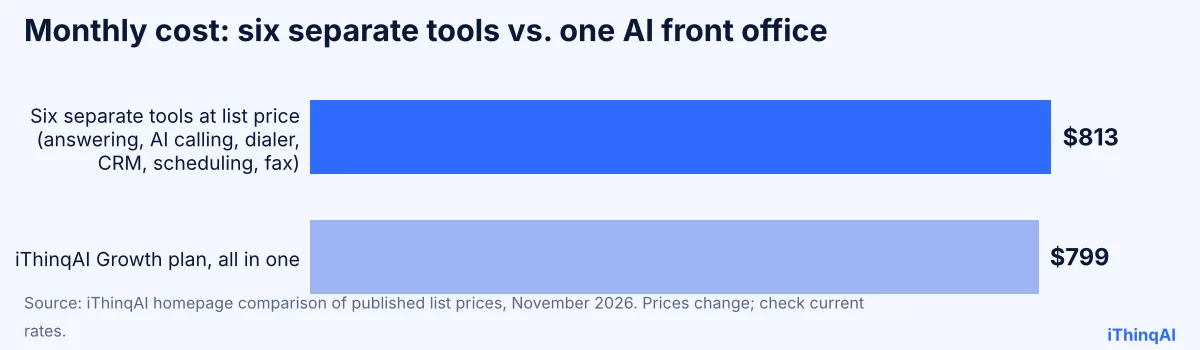
The savings are small. That isn't the point. The point is what disappears: five logins, five bills, and every gap between them where a lead can fall through. Prices change, so check current rates yourself.
How much does this Smith.ai alternative cost?
iThinqAI is priced by seats and usage, not per call. Published plans as of November 2026:
| Plan | Price | Seats | AI minutes | Highlights |
|---|---|---|---|---|
| Starter | $299/mo | 2 | 1,000 | Inbound AI voice agent, unified inbox, CRM, pipeline, calendar, tasks |
| Growth | $799/mo | 5 | 5,000 | Adds AI calling campaigns, dialer, prospect discovery, automations |
| Scale | $1,999/mo | 15 | 15,000 | Adds computer use, multiple locations and numbers |
Annual billing includes two months free. Extra AI minutes are billed at listed rates and telecom pass-through charges may apply. See current pricing.
Is it cheaper than Smith.ai? Not always. A very low-volume business may pay less elsewhere. Compare the full stack you'd need, not just the answering line.
How to switch to a Smith.ai alternative without losing a single lead
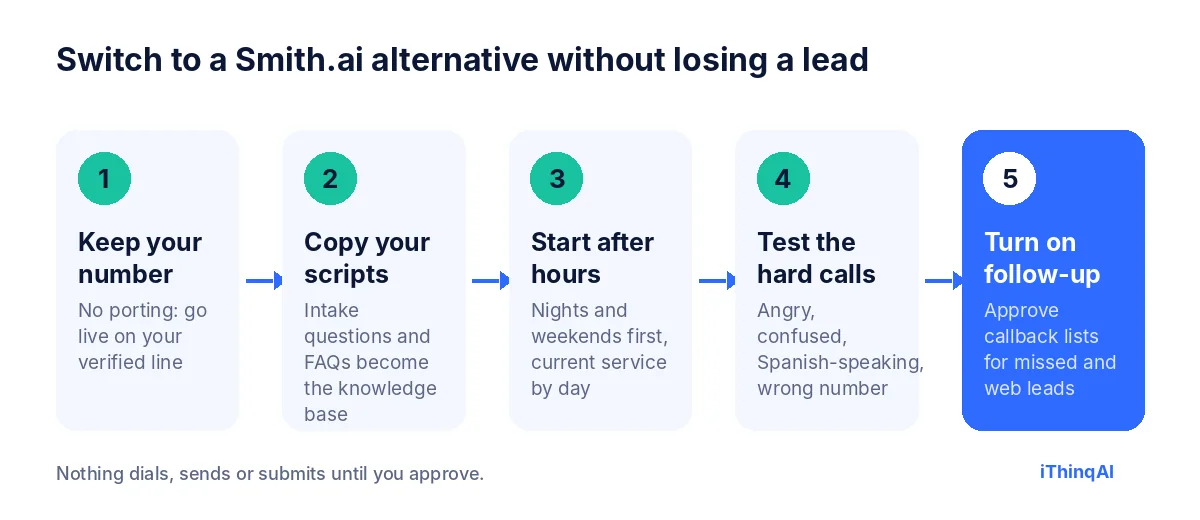
- Keep your number. iThinqAI works on your existing business line once it's verified, so there's no port and no downtime.
- Copy your scripts. Export your intake questions, FAQs, transfer rules and after-hours instructions. They become the AI's knowledge base.
- Start with after hours. Route nights and weekends to iThinqAI first. Keep your current virtual receptionist service on business hours for a week.
- Test the hard calls. Call it yourself as an angry customer, a confused one, a Spanish speaker and a wrong number. Tune the knowledge base after each.
- Turn on follow-up last. Once inbound is solid, approve a callback list for missed calls and web leads. That's where the new money shows up.
Run both side by side for a week and compare booked appointments, not just answered calls. Let the numbers make the decision.
The reason why owners who switch tend to stay
Albert Lasker built the modern ad business on one idea: tell people the reason why. Here is ours.
An answering service is paid to pick up the phone. An AI front office is built to finish the job the caller started. When the call, the calendar, the CRM and the follow-up live in one place, the AI can do the whole job in one motion. The caller asks for Thursday. The agent checks the calendar, books it, texts the confirmation, creates the contact, moves the deal to "booked" and sets a reminder for Wednesday. Nobody copies anything.
That's the difference between software that answers and software that works.
Nothing dials until you approve
Outbound calling with AI voices falls under the TCPA. In February 2024 the FCC confirmed that AI-generated voices count as "artificial" voices, so consent rules apply (Mayer Brown). That's why iThinqAI uses approval gates, calling windows, daily limits, Do Not Call controls and AI disclosure. You stay in charge of every list.
AI front office vs. virtual receptionist service: one Monday, two outcomes
Numbers are easier to feel in a story. Here's the same Monday at two identical businesses.
Business one: a staffed virtual receptionist service
At 8:05 AM three calls arrive at once. The service picks up all three, takes names and numbers, and emails three summaries. At 9:40 the owner reads them between jobs. He calls the first person back at 11:15; she has already booked with someone else. The second caller wanted a price range, which the receptionist didn't have. The third is a returning customer who has to explain her history again. At 4 PM a web form arrives. Nobody sees it until Tuesday.
By Friday the service has answered every call. The calendar has two new appointments.
Business two: an AI front office
At 8:05 AM the same three calls arrive. The AI agent answers all three at once. The first caller gets a confirmed 10:30 slot and a text. The second gets the price range from the knowledge base and books a quote visit. The third is recognized as a returning customer; the agent pulls up her last job and books the follow-up. At 4 PM the web form arrives. Within minutes the agent calls back from the approved list, qualifies the lead and books Wednesday. The owner reads one summary at lunch.
By Friday the calendar has nine new appointments, and every one of them is in the CRM.
Both businesses "answered every call." Only one of them turned calls into customers. That's the whole case for a Smith.ai alternative built as an AI front office.
Which Smith.ai alternative fits your business?
Different businesses switch for different reasons. Use this table to see where you land:
| Your situation | What you need most | Best fit |
|---|---|---|
| High call volume, mostly routine questions | Every call answered at once, booking, low cost per call | AI front office |
| Lots of web and portal leads | Callbacks within minutes, from approved lists | AI agent with outbound calling |
| Emotional or crisis calls | A trained human voice every time | Staffed virtual receptionist service |
| Very few calls, no follow-up | Basic coverage at the lowest price | Basic answering tool |
| Portals, renewals and paperwork after calls | An AI that does the work on its own computer | AI agent on the Scale plan |
If you see yourself in the first, second or last row, an AI front office will likely pay for itself. If you're in the third row, keep your humans and add AI for overflow and nights.
What changes in your first 30 days
Owners always ask what the transition actually feels like. Here's the typical arc.
Week 1: After hours only. Nights and weekends route to iThinqAI. You read every summary and fix anything the knowledge base got wrong. Most fixes are small: a missing price range, an unclear service area.
Week 2: Overflow. The AI answers whenever your team doesn't pick up within a few rings. Your front desk notices the Monday-morning pile-up is gone.
Week 3: Follow-up. You approve your first callback list for missed calls and web leads. This is usually the week the calendar starts filling faster than before.
Week 4: Decide. Compare booked appointments, not answered calls, against your old virtual receptionist service. If the numbers win, cancel the old service before the next renewal. If they don't, you've lost nothing but a month.
What to ask any Smith.ai alternative before you sign
Use these questions on every vendor, including us:
- Can I keep my number without porting?
- Will it book into my calendar during the call?
- Who calls my missed and web leads back, and who approves those calls?
- Where does every call get logged, and what happens after it's logged?
- How does pricing change if my call volume doubles?
- Can I call a live demo line right now?
If a vendor can't answer all six clearly, keep looking.
Three objections we hear most, with straight answers
"My customers want a real person." Some do. That's why the agent offers a transfer and why we tell you who should keep human receptionists. But most callers want something simpler than a person: a fast answer and a confirmed time. In CallRail's survey, 52% of consumers said businesses using AI assistants after hours give superior service.
"What if it says something wrong?" It answers from the knowledge base you write, and you can tell it to route anything it doesn't know. Review the first week of calls, fix the gaps, and the error rate drops quickly. Approvals stop anything important from going out unchecked.
"Switching sounds like a project." It's a week, not a quarter. Your number stays where it is. Your scripts become the knowledge base. You start with nights and weekends, so nothing your daytime customers experience changes until you're confident.
Hear it before you decide
Don't switch because of a blog post. Switch because of a phone call.
Call 561-715-7686. Ask it the questions your callers ask. Ask it to book something. Then book a demo and we'll show it running on your own number and scripts. If you're weighing AI against a human, read answering service vs AI, and for the full pricing picture see AI answering service cost.
P.S. The best time to test a Smith.ai alternative is before your next bill renews. Put the renewal date on your calendar, call 561-715-7686 today, and you'll know in five minutes whether it deserves a closer look.
Sources
Frequently Asked Questions
What is the best Smith.ai alternative?
It depends on whether you need humans on every call. For AI answering plus outbound follow-up, a built-in CRM and follow-up work on your existing number, iThinqAI is built for that job.
Can I switch without changing my phone number?
Yes. iThinqAI runs on your existing number after verification, with no porting.
Does iThinqAI use human receptionists?
No. It's an AI agent that discloses it's an AI and transfers calls to your team when a person is needed.
Is iThinqAI cheaper than Smith.ai?
Not always. Very low-volume businesses may pay less elsewhere. iThinqAI is priced by seats and usage and includes outbound calling and a CRM, so compare the full stack.
How long does it take to switch?
Many businesses run both services side by side for a week, starting with after-hours calls, then move fully once the booked appointments prove it out.